Category: News

Digital Signage Addon Improved!

Digital Signage The Digital Signage addon for our room booking and resource scheduling software is a feature-rich signage solution. It offers real-time display of your room bookings on TV screens around your site! Whether you’d like to display today’s bookings to visitors in your reception area, or have an individual screen outside each room just showing what’s currently taking place in that one room, our Digital Signage addon is for you! Find out how it works in this short Video Tutorial.

Digital Signage Booking System

Today we’ve released an update to the Digital Signage addon.

Better support for connection issues

The v1.09 update features better handling of server connection errors. Our Digital Signage addon has always allowed you to configure on a per-screen basis how often data on the screen should refresh. The default interval is every 5 minutes. This means every 5 minutes the addon needs to connect to your MIDAS server to retrieve up-to-date information to display on your screens.

No more Unable To Connect ScreensPreviously, if the addon was unable to connect to the server, your signage screens could display an ugly “Web page not available”-type screen. This would then require a subsequent manual refresh in order to display data again.

We’ve massively improved this for v1.09 of the addon! Now, if the addon is unable to connect to your server for any reason, it will simply retain the last known data on screen. At the same time, a small indication in the lower left corner indicating that the connection to the server has been lost will show. MIDAS will then keep attempting to automatically re-establish a connection to your server. Once a connection can been reestablished, your screen(s) will update accordingly.

We’re sure this update with meet with the approval of administrators, especially those running multiple screens around their site. Now there’s no need to manually refresh all screens after a server reboot or loss of internet connection!

Smooth Screen Transitions

The other notable improvement for v1.09 is in the way screen refreshes and transitions occur. Now the current screen will now smoothly “fade out” and then “fade in” the next screen.

You’ll find complete implementation, usage documentation and live examples of our Digital Signage at mid.as/digital-signage

How to Get The Digital Signage Addon For MIDAS:

Our Digital Signage addon v1.09 is available as a FREE update to customers with a previous version of the addon and who have a subscription valid for MIDAS v4.07.

Customers may update their addon via MIDAS Admin Options → Manage Addons → Addons Ready To Update

If you don’t already have the Digital Signage addon for your MIDAS system, you can can add it by upgrading.

Not yet using MIDAS? You can get it together with the optional Digital Signage addon here.

You might also be interested in:
Case Study: Read how The Livingston Centre in Ontario, Canada use the Digital Signage Addon

MIDAS v4.07 Now Available!

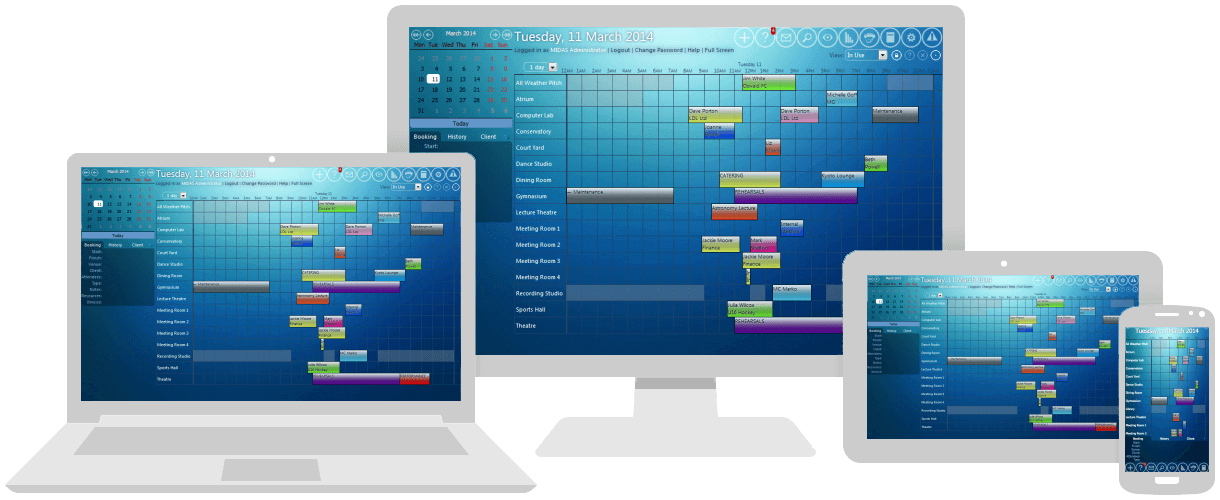
MIDAS v4.07 brings unified Web Based Room Booking and Resource Scheduling across your Desktop, Laptop, Tablet and Mobile Devices!

Room Booking and Resource Scheduling for your Desktop, Laptop, Tablet and Mobile Device

We’re excited to announce the availability of the latest version of our web based room booking and resource scheduling software, MIDAS – Version 4.07.

MIDAS v4.07 contains a whole host of new & improved features, many of which are as a direct result of feedback and suggestions from you our customers, and most of which we’ve already been blogging and Tweeting about during August.

So here’s the rundown on exactly what’s new and improved in the latest version of our powerful and intuitive scheduling system:

How To Get MIDAS v4.07

Existing MIDAS customers with valid Annual Support Subscriptions can update to v4.07 from within the software via MIDAS Admin Options → Manage MIDAS → Update.

Customers who have their MIDAS “remotely hosted” by us – you don’t need to do anything – you’ve already been automatically updated to v4.07!

Is your organization not yet using MIDAS for its scheduling needs? Maybe now is the right time to get on top of your room bookings and resource scheduling once and for all with our intuitive, powerful and easy to use, web based software!

So why not give MIDAS a try online now, Read what some of our existing customers say, and get MIDAS working for your organization today!

Keep Your Browser Up-to-date!

Supported BrowsersWe want you to have the best possible user experience when using MIDAS in your favorite Web Browser. We support our web based scheduling software in all major browsers (including Internet Explorer, Firefox, Chrome, Safari, and Opera). A list of minimum and recommended browser versions can be found at https://mid.as/browsers.


Whatever happened to Google Checkout?

Google Checkout LogoOur MIDAS room scheduling software allows your customers to pay invoices for the hire of your rooms, facilities, and resources online.

This feature was first introduced back in 2010 with MIDAS v3.10. Since then, we’ve natively supported payment of invoices using either PayPal or Google Checkout.

Unfortunately, as of MIDAS v4.07 we have now removed – the now defunct – Google Checkout support from our software.

What was Google Checkout?

Google Checkout first came into being in 2006 with the aim of simplifying the process of paying for online purchases. Users would store their credit or debit card and shipping information in their Google Account. This allowed them to make purchases without having to re-enter their information each time, and secure in the knowledge that their card details wouldn’t be made available to the seller.

Transaction fees for using Google Checkout were initially free. However, as one of PayPal‘s main competitors, over time the transaction fees for using Google Checkout became identical to PayPal’s fees. Many of the each platform’s features also aligned, such as providing fraud protection and the ability for customers to track purchases.

Whilst PayPal and Google Checkout were in direct competition offering quite similar services, there were a number of differences.

On the plus side, once a merchant received a payment via Google Checkout it would be automatically withdrawn to the merchants bank account. PayPal, on the other hand, required merchants to manually withdraw funds to their bank account. On the downside, whilst PayPal supported transactions in multiple currencies; Google Checkout only accepted payments in the currency that the merchant’s bank account was in. It was not possible for Google Checkout merchants to accept multiple currencies.

Google Checkout Becomes Google Wallet

Google Wallet Logo In 2011, Google then announced a “rebrand” of Google Checkout to “Google Wallet”, but the services offered remained the same.
However, in late November 2013, Google Checkout was discontinued and the nature of “Google Wallet” shifted.

The shift in Google Wallet’s functionality

Google Wallet then become a method for making and accepting payments exclusively for apps and in-app purchases via the Google Play Store. It could no longer be used as an online payment processor for anything else.

Due to this new direction in which Google took their Google Wallet service in late 2013, the previous functionality we were able to offer in MIDAS – the ability for clients to pay their invoices online using Google Checkout/Wallet – no longer works. We therefore removed all Google Checkout/Wallet integration as of MIDAS v4.07.

We hope Google reconsider their stance to provide online payment processing solely for their own Google App Store. The more choice there is for both consumers and merchants alike the better. That said, there are numerous other online payment processors that have sprung up in recent times. These include notable solutions such as Amazon Payments and Stripe. Incidentally, Stripe is now our preferred card payment processor for purchases made through our website.

Going forward, we continue to support PayPal as a method to allow your clients to directly pay their invoices online for use of your rooms/facilities. In fact, we’ve also improved this support for v4.07 too! If you allow clients to pay invoices online via PayPal, PayPal can now automatically update the status of their MIDAS invoices once payment has been made. This means that you’ll no longer have to manually update invoices yourself! For more information, please see: Configuring PayPal Integration

We’re also keen to hear from you! Are any other online payment processors you’d like us to consider supporting in future updates to MIDAS? We can’t promise we’ll natively support them, but we’d love to hear from you!


Making card payments simpler

Following feedback from our customers, we are pleased to announce we are trialing a new card payment processor on our website. This will benefit those purchasing, renewing, or upgrading a MIDAS room booking & resource scheduling software using a Credit/Debit card. It will allow these customers to complete their purchase without having to go through PayPal.

PayPal Payments

Whilst PayPal is arguably the largest and most popular card payment processor on the Internet, one of the concerns some of our customers have is that in order to complete a card payment via PayPal they are forced to sign up for a PayPal account. Many do not want to do this.

PayPal advertises that customers can make card payments without also requiring a PayPal account. In some cases this is certainly true. However, it’s not true in all cases!

For example, after you’ve used PayPal for a number of “one off” card payments without a PayPal account, PayPal then insist you create an account to continue making card payments through their system:

“You will only be able to use PayPal … for up to [10] transactions before we will require you to open a PayPal account … to enable further use of the PayPal system. At that point you will be required to enter into our standard user agreement to govern the ongoing relationship with PayPal”

Additionally, the country you’re in can also affect whether PayPal will allow you to make a card payment without a PayPal account, or insist you create one first.

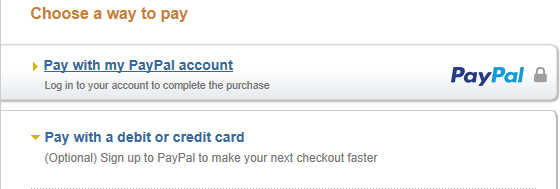
On a PayPal payment page, if your country is set to United Kingdom, you might see:

PayPal card payment without requiring a PayPal account

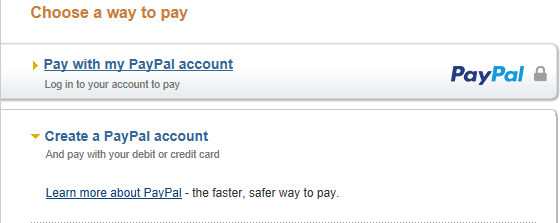
…Whereas change your location to Canada, and you’ll see:

PayPal card payment requiring a PayPal account first

…spot the difference?! Yes, the option to pay directly by card directly has been replaced with an option to create a PayPal account!

We want to make things simpler for all our customers who just want to pay by Credit/Debit card without signing up for any 3rd party accounts!

Introducing Stripe

Stripe.comSo whilst PayPal remains a payment method option for our customers, we’ve now also integrated Stripe into our secure site.

Stripe securely handles card payments directly from our website. So unlike PayPal, you’re not transferred back and forth between a hosted payment page on another site and then back to our site. You can complete your card purchase securely and directly from our website. Plus, you won’t need to sign up for a Stripe account to make your payment either!

We will be trialing Stripe for a number of weeks, and we’d appreciate your feedback!

We’ve also updated our site’s Privacy Policy accordingly.