Category: Development

New Bypass Venue Blocks Permission

As the wet and windy wintry weather shows no sign of letting up here in the UK, we continue to put the finishing touches to the next update to our MIDAS web based room booking and resource scheduling software, v4.24.

In our previous article, we announced support in v4.24 for a new multi-select custom list field. In this blog post, we’re revealing a new user permission we’re adding to our forthcoming update.

“User Permissions” in MIDAS allow administrators to precisely control what each user account within the system can access. From very restrictive “view only” permissions to fully-fledged administrator – and everything in between! In fact, there are in excess of 30 individual permissions you can set on a per-account basis. A full list of these permissions may be found here.

For v4.24 we’re adding a new additional user permission: “Can Bypass Venue Blocks”. To understand the purpose of this new permissions, we first need to understand what “Venue Blocks” actually are..

What are venue “blocks”?

Back in 2014, we introduced “Venue Blocks” to MIDAS. You can read more about this cool feature in this blog post. Essentially, venue “blocking” allows administrators to set up rules so that when a certain venue is booked, another venue is then automatically blocked from having any bookings during the same time period.

An example of where this may be useful is in a Church environment where you have a quiet prayer room adjacent to a sports hall. It may be desirable to prevent noisy bookings taking place in the sports hall when there’s a prayer meeting happening in the room next door. This is where Venue Blocking comes in.

Another example might be a large room which can either be hired as a whole space, or sub-divided and hired as two separate, smaller rooms. Obviously, if one of the sub-divisions is booked, another booking couldn’t take place in the space as a whole at the same time. Again, this is where Venue Blocking in MIDAS becomes really useful, as you can easily prevent such occurrences.

Bypassing Venue Blocks

Until now, however, there has been no way to “override” venue blocks, short of removing the blocks from venues themselves. That’s why we’re introducing the new “Can Bypass Venue Blocks” permission for v4.24:
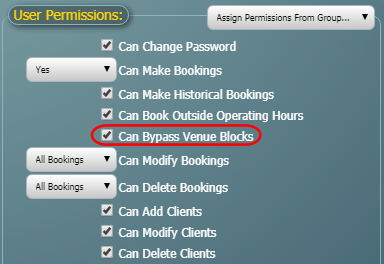
Bypass MIDAS Venue Blocking Rules
New “Bypass Venue Blocks” permission in v4.24

This permission isn’t granted to any user by default. However, any user account subsequently granted the “Can Bypass Venue Blocks” permission, can then make bookings regardless of any venue blocking rules in effect.

We’re sure this additional user permission will be of considerable use in helping you manage your bookable spaces more effectively. And once again, this improvement is being implemented as a direct result of feedback from our users. We love hearing feedback and suggestions for improvement and new features from our customers. Why not vote on some suggestions and let us know what you’d like to see in MIDAS in the future!
New Multi-Select Custom List Fields

The new decade has gotten off to an unusually windy and wet start here in the UK. We’ve taken a bit of a battering from Storm Ciara and Storm Dennis in quick succession. It’s not been very nice weather to go out in at all! So instead, we’ve been spending a lot of time indoors working away at the next update to our MIDAS web based room booking and resource scheduling software.

Our first update in 2020 includes a host of new and improved features, which we’re going to give you a look at in the coming blog posts.

In this post we’re going to cover the first of these new features coming in MIDAS v4.24:

Multi-Select Custom List Fields

One of the reasons our room bookings software is so flexible and versatile is that we allow you to create your own bespoke booking fields, and more recently your own bespoke client fields too!

The types of custom booking/client fields you can create in MIDAS are as follows:

  • Checkbox – A “tick box” field
  • File – (self-hosted editions only) Allows uploading/attaching of files and documents to client records
  • List – A drop-down list of pre-defined items
  • Number – A field that will only accept numerical input
  • Range – A “slider” control allowing selection of a numeric value within a defined range
  • Text – A single-line text field
  • Text Area – A multi-line text field
  • URL – A navigable web link to an external resource

Documentation on how to create and use custom fields in your MIDAS system may be found here. We also have a short tutorial covering custom fields too:

TUTORIAL: How to Control & Customize Fields in MIDAS

Until now the custom “List” field allowed users to select a single item from a list of pre-defined values created by an administrator, and assign the selected item to the booking or client record.

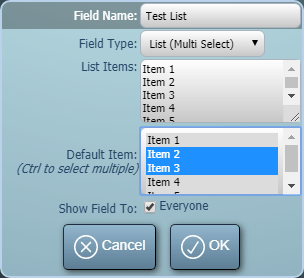
For v4.24, we’re expanding the custom “List” field options to additionally include a “multi select” list option. Administrators can now also create drop-down lists from which users may select multiple options.

Administrators will of course also be able to select which option (or options) in the list are selected by default, and also control whether the list is visible to all users, or restricted to just certain users:

Multi-select custom drop-down field in MIDAS booking systems
New multi-select custom field option in MIDAS v4.24

We’re excited about the new custom “multi-select list” field option coming in v4.24. Once again, this has been implemented as a direct result of customer feedback. Remember, we love feedback and feature requests from our customers, so do vote and let us know what you’d like to see in future updates to our software.


Improved “Feeds” addon (formerly RSS Feeds)

Work is nearing completion on the next update to our MIDAS web based room booking and resource scheduling software. We anticipate this to be released next month.

In previous posts, we introduced the new setup / breakdown time features and improvements to similar booking searching coming in v4.23. In this post, we’d like to highlight some of the improvements we’ve made to one of our optional “addons”. Addons allow you to further extend the capabilities of your MIDAS system.

Data Feeds Addon

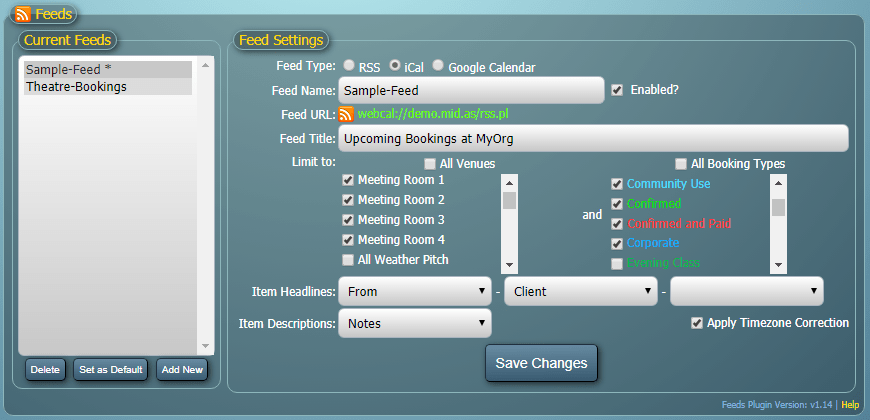
For v4.23 we’re updating and improving the “Feeds” addon. Previously, this addon was known as our “RSS Feeds” addon. That’s because previously it did just that – automatically generating RSS 2.0/Atom data feeds of your upcoming bookings.

Due to popular demand, we’re introducing the ability to sync bookings in your MIDAS system with an external calendar – such as Google Calendar, or any external calendar that’s capable of subscribing to an iCal (webcal) feed. These new capabilities will be included, along with previous RSS feed generation options, in a newly renamed “Data Feeds” addon.

For those customers who are familiar with the “RSS Feeds” addon, the new “Data Feeds” addon looks and feels very similar. However, the new addon includes an additional “Feed Type” selector. The “Feed Type” selector is used to control the type of data feed being generated.

The three available feed types are:

  • RSS (An RSS 2.0/Atom Datafeed – for use in RSS readers and similar)
  • Google Calendar (A feed that will automatically open in Google Calendar)
  • iCal (A iCal data feed that external calendars capable of subscribing to webcal:// URLS can subscribe to)
Data Feeds addon allowing synchronization of bookings from MIDAS to an external calendar like Google or Outlook
Improved “Feeds” addon, allowing synchronization of bookings to your external calendar

Depending upon the selected feed type, the “Feed URL” will update with a link that you can use in your external calendar to synchronize bookings from your MIDAS system to your external calendar.

Configuring A Data Feed

A wide range of settings are available, as per the previous “RSS Feeds” addon. These allow control over which venue(s) bookings and/or which booking types will be included in the generated feed.

There are also no limits on the number of feeds you can create. You could have a different feed for each of your individual venues or booking types if you’d like!

Existing customers who previously purchased the older “RSS Feeds” addon will automatically be migrated to the new “Data Feeds” addon with MIDAS v4.23 at no additional cost! If you’re an existing customer who’d like to be able to add the optional “Data Feeds” addon to your MIDAS system, you’ll be able to purchase it via mid.as/upgrade once MIDAS v4.23 is released.

We’re excited about these new improvements to the optional “Feeds” addon and we’re sure they’ll be of great benefit to our customers! Remember, we love feedback and feature requests from our customers. So do vote and let us know what you’d like to see in future updates to our software.


Modify/Delete Similar Bookings on specific days

Work is nearing completion on the next update to our MIDAS web based room booking and resource scheduling software, anticipated to be released next month.

In our previous blog post, we introduced the new setup/breakdown time features in v4.23. In this post, we’re highlighting one of the improvements we’re making in this next update to bulk modifying/deleting “similar” bookings.

The “modify similar bookings” feature allows you to select an existing booking, and then quickly locate other similar bookings for bulk modification. The “delete similar bookings” feature allows you to select an existing booking and then quickly locate other similar bookings for bulk deletion.

These features allow you to narrow down the search for “similar” bookings to those which fall within a certain date range, and/or which take place in a particular room/venue, and/or which are of a certain type.

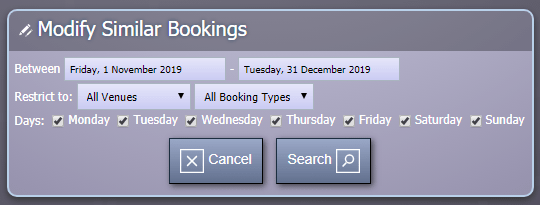
Following customer feedback, we’re improving these options in v4.23. They’ll now also include the ability to restrict booking results to those which take place on particular days of the week.

Limit similar booking search results to specific days of the week

So now, if you want to modify all similar bookings over a date range, but only include those bookings which fall on say a Tuesday, you can!

Previously, you could still do this, but you’d have to list all relevant bookings in the date range, and then painstakingly mark each of those which fell on the specific day(s) you were interested in. In MIDAS v4.23 we’re making this process far less laborious!

We’re excited about these new features and we’re sure they’ll be of great benefit to our customers! Remember, we love feedback and feature requests from our customers, so do vote and let us know what you’d like to see in future updates to our software.