Category: Development

More Flexible Email Templates

The next update to our Web Based Room Booking and Resource Scheduling software MIDAS is fast approaching, and throughout March we’re giving you a first look at some of the new features and improvements you can look forward to in MIDAS v4.12..

A growing selection of templates are available and editable within MIDAS, allowing you to customize and tailor the appearance of various parts of the software, as well as printouts and emails.

Templates are constructed using a combination of common HTML code and special MIDAS variables – don’t worry if you’re not familiar with HTML, we’re produced a handy “What is HTML and how do I use it within my MIDAS templates?” guide, complete with simple examples.

MIDAS also includes a visual WYSIWYG (what-you-see-is-what-you-get) template editor where you can simply drag/drop/insert elements into your templates, rather than entering raw HTML code.

Since the introduction of templates, email templates in particular contained a special %CONTENT% variable. This variable would be automatically substituted for generated content when an email was sent. For example, here’s some simplified content for a Booking Confirmation email template in MIDAS v4.11:

Dear %CLIENT_FIRSTNAME%,
Details of your confirmed booking at %DATABASE% are as follows:
%CONTENT%
We look forward to seeing you then!

In the above template, when a booking confirmation email is sent, the variable %CLIENT_FIRSTNAME% is automatically substituted with the forename of the client the notification is to be sent to and %DATABASE% is be substituted for the name of your MIDAS database (usually your organization’s name).

The %CONTENT% variable is then replaced with details of the client’s bookings, and would include the booking fields that had been selected via MIDAS Admin Options → Manage MIDAS → Fields → Show In → Booking Confirmation.

Using the above template, the resulting email content may look like:

Dear Joe,
Details of your confirmed booking at St James are as follows:

Date/Times: 21/03/2016 @ 09:00 – 10:30
Venue: Room 1
Resources: x1 Laptop, x1 Data Projector

Date/Times: 21/03/2016 @ 09:00 – 10:30
Venue: Room 2
Resources: x4 Tables, x20 Chairs

We look forward to seeing you then!

For MIDAS v4.12, we’ve overhauled email templates to give you far greater flexibility and control over the generated content of emails. The rigid %CONTENT% variable has been replaced with more useful variables. For example, a new booking confirmation email template may now look like this:

Dear %CLIENT_FIRSTNAME%,
Details of your confirmed booking at %DATABASE% are as follows:

<bookings>
Dates/Times: %START% – %FINISH%
Venue: %VENUE%
Resources: %RESOURCES%
</bookings>

We look forward to seeing you then!

…as you can see, the original %CONTENT% variable has been replaced in v4.12 with a <bookings> … </bookings> section, in which you can add your own text and variables to customize the generated content exactly as you’d like. You can also include content from any custom booking fields you’ve added to MIDAS – for example, if you’ve created a booking field named “Test Field”, you can insert the variable %CUSTOM_TEST_FIELD% into the <bookings> … </bookings> section. (This brings email templates in line with the format of templates in our optional Digital Signage and Web Calendars addons, which have always supported <bookings> … </bookings> template sections)

We’ve also added support for a couple of new variables too; %BOOKING_COST% and %TOTAL_COST%.

%BOOKING_COST% can be added within the <bookings> … </bookings> section and will be substituted for the cost of the individual booking (including both venue and resource usage).

%TOTAL_COST% can be added anywhere in the template and will be substituted for the total cost of all the bookings listed in the email.

When editing templates via MIDAS Admin Options → Manage MIDAS → Templates, a complete list is displayed of all available variables that can be inserted into the current templates.

We believe replacing the limited %CONTENT% variable with a flexible <bookings> … </bookings> section in email notifications will give customers far greater control over the appearance and content of emails sent through MIDAS.

MIDAS v4.12 is expected to be made available to Beta Testers later this month, with a general release shortly after. We’re currently looking for additional testers to help test and provide feedback/bug reports on pre-release versions of our software. Becoming a tester is free and no experience is required, and what’s more we’ll reward you for your participation! Find out more about becoming a MIDAS Beta Tester here.

If you would like to be notified when v4.12 is fully released, then why not join our Mailing List?

Accept Card Payments with Stripe

The next update to our Web Based Room Booking and Resource Scheduling software MIDAS is fast approaching. Throughout March we’re giving you a first look at some of the new features and improvements you can look forward to in MIDAS v4.12.

Back in October 2010, we released MIDAS v3.10. This update introduced a new feature allowing your clients to pay invoices generated by MIDAS online using either PayPal or Google Wallet (or Google Checkout as it was known back then).

Whilst the ability for customer’s clients to pay their invoices online using PayPal was popular, Unfortunately, Google changed direction with their Google Checkout/Wallet service. This meant it was no longer a viable payment processor for customer’s client’s invoices. As such, the option to pay invoices via Google Checkout was removed as of MIDAS v4.07 in September 2014. You can read more about the sad demise of Google Checkout in this blog post.

Since then, PayPal has been the sole payment option natively provided within MIDAS to allow your clients to pay invoices online. Of course, with our optional API available, customers have been able to develop their own specific integrations with other 3rd party payment processors as required.

However, ever since we removed the Google Checkout/Wallet option, we’ve wanted to include a “PayPal alternative” as standard within our software.

For nearly two years now, we’ve made card payments simpler through our own website, by partnering with Stripe. We’ve been very impressed with Stripe, and they are now our preferred payment processor.

So we’re pleased to announce that Stripe will now also be a native payment option for invoices within MIDAS itself, along with the existing PayPal option!

Here’s a few of the things we really like about Stripe:

  • Stripe allows you to take a payment on the current page. Unlike PayPal, the customer won’t be transferred to a separate “hosted” payment page.
  • Despite allowing card payments to be taken on the current page, no card details pass through or are stored the server where your MIDAS resides. All the processing is handled by Stripe, ensuring you are fully comply with PCI DSS 3.1
  • Stripe automatically withdraws funds to your bank account on a rolling 7 day basis. With PayPal, funds remain in your account until you manually withdraw them.
  • Stripe never forces the customer to “create an account” in order to make a card payment. With PayPal, “unregistered” users may be forced to create a PayPal account in order to make a card payment. This can depending upon your geographic region, or the number of times you’ve used PayPal before.
  • In our experience, Stripe’s processing fees have been lower than PayPal’s.

What about PayPal?

Now, reading the above, you make think that we’re anti-PayPal. Don’t worry – we’re very aware of the popularity of PayPal. It’s still arguably the most common online payment processor across the globe. Therefore, we have no plans to remove the PayPal payment option from our software. But we do believe in giving our customers choice over their payment provider. This is why we’re really exciting to be able to offer native Stripe integration starting with MIDAS v4.12!

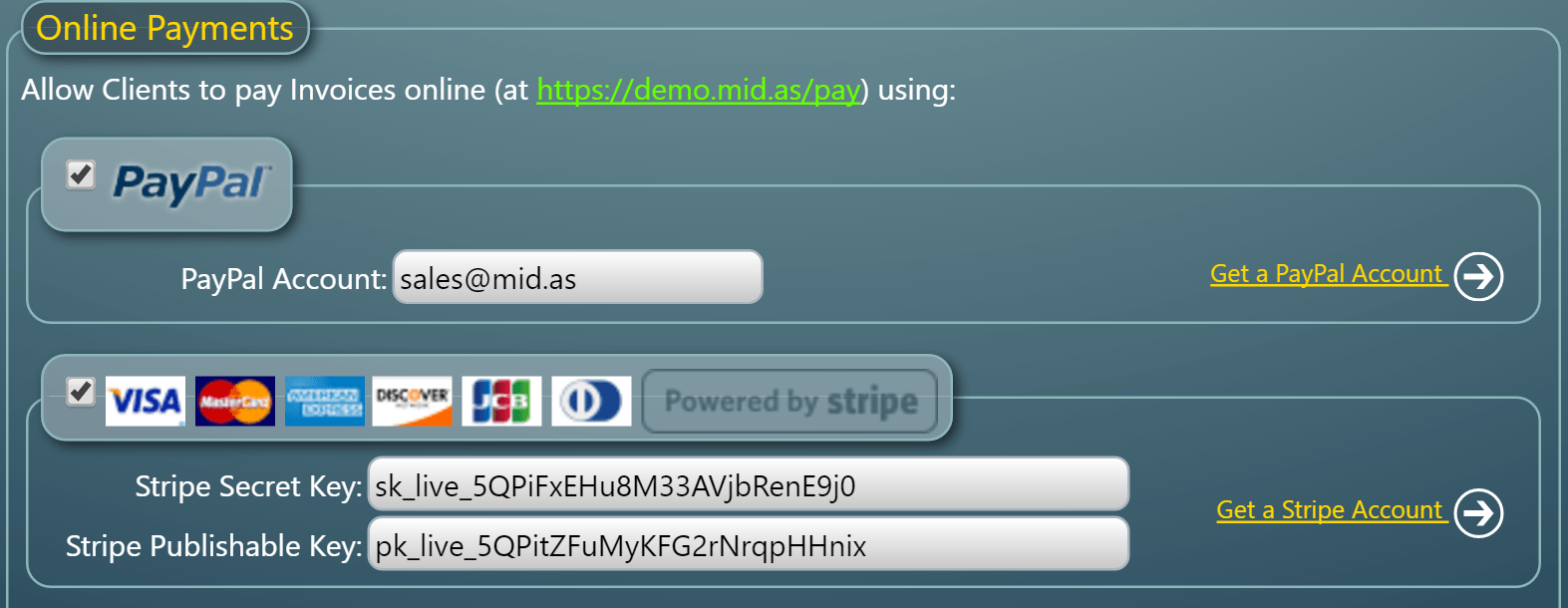
You’ll be able to choose which payment provider to use to allow your clients to pay their invoices online. You can also configure both, to give clients a choice of completing their payment via PayPal or Stripe:

Online Invoice Payment Settings

In order to accept payments through PayPal, you’ll need a PayPal account.

In order to accept payments through Stripe, you’ll need a Stripe account. You’ll also need Stripe API keys. For more information on obtaining these, please see our KB article “Configuring Stripe Integration

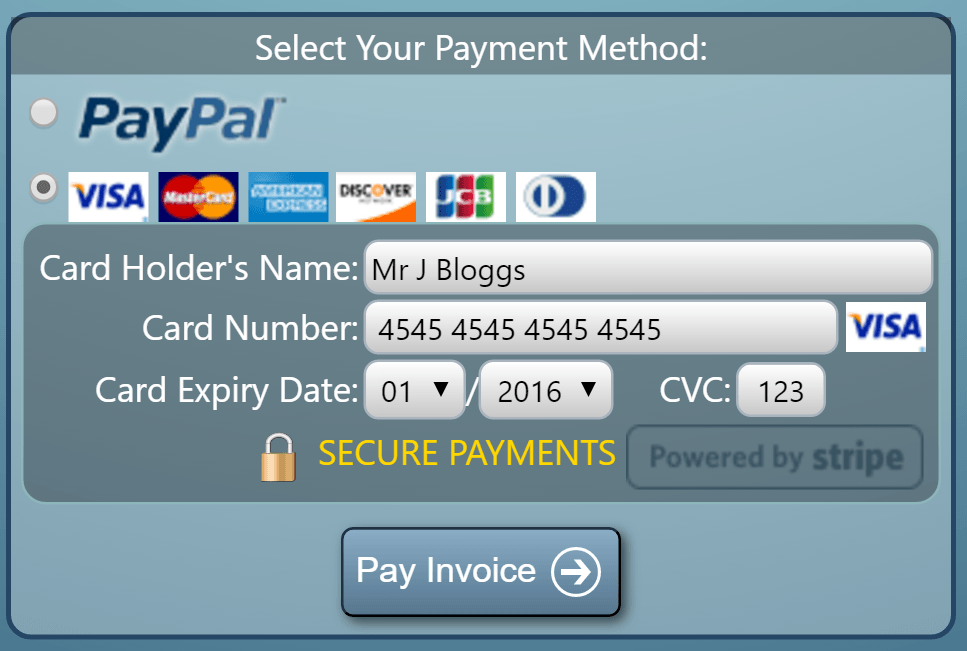
Once you’ve set up your PayPal and/or Stripe account, you can enable and configure them via MIDAS Admin Options → Manage MIDAS → Invoicing → Online Payments. Once configured, your customers will then be able to pay their invoices online via https://your_midas_url/pay:

Online Invoice Payment Selection

With Stripe integration, as soon as a client completes their payment, their invoice will automatically be instantly updated in MIDAS to reflect their payment.

With PayPal integration, you’ll also need to configure Instant Payment Notifications (IPN) within your PayPal account in order for MIDAS to automatically update a client’s invoice following a successful PayPal transaction.


Maintain a line of credit for your clients

The next update to our Web Based Room Booking and Resource Scheduling software MIDAS is on the horizon, and throughout March we’re giving you a first look at some of the new features and improvements you can look forward to in this next MIDAS update..

One of the areas of our software that we often receive feedback and ideas for new features for is “Invoicing”. We’re pleased to once again adding even more Invoicing features for v4.12, one of which will facilitate the ability to maintain a line of “credit” for each of your clients.

Adding credit for a client is really simple, and is done via the “Current Credit” field in each client’s database entry. Simply enter the amount to credit to associate with the client and click “Save Changes”:

Maintain a line of credit for each client in a MIDAS booking system
Maintain a line of credit for clients

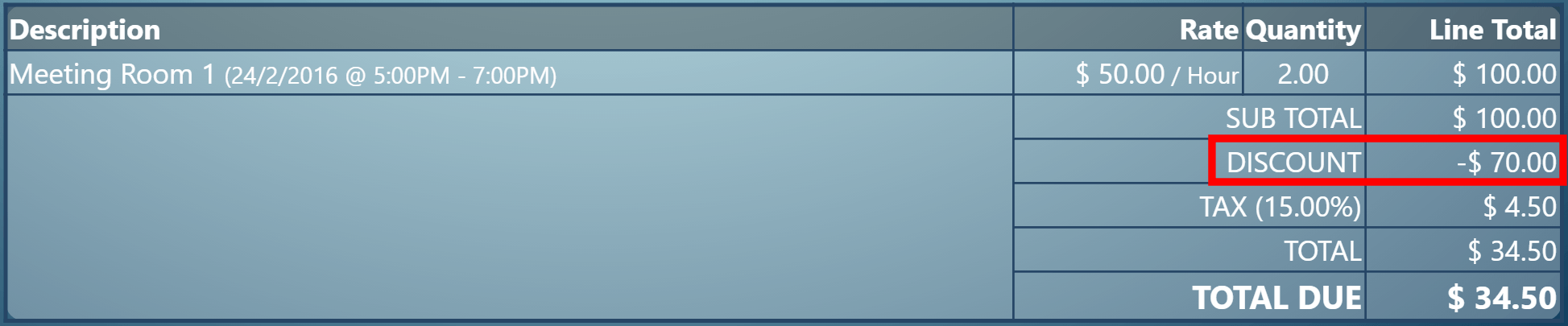
Then, the next time an invoice is generated/created for the client, this credit will be applied to their invoice as a discount, and the line of credit remaining for the client updated accordingly.

Example 1:

  • A client entry has a $70 credit associated it.
  • The client’s next invoice is for a total of $100.
  • $70 is automatically deducted from the pre-tax total of their next invoice
  • The client’s remaining credit balance automatically reduces to $0
Automatically apply credit to customer invoices in MIDAS
Credit automatically applied to client invoices

Example 2:

  • A client entry has a $70 credit associated with it.
  • The client’s next invoice is for a total of $50.
  • $50 is automatically deducted from the pre-tax total of that invoice
  • The client’s remaining credit balance automatically reduces to $20, which will be applied to their next invoice

Users with access to the invoicing capabilities of MIDAS and who also have the ability to modify clients can update the amount of credit associated with each client at any time.

MIDAS v4.12 is expected to be made available to Beta Testers later this month, with a general release shortly after. We’re currently looking for additional testers to help test and provide feedback/bug reports on pre-release versions of our software. Becoming a tester is free and no experience is required, and what’s more we’ll reward you for your participation! Find out more about becoming a MIDAS Beta Tester here.

If you would like to be notified when v4.12 is fully released, then why not join our Mailing List?

New Current Availability Report

This week marks 10 years since the very first public and commercial release of our Web Based Room Booking and Resource Scheduling software, MIDAS, back in 2006. As well as celebrating our longevity, we’re also very proud of the fact that a decade on, our software remains in active development with new and improved features being regularly added!

To that end, MIDAS v4.12 is on the horizon, and over the coming blog posts, we’re giving you a first look at some of the new features and improvements you can look forward to in the next MIDAS update..

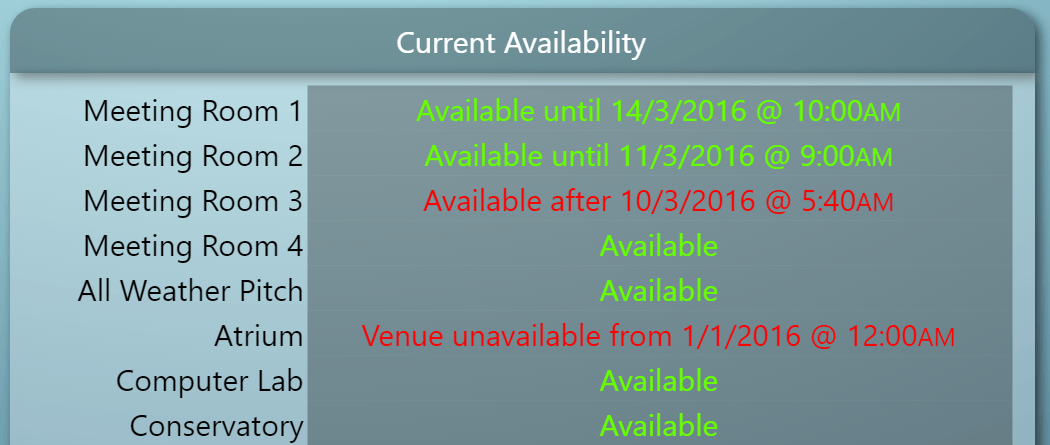
The first new feature of v4.12 we’d like to unveil is a brand-new “Current Availability” report:

Current Availability Report

Arising from customer suggestions of being able to see an “overview” of the current and forecast availability of your venues “at a glance”, the new Current Availability, provides just that!

The report analyses each venue to determine is current status. If a venue is presently “available”, MIDAS will check to see when it’s available until (i.e. when the next booking takes place). If a venue isn’t presently available, MIDAS will check to see when it’s next available.

The results for all venues are then amalgamated into a single easy-to-read “Current Availability” report, which can also be printed.

The Current Availability report is just one of over a dozen real-time reports and statistics that MIDAS can generate. For more information, please see: https://mid.as/help/statistics

Finally, as we mentioned at the top of this article, it’s been 10 years since the first release of MIDAS, and there’s still time to enter our epic giveaway to celebrate – head on over to [THIS GIVEAWAY HAS NOW ENDED] – for you chance to WIN a FREE Cloud-Hosted edition of MIDAS, or your share of $1,000 worth of discounts off our software (including upgrades, addons, and subscription renewals)

MIDAS v4.12 is expected to be made available to Beta Testers later this month, with a general release shortly after. We’re currently looking for additional testers to help test and provide feedback/bug reports on pre-release versions of our software. Becoming a tester is free and no experience is required, and what’s more we’ll reward you for your participation! Find out more about becoming a MIDAS Beta Tester here.

If you would like to be notified when v4.12 is fully released, then why not join our Mailing List?