Booking and scheduling should be quick. Yet checking whether a room is free, adding a booking, or pulling up next week’s schedule still usually means logging in, clicking through menus, and filling in forms. What if you could simply ask?
We are pleased to announce the new MIDAS MCP Server add-on, which lets you connect your MIDAS room and resource booking system directly to the AI assistant of your choice, including Claude, ChatGPT, and Google Gemini. Once connected, you can check availability, add and amend bookings, look up clients, manage resources, and even raise invoices, all through natural conversation.
What is an MCP server?
MCP stands for Model Context Protocol. It is an open standard that lets AI assistants connect securely to other software and data sources. On its own, an AI assistant has no way to look things up in your systems or carry out actions in them. An MCP server bridges that gap. It exposes a defined set of “tools” that an AI assistant is allowed to use, so the assistant can read information from a connected system and, where permitted, make changes to it too.
Because MCP is an open standard, any AI platform that supports it can connect to a compatible MCP server. That means the MIDAS MCP Server is not tied to a single AI provider. You choose the assistant you already use and prefer, and connect it to MIDAS.
Book and manage rooms using plain English
Once the MIDAS MCP Server is enabled and connected to your AI assistant, everyday booking tasks become as simple as asking a question. For example, you could say:
- “Is the Boardroom free tomorrow afternoon?”
- “Book Studio 1 from 2pm to 4pm on Friday for a client meeting.”
- “Show me all bookings for Meeting Room 3 next week.”
- “Which rooms are available on Thursday morning for 20 people?”
- “Generate an invoice for last month’s confirmed bookings for Acme Ltd.”
- “Who is the client with the email address [email protected]?”
Your AI assistant translates each request into the appropriate action, sends it to MIDAS, and replies in plain English. There are no menus to navigate and no forms to complete for these routine tasks.
A booking and scheduling system that works with your AI agent
If you have been searching for a booking, scheduling, or calendar system that integrates with your chosen AI agent or platform, the MIDAS MCP Server is designed for exactly that. It turns MIDAS into a fully AI-accessible booking system, without locking you into any one AI provider.
This opens the door to more than just chat. Because any MCP-compatible AI assistant or agent can connect, you can build assistants and automations around your booking data. Think of a front-of-house assistant that answers availability enquiries, or an agent that drafts invoices from the week’s confirmed bookings. If a platform supports MCP, it can work with MIDAS.
Availability
The MIDAS MCP Server is an optional add-on available from MIDAS v4.43 (or later). It’s available for both cloud-hosted an self-hosted editions of our booking system.
Existing customers (running MIDAS v4.43 or later) can add the MCP Server add-on to their system via mid.as/upgrade.
New customers can obtain MIDAS with the optional MCP Server add-on via mid.as/pricing.
Which AI platforms are supported?
The MIDAS MCP Server works with any AI assistant or platform that supports the Model Context Protocol, including:
- Claude (Anthropic), via both Claude Desktop and the Claude web and mobile apps.
- ChatGPT (OpenAI), via its Connectors feature.
- Google Gemini, via the Gemini CLI.
- Other MCP-compatible platforms, including a growing range of AI-powered tools and agent platforms.
Support for MCP is expanding quickly across the AI industry, so the list of compatible platforms continues to grow.
Built with security and control in mind
Giving an AI assistant access to your booking system is a significant step, so our MIDAS MCP Server puts you firmly in control:
- Read-only mode – Start by allowing enquiries and availability checks only. The AI can look things up but cannot change anything. Enable write access later, when you are ready.
- Secure by default – Connections require HTTPS and are protected by a confidential MCP key that you generate and can revoke at any time.
- IP restrictions – Optionally limit access to specific IP addresses.
- Your existing rules still apply – Every action taken through the MCP server respects the same permissions and business rules that already govern your MIDAS system. You can even configure the MCP to inherit the permissions of a specific user account.
- A clear activity trail – Actions taken through the MCP server can be recorded in your MIDAS Recent Activity log, so you can see what was done.
Everything you can do
The MIDAS MCP Server provides a comprehensive set of tools covering the full range of day-to-day booking and administration tasks, including:
- Checking venue and resource availability
- Adding, amending, deleting, and restoring bookings
- Approving and rejecting pending booking requests
- Looking up and managing clients
- Managing venues, venue groups, and bookable resources
- Checking consumable stock levels
- Raising, amending, and generating invoices
- Sending notifications and emailing clients
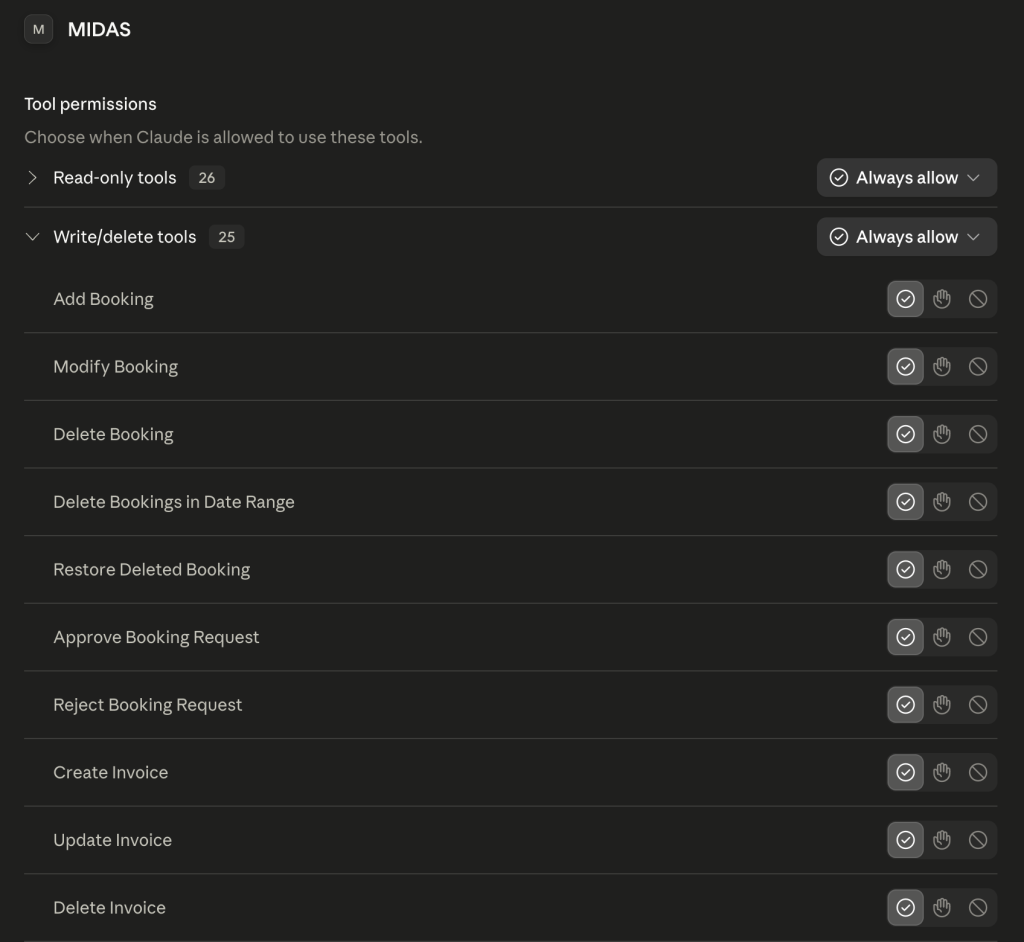
Read-only tools retrieve information only, while write tools can create and change data. If you run the server in read-only mode, only the read-only tools will be available.
Getting started
Setting up the MIDAS MCP Server takes just a few minutes:
- Get the MCP Server addon (mid.as/upgrade for existing customers, mid.as/pricing for new customers)
- Enable the MCP Server addon and connect your AI assistant (here’s how)
- Start asking your AI assistant about your bookings.
Full instructions for each supported platform, including Claude, ChatGPT, and Gemini, are available in our documentation.
Read the MIDAS MCP Server documentation and get started »
The future of booking is conversational
AI assistants are quickly becoming part of everyday working life. With the MIDAS MCP Server, your booking and scheduling system is ready to be part of that shift. Whether you want to check availability at a glance, speed up routine admin, or build richer automations around your booking data, the MIDAS MCP Server connects MIDAS to the AI tools you already use.
Existing MIDAS customers can find out more and get set up today on our MIDAS MCP Server pages. New to MIDAS? Discover why MIDAS is the flexible, affordable choice for room and resource booking, now with AI built in.