Posts Tagged: Gemini

Introducing the MIDAS MCP Server: Manage Your Bookings With Any AI Assistant

MIDAS MCP Server

Booking and scheduling should be quick. Yet checking whether a room is free, adding a booking, or pulling up next week’s schedule still usually means logging in, clicking through menus, and filling in forms. What if you could simply ask?

We are pleased to announce the new MIDAS MCP Server add-on, which lets you connect your MIDAS room and resource booking system directly to the AI assistant of your choice, including Claude, ChatGPT, and Google Gemini. Once connected, you can check availability, add and amend bookings, look up clients, manage resources, and even raise invoices, all through natural conversation.

What is an MCP server?

MCP stands for Model Context Protocol. It is an open standard that lets AI assistants connect securely to other software and data sources. On its own, an AI assistant has no way to look things up in your systems or carry out actions in them. An MCP server bridges that gap. It exposes a defined set of “tools” that an AI assistant is allowed to use, so the assistant can read information from a connected system and, where permitted, make changes to it too.

Because MCP is an open standard, any AI platform that supports it can connect to a compatible MCP server. That means the MIDAS MCP Server is not tied to a single AI provider. You choose the assistant you already use and prefer, and connect it to MIDAS.

Book and manage rooms using plain English

Once the MIDAS MCP Server is enabled and connected to your AI assistant, everyday booking tasks become as simple as asking a question. For example, you could say:

  • “Is the Boardroom free tomorrow afternoon?”
  • “Book Studio 1 from 2pm to 4pm on Friday for a client meeting.”
  • “Show me all bookings for Meeting Room 3 next week.”
  • “Which rooms are available on Thursday morning for 20 people?”
  • “Generate an invoice for last month’s confirmed bookings for Acme Ltd.”
  • “Who is the client with the email address [email protected]?”

Your AI assistant translates each request into the appropriate action, sends it to MIDAS, and replies in plain English. There are no menus to navigate and no forms to complete for these routine tasks.

A booking and scheduling system that works with your AI agent

If you have been searching for a booking, scheduling, or calendar system that integrates with your chosen AI agent or platform, the MIDAS MCP Server is designed for exactly that. It turns MIDAS into a fully AI-accessible booking system, without locking you into any one AI provider.

This opens the door to more than just chat. Because any MCP-compatible AI assistant or agent can connect, you can build assistants and automations around your booking data. Think of a front-of-house assistant that answers availability enquiries, or an agent that drafts invoices from the week’s confirmed bookings. If a platform supports MCP, it can work with MIDAS.

Availability

The MIDAS MCP Server is an optional add-on available from MIDAS v4.43 (or later). It’s available for both cloud-hosted an self-hosted editions of our booking system.

Existing customers (running MIDAS v4.43 or later) can add the MCP Server add-on to their system via mid.as/upgrade.

New customers can obtain MIDAS with the optional MCP Server add-on via mid.as/pricing.

Which AI platforms are supported?

The MIDAS MCP Server works with any AI assistant or platform that supports the Model Context Protocol, including:

  • Claude (Anthropic), via both Claude Desktop and the Claude web and mobile apps.
  • ChatGPT (OpenAI), via its Connectors feature.
  • Google Gemini, via the Gemini CLI.
  • Other MCP-compatible platforms, including a growing range of AI-powered tools and agent platforms.

Support for MCP is expanding quickly across the AI industry, so the list of compatible platforms continues to grow.

Built with security and control in mind

Giving an AI assistant access to your booking system is a significant step, so our MIDAS MCP Server puts you firmly in control:

  • Read-only mode – Start by allowing enquiries and availability checks only. The AI can look things up but cannot change anything. Enable write access later, when you are ready.
  • Secure by default – Connections require HTTPS and are protected by a confidential MCP key that you generate and can revoke at any time.
  • IP restrictions – Optionally limit access to specific IP addresses.
  • Your existing rules still apply – Every action taken through the MCP server respects the same permissions and business rules that already govern your MIDAS system. You can even configure the MCP to inherit the permissions of a specific user account.
  • A clear activity trail – Actions taken through the MCP server can be recorded in your MIDAS Recent Activity log, so you can see what was done.

Everything you can do

The MIDAS MCP Server provides a comprehensive set of tools covering the full range of day-to-day booking and administration tasks, including:

  • Checking venue and resource availability
  • Adding, amending, deleting, and restoring bookings
  • Approving and rejecting pending booking requests
  • Looking up and managing clients
  • Managing venues, venue groups, and bookable resources
  • Checking consumable stock levels
  • Raising, amending, and generating invoices
  • Sending notifications and emailing clients
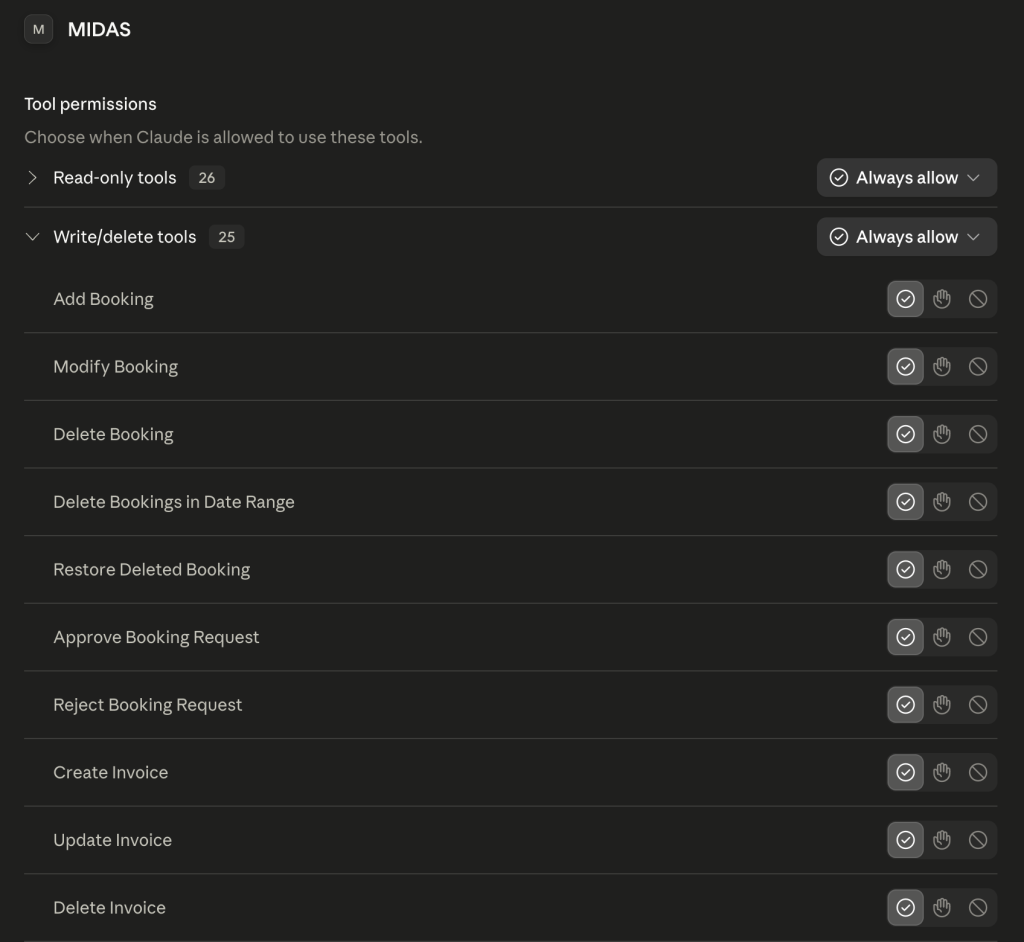
Some of the tools available in the MIDAS MCP Server (shown here in Claude Desktop)

Read-only tools retrieve information only, while write tools can create and change data. If you run the server in read-only mode, only the read-only tools will be available.

Getting started

Setting up the MIDAS MCP Server takes just a few minutes:

  1. Get the MCP Server addon (mid.as/upgrade for existing customers, mid.as/pricing for new customers)
  2. Enable the MCP Server addon and connect your AI assistant (here’s how)
  3. Start asking your AI assistant about your bookings.

Full instructions for each supported platform, including Claude, ChatGPT, and Gemini, are available in our documentation.

Read the MIDAS MCP Server documentation and get started ยป

The future of booking is conversational

AI assistants are quickly becoming part of everyday working life. With the MIDAS MCP Server, your booking and scheduling system is ready to be part of that shift. Whether you want to check availability at a glance, speed up routine admin, or build richer automations around your booking data, the MIDAS MCP Server connects MIDAS to the AI tools you already use.

Existing MIDAS customers can find out more and get set up today on our MIDAS MCP Server pages. New to MIDAS? Discover why MIDAS is the flexible, affordable choice for room and resource booking, now with AI built in.
How we’re Optimizing Source Code with AI

Optimizing Software Code using AI

Often in the release notes for our MIDAS room scheduling software, you may see the entry “Code Optimization”.

What is “Code Optimization”?

Code optimization is the process of refining our software’s source code to make it execute more efficiently, consume fewer resources, or improve its overall performance. It involves strategically modifying source code whilst at the same time ensuring the new code still produces the correct results.

Key goals of source code optimization:

  • Enhanced speed: Executing tasks more quickly
  • Reduced resource consumption: Using less memory, CPU cycles, or power
  • Improved scalability: Handling larger workloads effectively
  • Maintainability: Making code easier to understand and modify

Some common source code optimization techniques involve:

  • Algorithm optimization: Choosing more efficient algorithms
  • Loop optimization: Reducing loop iterations or overhead
  • Memory optimization: Minimizing memory usage and allocations
  • Input/output optimization: Streamlining data reading and writing
  • Caching: Storing frequently used data for faster access
  • Compiler optimization: Leveraging compiler features for automatic optimization
  • Profiling: Identifying performance bottlenecks to focus optimization efforts

Code Optimization in MIDAS

Over the years we’ve been developing MIDAS, all our code optimization work has been done manually.

This work has involved attempting to simplify and rewrite parts of the source code to be more efficient.

AI Code Optimizing

In our latest release, MIDAS v4.35, for the very first time, a small section of source code has been optimized with the assistance of AI (or Artificial Intelligence).

We performed this AI code optimization as an experiment to see whether AI could potentially be used to aid our development processes in the future.

We chose a small “subroutine” from our software and asked an AI if it could optimize it for us.

A “subroutine” is essentially a small block of code which can be re-used and “called” repeatedly during a program’s execution.

The subroutine within the MIDAS software code that we asked an AI if it could optimize for us was basically a function which converts dates to “epoch” time.

Epoch time is the number of seconds that have elapsed since January 1, 1970 (midnight UTC/GMT).

How did the AI optimized code perform?

Our original subroutine was 15 lines of code long. Using AI to optimize code, reduced this subroutine down to just 9 lines of code.

However, the initial source code that the AI generated for us did not just work “out of the box”. In fact, it didn’t work at all!

But using this AI generated code as a “template”, our team was able to modify the generated code so that it worked and produced the correct results.

Our team then extensively tested the new subroutine to ensure that it consistently produced the same expected output as the original subroutine.

Once we had a working subroutine that we were confident in, the next step was to “benchmark” the new routine against the old one. After all, there would be no point in using the new routine if there were no performance gains to be had, or indeed if the new code performed worse than the original.

To test this, we ran each subroutine 10,000,000 (10 million times), and analyzed the results:

Our Original Subroutine:
30 wallclock secs (30.28 usr + 0.00 sys = 30.28 CPU) @ 330229.18/s (n=10000000)

AI Optimized Subroutine:
27 wallclock secs (27.09 usr + 0.00 sys = 27.09 CPU) @ 369085.41/s (n=10000000)

To explain the above results, over 10 million iterations of each subroutine, the new AI optimized subroutine was more efficient. It ran (executed) quicker, and consumed less processing (CPU) power to achieve the same results as the original subroutine.

On our test server, the optimized subroutine was able to run 369,085 times in the space of one second, compared with 330,229 times in the space of a second for the original subroutine.

Ok, so the original subroutine was pretty quick and efficient to begin with – but with the assistance of AI, we were able to improve its efficiency by almost 12%.

The future of AI code optimization

Firstly, don’t worry, Artificial Intelligence is not about to take over the development of our MIDAS software!

MIDAS has been – and will remain – coded, developed, and maintained by human programmers.

But our experiment – on a very small part of our code – has demonstrated that AI tools may be able to assist our human developers to write ever more efficient source code.

The result of such carefully applied optimizations is that our software can potentially run faster, use resources more efficiently, and provide a better overall user experience.


What AI thinks about MIDAS?

What rivals ChatGPT and Google Bard think about MIDAS

It’s an exciting time in the world of Artificial Intelligence (AI), especially when it comes to AI powered interactive chat “bots”.

You may well have heard about “ChatGPT“, which is funded by Microsoft, and who are now starting to integrate its capabilities into the Bing search engine.

You may have also heard about Google’s rival, “Bard” (now know as “Gemini”), who are also integrating their AI chat bot into their search engine.

So for a bit of fun, we decided to put both of these leading AI chat bots to the test. We asked them both a very simple question to see if they knew…

“What is MIDAS room booking software?”

Here’s what ChatGPT has to say…

MIDAS (which stands for Meeting Room Scheduling) is a web-based software application designed to help organizations manage their room booking and scheduling needs. The software allows users to book meeting rooms, conference rooms, and other facilities quickly and easily, and provides a range of tools to help manage the booking process efficiently.

MIDAS allows users to set up and manage multiple rooms, view real-time availability, and make bookings directly through the software. It also includes features such as email notifications, automated invoicing, and reporting tools to help track usage and optimize room allocation.

MIDAS is a popular choice for businesses, schools, and other organizations that need to manage their room scheduling needs efficiently. It is easy to use, flexible, and customizable, making it suitable for a wide range of applications.

– ChatGPT

Here’s what Google’s Bard has to say…

MIDAS is a cloud-based room booking software that helps businesses and organizations of all sizes manage their meeting and event spaces. With MIDAS, users can easily book rooms, track room availability, and manage room reservations. MIDAS also offers a variety of features that can help businesses save time and money, such as:

  • Real-time availability: MIDAS provides real-time availability of rooms, so users can always see which rooms are available and book them quickly and easily.
  • Group booking: MIDAS makes it easy for users to book rooms for groups, so they can easily coordinate their schedules and ensure that everyone has a space to meet.
  • Reporting: MIDAS provides detailed reports on room usage, so businesses can track their spending and make informed decisions about how to allocate their resources.
  • Integrations: MIDAS integrates with a variety of other business systems, so users can easily manage their room bookings from within their existing workflows.

MIDAS is a powerful and flexible room booking software that can help businesses and organizations of all sizes save time and money. With MIDAS, users can easily book rooms, track room availability, and manage room reservations. MIDAS also offers a variety of features that can help businesses save time and money, such as real-time availability, group booking, reporting, and integrations.

Here are some of the benefits of using MIDAS room booking software:

  • Save time and money: MIDAS can help businesses save time and money by automating the room booking process. With MIDAS, users can easily book rooms, track room availability, and manage room reservations. This can free up staff time to focus on other tasks, and it can also help businesses avoid overbooking and underutilizing their meeting and event spaces.
  • Improve efficiency: MIDAS can help businesses improve efficiency by providing a centralized platform for managing room bookings. With MIDAS, users can easily see which rooms are available, book rooms, and track room reservations. This can help businesses avoid the hassle of manually tracking room availability and booking rooms.
  • Increase collaboration: MIDAS can help businesses increase collaboration by providing a platform for users to share information about room bookings. With MIDAS, users can easily see which rooms are available, book rooms, and track room reservations. This can help businesses ensure that everyone is on the same page when it comes to meeting and event planning.

Overall, MIDAS is a powerful and flexible room booking software that can help businesses and organizations of all sizes save time and money. With MIDAS, users can easily book rooms, track room availability, and manage room reservations. MIDAS also offers a variety of features that can help businesses improve efficiency and increase collaboration.

– Bard

Our thoughts…

We have to admit that on this occasion, we preferred Google Bard’s response. It was certainly a more in depth summary of our MIDAS software.

ChatGPT’s response – whilst concise – was a little misleading. It claimed that “MIDAS” stands for “Meeting Room Scheduling”.

Whilst MIDAS is indeed a meeting room scheduling system, the acronym “MIDAS” itself doesn’t stand for “Meeting Room Scheduling”. For a clue as to what MIDAS does stand for, see this blog post.

AI chatbots are certainly having a bumpy ride of late.

Back in February this year, $100bn was wiped off Google’s parent company, Alphabet’s shares, after Bard made a mistake and investors became nervous.

More recently, a man widely considered to be the “godfather” of Artificial Intelligence, who quit his job at Google, has warned about the growing dangers from developments in the field.

When two big rivals – Google and Microsoft – both launch competing AI ChatBots, the race is on. Yet many are warning that we need to slow down AI development and ensure that ethics are taken into account.

In the fifteen plus years that we’ve been developing MIDAS, we’ve seen (and implemented) numerous technological advances. It’s exciting – if not also a little scary – to think where the advancements in AI might take us in just a few year’s time.

UPDATE: January 2024: We’ve used AI for the first time to help optimize some of our MIDAS code! Read more about this in our optimizing code with AI blog post.

UPDATE: February 2024: “Bard” has now been rebranded as “Gemini”.