Posts Tagged: cloud hosted

What Twenty Years of Building Booking Software Has Taught Us

MIDAS 20 YEAR ANNIVERSARY

We hear a version of the same story more often than you’d think: an organization gets in touch because their current booking system is going away. Sometimes the vendor got acquired and folded into a bigger platform. Sometimes a “free” tool they’d come to depend on quietly shut down. Sometimes a school management system swallowed the booking module they liked and replaced it with one they didn’t.

Whatever the cause, the result is the same – a business manager or facilities coordinator staring down a migration they didn’t ask for, hoping the data export comes out clean.

We’ve been building MIDAS since 2006, and stories like that are a big part of why we still are. So we wanted to write plainly about what we think actually matters when you’re choosing software that a school, a church, or a community group is going to depend on for years, not months – and where we think MIDAS earns its place.

The deployment question nobody else lets you ask

Almost every booking system on the market today makes one decision for you before you’ve even seen a demo: it will live on someone else’s servers, in someone else’s cloud, under someone else’s terms. For a lot of organizations that’s completely fine. For a lot of others – schools with strict data protection obligations, churches wary of where congregation data ends up, government bodies with procurement rules that basically require it – that’s a non-starter.

MIDAS is one of the few systems left that genuinely lets you choose.

Run it on your own server, behind your own firewall, backed up on your own schedule, and your booking data never has to leave the building. Or let us host it, if server maintenance isn’t something you want on your plate. Either way works, and – this is the part people are often surprised by – you can move between the two later if your circumstances change. Most vendors only built one option, so they don’t offer that choice at all.

Why “since 2006” is actually a selling point

Here’s a number that we think says more about MIDAS than any feature list could: the median organization using MIDAS today has been with us for over nine years. Not nine months. Nine years.

We bring this up not to boast but because we think it answers the real question underneath “which software should we buy?” – which is really “will this still be here, and will it still work, in five years?

A lot of the room booking space right now is genuinely unstable: companies get bought, folded into bigger suites, sunset, rebranded, repriced. MIDAS has been continuously developed since 2006, and we’re not trying to get acquired or chasing a quarterly roadmap review that might decide room booking is no longer “core.” It’s the whole business, and it has been for twenty years.

Pricing that doesn’t need a phone call to understand

Plenty of software in this space keeps its pricing behind a “contact sales” button – in fact in our own research we found that almost a third of software vendors don’t publish pricing – and we’ve never liked that as an approach.

So MIDAS doesn’t work that way. Every price is published, openly, on our website, based on exactly two things – how many venues you need and how many users you need. No per-booking charges that punish you for actually using the software. No mystery enterprise tier that only reveals itself after a demo. You can work out your exact cost in about thirty seconds, and when it’s time to renew, the price is the same standard rate you already know (subject to currency fluctuations), not some number that’s crept up while you weren’t looking.

If you’re the person who has to justify a line item to a board, a council, or a budget committee, that kind of transparency tends to matter more than people expect.

We’re not trying to be everything

This one took us a while to say plainly, so let’s just say it: MIDAS is not a church management system. It’s not a school information system. It’s not a facilities maintenance platform. If what you actually need is one giant piece of software that handles giving, attendance, gradebooks, and work orders as well as room bookings, there are products built for exactly that, and we’d rather tell you that upfront than pretend otherwise.

What we have noticed, though, is that booking is usually the thing those all-in-one systems treat as an afterthought – a module maintained alongside features that matter more to the wider platform. The organizations that come to MIDAS from a bundled suite tend to say some version of the same thing: booking finally works the way they need it to, and everything else they were using keeps doing its job right alongside it. MIDAS is built to integrate with the tools you already run, not to replace them.

If any of this sounds familiar

Maybe your team is juggling a shared calendar and a spreadsheet of “who’s using the hall Thursday.” Maybe you’re facing a migration because a system you relied on is being discontinued or absorbed elsewhere. Maybe you just want to know, in plain numbers, what a proper booking system would actually cost your organization.

Either way, there’s no obligation to talk to anyone first. Try MIDAS free for 30 days with your own rooms and your own schedule, or just look up your exact price right now.

Start your free 30-day trial – no credit card required.

See pricing for your organization – published openly, no sales call needed.

Zero Configuration Email Delivery for Cloud-Hosted Customers

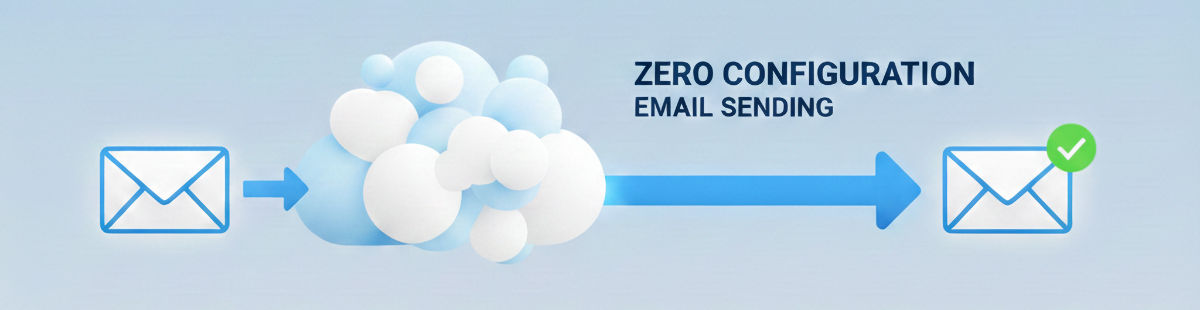
Zero Configuration Email Delivery

The ability to send email is essential for any booking system.

From booking confirmations and reminders, to invoices, notifications, and password resets, booking and scheduling systems rely on email.

MIDAS naturally supports the sending of email, but we’ve made some exciting and significant improvements to email sending for our cloud-hosted customers for v4.42.

But first, let’s look at the existing ways in which MIDAS can send email.

Until now, the sending of email by MIDAS has been through a choice between “Sendmail” or “SMTP”.

What is Sendmail?

Available on Linux-based servers, Sendmail is a built-in server application for sending email directly from the server itself. Read more about Sendmail.

What is SMTP?

SMTP (or Simple Mail Transfer Protocol) is the standard language used by computers to send emails across the internet. Read more about SMTP.

Sendmail vs SMTP

Both Sendmail and SMTP options have been available in both our cloud-hosted and self-hosted editions.

“Sendmail” has long been the default ‘out of the box’ email transport setting for cloud-hosted customers. However, we’ve always encouraged customers to move over to SMTP as soon as possible.

That’s because generally email deliverability rates are substantially higher when MIDAS is configured to send email through a customer’s own SMTP server, than if instead sent directly through our own servers.

Whilst Sendmail is configured to work ‘out of the box’ for cloud-hosted customers, SMTP requires a little more configuration.

To configure MIDAS to send email via SMTP, you will need:

  • The address of your SMTP server
  • The correct port number
  • The SMTP username and password
  • The correct SSL, TLS, or STARTTLS encryption method setting

You will also need to ensure that your SMTP server accepts connections from your cloud-hosted MIDAS system. In addition, your organization’s domain must be configured to allow MIDAS to send email on behalf of your domain.

This requires significant configuration and setup. We want to simplify this for our cloud-hosted customers. That’s why we’re introducing cloud email sending.

Introducing “Cloud Sending”

New Zero Configuration Email Sending Option

For MIDAS v4.42, we’ve introduced a new “Cloud” option for sending email. This new option is available to all cloud-hosted customers, and replaces the previous “Sendmail” option. (Sendmail continues to remain an option for self-hosted customers).

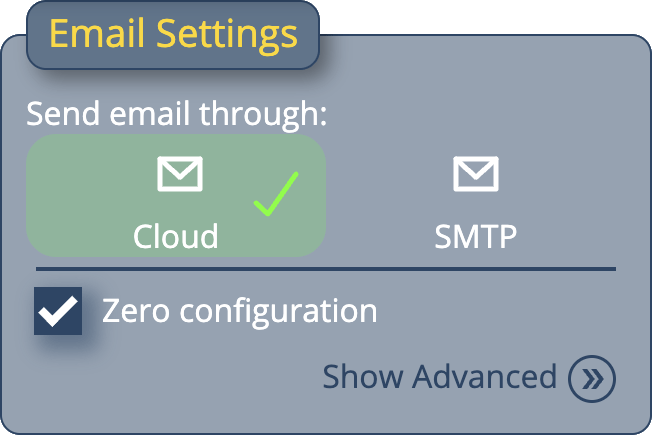
With the new cloud email option selected, you won’t need to specify an SMTP host, or enter credentials or specify ports – MIDAS will take care of all of that!

We have partnered with a dedicated transactional email provider specializing in high-deliverability email delivery services, to provide efficient and reliable email delivery for cloud-hosted customers who select the “Cloud” email sending option.

Zero Configuration Email Sending

To complement our new “cloud” email offering, we’ve also included a “Zero Configuration” option.

With this option enabled, MIDAS and Mailgun will seamlessly handle email delivery for your MIDAS system. You won’t need to configure an outgoing email address, nor will you need to update your organization’s domain’s SPF (Sender Policy Framework) DNS record – email will just ‘work’ right out of the box.

Of course, if you wish to customize the “send from” or “reply to” addresses, you can untick the “Zero Configuration” option and change those settings.

But in its simplest form, our new “cloud” email sending and “Zero Configuration” options mean that brand new cloud-hosted email systems can now reliably send email right from the outset.

Migrating from Sendmail to Cloud email sending

For our existing cloud-hosted customers, if you’re currently using the “Sendmail” option in your MIDAS system, you’ll be automatically migrated to “cloud” sending soon after we update you to v4.42.

If you do not wish to use the new “Cloud” sending option, you should update your MIDAS settings to instead send email via SMTP.

You can change your MIDAS email settings via MIDAS Admin Options → Manage MIDAS → Email.

If your cloud-hosted MIDAS system is currently configured to send email via SMTP, this setting will be unaffected when we update your booking system to v4.42. Of course, you can then always change over to use the cloud email sending option at any time.


Cloud Infrastructure Upgrades – December 2024

Cloud Infrastructure

Last week we undertook some upgrades in the three client data centers where our cloud-hosted customer’s MIDAS systems reside.

These data centers are located Atlanta, Georgia (US East Coast Data Center), Seattle, Washington (US West Coast Data Center), and Amsterdam, Netherlands (European Data Center).

When a customer chooses a cloud-hosted edition of MIDAS, they can choose which of these data centers their booking system runs from. (We also offer a self-hosted edition too, for customers wishing to run MIDAS on their own infrastructure)

The upgrades to the sever ‘nodes’ where our cloud-hosted client’s MIDAS systems run include:

  • Increased CPU cores by 50%
  • Increased Memory capacity by 50%
  • Increased port speed by 50%

These upgrades were performed seamlessly without any downtime or impact on customer’s MIDAS operations.

The result of these upgrades is that we can deliver more powerful client nodes, with improved network connections.

In turn, this translates to even more responsive MIDAS booking systems for our customers. It’s all part of the service and commitment we have to our end-users!


Why Does Data Center Location Matter?

Why does Data Center location matter?

Data Centers exist all over the world. They’re used to stored all sorts of computer data, including websites and web apps, like MIDAS.

Does Data Center location matter?

Yes – The location of the data center that houses your cloud-hosted MIDAS system can have an impact on the quality of your overall experience.

One of the unavoidable aspects of long-distance internet communications is high latency.

What is latency and why is it important?

The term “latency” describes a measure of delay between two events. 

In the context of the internet, latency refers to the amount of time it takes for data to perform a round-trip between two points in a network. In the case of your MIDAS system, these two points are represented by your web browser and the server in a data center which runs your MIDAS system. 

The amount of time it takes for a unit of data to travel from the server in the data center to your browser is considered the latency of the network. This is usually measured in milliseconds and expressed as ms. This is also frequently referred to as the response time of a server.

We recently added two new data centers to our network, including one in Europe.

In our testing, we saw lower latency leading to an approximately 30% improvement in page loading times for Europe-based users accessing a MIDAS system in our EU data center vs our East Coast US location.

How does a data center’s location help reduce latency?

Being geographically closer to a data center can have several benefits, including:

  • Lower Latency: When the distance between a user and a data center is shorter, the time required to transfer data is reduced. This results in lower latency and faster response times.
  • Improved Performance: Lower latency can result in improved performance for applications and services hosted at the data center, such as faster loading times for websites, smoother streaming, and reduced lag in online gaming.
  • Increased Reliability: By being geographically closer to a data center, users are less likely to experience network congestion, data loss, and other issues that can affect the reliability of their connections.
  • Better Compliance: Data centers located in specific regions may be subject to local laws and regulations, such as data privacy and security standards, which can affect their suitability for hosting certain types of data. By being closer to a data center, organizations can more easily ensure compliance with these regulations.

How far should data centers be apart?

Having two data centers physically located next door to each other has little benefit. The whole reason to have data centers spread further apart is to reduce risk of downtime and to increase performance.

If two data centers are built next to each other and a natural disaster – like a hurricane or wildfire – hits that location, both data centers are at risk of suffering damage and outages. Whereas, if data centers are built several hundred – or indeed thousands – of miles apart, the risk of the same natural disaster hitting them all is negligible.

Similarly, in terms of performance, if a user is located in London, England, but a cloud-based application they’re using can be run from one of two data centers both located in San Fransisco, California, it will make very little difference to the client as to which data center their application is run from. However, if the client has a choice between a data center in California or a data center in the United Kingdom, there will likely be significantly lower latency from the UK data center.

So, how far apart should data centers be? They should be far enough apart as to minimize a potential disaster occurring at one location from impacting operations at other locations.

They should also be geographically distributed based upon the location that users will be connecting from. If all users will be connecting from within the US, it makes sense to use data centers around the US. If users will be connecting from all around the world, it makes sense to use data centers spread across the globe.

Our Data Centers

Earlier this year, we significantly expanded our network into new data centers.

We added new client nodes in a data center in Europe (in Amsterdam, Netherlands), and in a data center on the West Coast of the US (in Seattle, Washington).

These two new data center locations are in addition to our existing nodes residing in our East Coast US data center (in Atlanta, Georgia).

We then looked at the location of each organization with an active cloud-hosted MIDAS service. Those which were geographically closer to either our EU or West Coast US locations were seamlessly migrated to those data center locations.

Naturally, we provided customers with advance notice of proposed migrations, and allowed individual customers to opt-out, or to choose a different data center for their MIDAS system.

The client migrations went smoothly, and have lead to noticeable improvements through lower latency for many customers.

Because our cloud-hosted MIDAS systems can now be run out of three different geographic regions (US East, US West, and Europe), we now offer all new cloud-hosted customers a choice of data center where they’d like their MIDAS system to reside.