Category: Development

Improved Statistics and Reports

We’re improving the statistics/reports that MIDAS can generate for you in v4.06 with three exciting new additions:

Venue Utilization Statistics
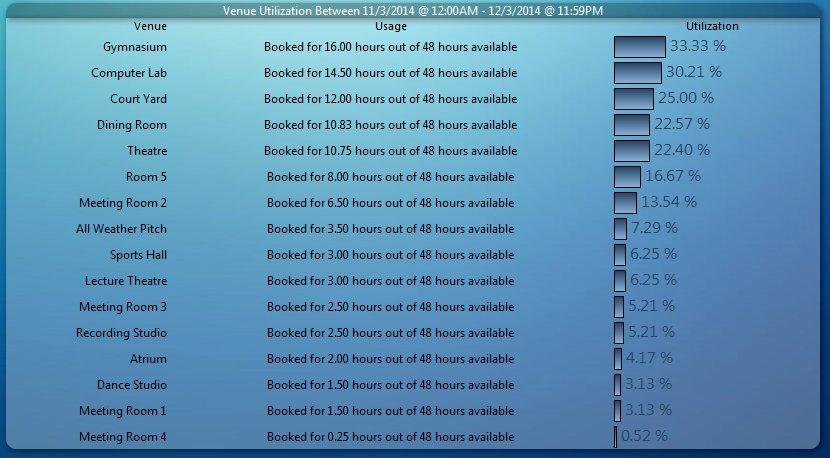
Venue Utilization Report

The new Venue Utilization report shows you the amount of usage that each venue has over a period of time. It will tell you for how many hours each venue is booked out of the total amount of hours available (taking into account the venue’s hours of operation too!), and give you a percentage utilization figure too!

Resource Statistics
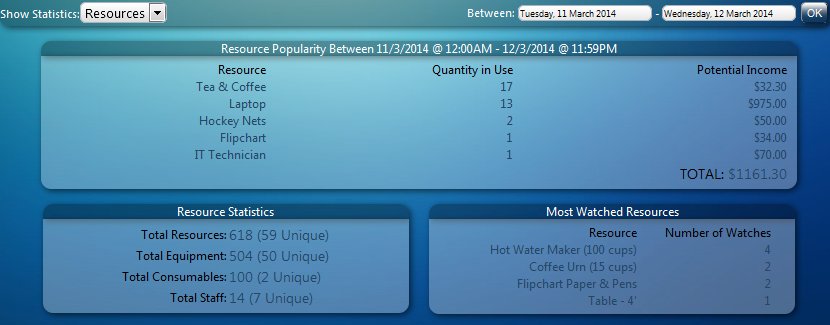
Resource Statistics Report

The brand new Resource Statistics section generates a report into your resources (equipment, consumables, and staffing) over a period of time. It provides details of the number of each resource in use during that period, and an estimate of the income potential from each. In addition, the report indicates the current totals of all resources (as well as unique resources) in your MIDAS, and also provides an insight into the most “watched” resources.

Individual Client Statistics
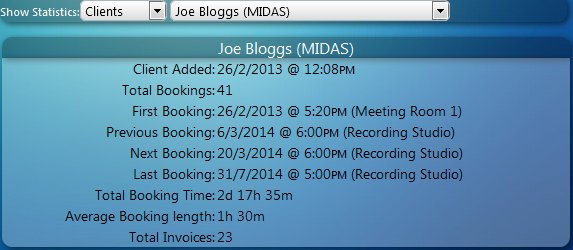
Individual Client Report

Improvements to Client reports now mean that with v4.06 you can see detailed reports for each individual client. These reports show when the client was added to the system, how many bookings and invoices they have, the dates/times of their first, previous, next and last bookings (which can be clicked to jump directly to those bookings). The report also calculates the total combined length of all the client’s bookings, as well as the average length of their bookings
New Flexible Venue Rates

We’re introducing even more flexibility when it comes to setting your venue rates in MIDAS v4.06!

Currently, you can already set up hourly/daily rates for each of your rooms, and have different rates depending upon the day of the week.

In MIDAS v4.06, we’ve extended this to also allow you to define rates based upon the length of the booking as well!

For example, you can now set up a venue’s rates so that bookings lasting say less than 4 hours could be charged and invoiced at a higher rate than those lasting more than 4 hours.

You can also now define rates as “per booking” as well as “per hour” and “per day”. The new “per booking” option charges a fixed set amount for bookings.

Flexible Venue Rates

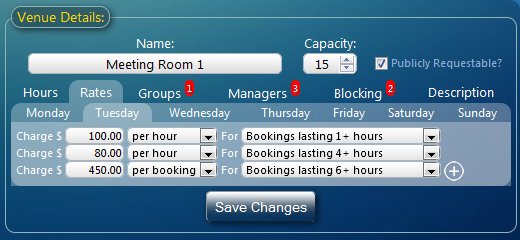
So, as per the above screenshot, let’s say you define the following rates for “Meeting Room 1”:

  • $100 per hour for bookings lasting 1+ hours
  • $80 per hour for bookings lasting 4+ hours
  • $450 per booking for bookings lasting 6+ hours

Bookings for “Meeting Room 1” would then be charged as follows:

Length of BookingTotal Charge
1h$100 ($100 x 1)
2h$200 ($100 x 2)
3h$300 ($100 x 3)
4h$320 ($80 x 4)
5h$400 ($80 x 5)
6h$450 ($450)
7h$450 ($450)
8h$450 ($450)

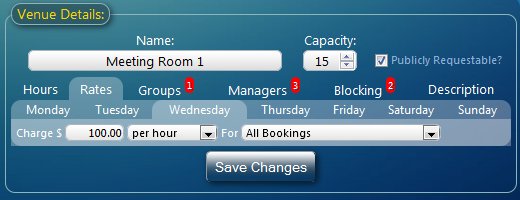
We believe this additional flexibility when it comes to charging and invoicing for use of your venues will be great benefit to our customers. Of course, for those who don’t require this level of flexibility, MIDAS can be simply set to charge a single rate for “all bookings”:

Setting a single Venue Rate

Active Directory Integration

Room Scheduling Software with Active Directory IntegrationThe most popular suggestion on our Feature Request page in recent times has been a desire for integration between MIDAS and an Active Directory allowing single sign-on to MIDAS using a user’s current system credentials.

We have been working to bring such integration to MIDAS for some time, and we are now pleased to announce that integration with an Active Directory will be possible starting with our forthcoming update to MIDAS, v4.06.

So, instead of a user having to log in twice (once to their computer, and then again when they open MIDAS), MIDAS can instead authenticate against your organization’s Active Directory, meaning users logged onto your network can simply open MIDAS and be seamlessly logged in each time!

Please Note: Active Directory integration will only be available if you’re running MIDAS on your own server (our “self-hosted” edition), and your MIDAS is licensed for “Unlimited” users.

We’re currently looking for beta testes who meet the above requirements (i.e. currently running a “self hosted” MIDAS with “Unlimited” users) who would be interested in testing integration between MIDAS and their Active Directory. If this is you, please contact us for more information.

Also, if you’re interested in Active Directory integration when it becomes publicly available with MIDAS v4.06, you can get a head start by making sure your infrastructure is ready with our Active Directory Integration Test Tool and by referring to the dedicated Active Directory Integration Documentation.


Invoicing Improvements in v4.05

Well, it’s Black Friday once again (more about that later!), and if you’re a regular reader of our blog then you’ll already know about some of the upcoming features in MIDAS v4.05 including improved iPad and touch-screen device support and a new Venue “Blocking” feature.

So we thought we’d take a moment to reveal some of the other improvements you can expect with the next update to our powerful web based room scheduling solution, this time in Invoicing:

Improvements to Invoicing

Previously, the “Booking Notes” associated any booking for which an invoice was generated were automatically included in the “Invoice Notes” area of the corresponding invoice.

In MIDAS v4.05, you’ll be able to disable this behavior, or choose a different booking field (including custom fields) to include in the “Invoice Notes” section of your generated invoices.

Itemize Invoice Notes

What’s more, we’ve included an “Itemize” option so for invoices containing multiple bookings, MIDAS can automatically denote which “notes” apply to which bookings:

Itemized Invoice Notes

After feedback from a couple of our customers, we’re also introducing a way to completely remove the “Tax” line from your invoices if you don’t charge tax, and don’t want to show a 0% tax rate on your invoices. In MIDAS v4.05, setting the “Default Tax Amount” blank (rather than just 0%) will hide the tax line on invoices where there is no tax element (existing invoices which contain a tax element will not be affected and will still show the tax line)

Now, back to Black Friday – if you’re not following us on Twitter (@mid_as), then right now you’re missing out on some incredible deals – for today only – for both new AND existing customers of our MIDAS web based room scheduling software