Category: Development

Print Individual Bookings

Many of our users require the ability to be able to print out bookings from their MIDAS system. Perhaps they have staff or volunteers who don’t have access the a computer, and therefore need a “paper copy” of bookings.

There are a number of ways this is facilitated in MIDAS.

Firstly, you can quickly print bookings for the currently viewed date (or date range) in the booking grid. This is achieved by simply clicking the “Print” icon in the MIDAS toolbar.

Furthermore, you can also right-click this icon to generate more advanced printouts.

MIDAS also allows you to print any individual client’s past or future bookings, or those over a specific date range.

We know that these extensive print capabilities within our software are extremely valuable to our users. However, until now there hasn’t been an easy way to print details of just a single individual booking.

Printing a single booking

This has been an often requested feature on our Feature Requests page. We’re therefore delighted to be able to introduce this for MIDAS v4.27.

Users who have been granted the “Can print” user permission, will notice the addition of a small print icon in the upper right of the Booking Information Panel:
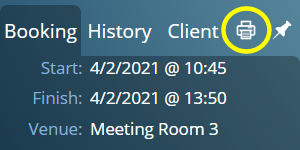
Print the currently selected tab in the Booking Information Panel

This icon will be present whenever the Booking Information Panel has been set to retain its information. The Booking Information Panel is populated when you “hover” your mouse over a booking in the booking grid. Now, normally, this information then disappears from the Panel when you move away from a booking. However, the small small “Pin” icon in the top-right corner of the Panel retains this last selected booking’s details. When set to retain information, the new Print icon will be displayed.

When this new small print icon is clicked, a window will open displaying all the information shown in the currently selected tab of the Booking Information Panel. This information is displayed in a printer-friendly format, and your browser’s native print dialog will then be shown.

So, if the “Booking” tab is currently selected, you’ll be able to print out all the information for the displayed booking.

When the “History” tab is selected, you’ll be able to print the full edit history for the displayed booking.

And, of course, if the “Client” tab is selected, you’ll be able to print detailed client information for the displayed client.

How To Get MIDAS v4.27…

MIDAS v4.27 isn’t yet publicly available. It is expected to be made available to Beta Testers soon, with a full public release shortly after. In the meantime, why not check out some of the new features that were included in v4.26 ?

Quickly Select Common Date Ranges

In number of places in our scheduling software you can select a date range. For example, when printing bookings, searching for bookings, of viewing reports and statistics over a custom date range.

For MIDAS v4.27 we’re making it really quick to select common date ranges.

Previously, to select a date range in these areas, you’d be presented with two fields, each of which may be selected separately to show a popup calendar. This allowed selecting both a start date and finish date for the date range.

In v4.27 you’ll notice that we’ve now added a small “…” icon after these dates:

Fast selection of common date ranges in MIDAS
A new “…” icon allows fast selection of common date ranges

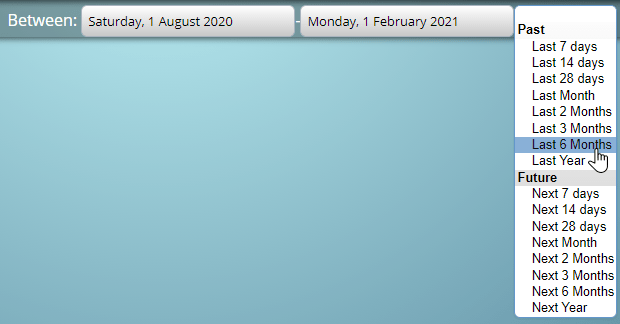
Clicking, or simply “hovering” your mouse over this “…” icon will show a dropdown list of common date ranges:

A number of common predefined date ranges are available in MIDAS
Quickly select a common date range in MIDAS

Selecting one of these common date ranges will automatically populate the start and finish dates respectively.

This makes it really fast to select, say, the last 7 days of bookings with just a single click!

Previously, this would take a minimum of 4 clicks! (Clicking once on the first date, clicking again to select a date from the resulting popup calendar, and then repeating this again for the second date).

How To Get MIDAS v4.27…

MIDAS v4.27 isn’t yet publicly available. It is expected to be made available to Beta Testers soon, with a full public release shortly after. In the meantime, why not check out some of the new features that were included in v4.26 ?

A New Calendar Widget

If you’ve previously used MIDAS, you’ll be familiar with the small calendar “widget” that appears throughout the software allowing you to select dates.

MIDAS v4.26 (and later) now use a slightly different calendar “widget” to previous versions.

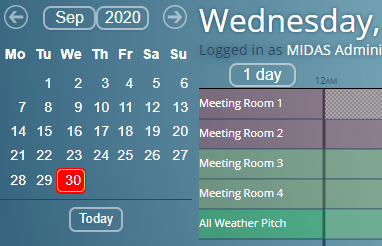
Here’s a comparison of the two:

The calendar widget in v4.25 (and earlier)
The new calendar widget in v4.26+

What’s changed?

We’ve been developing MIDAS for over 15 years now! Ever since our very first release we’ve been using a JavaScript calendar widget originally called “DHTML Calendar”. This was later renamed to “Dynarch Calendar” – or “JSCal2” for short.

From MIDAS v4.26 we’ve dropped JSCal2 in favor of jQuery UI’s “datepicker”.

Why the change?

Back when we started development on MIDAS in 2005, there were very few calendar widgets available that allowed embedding a fully-featured date picker into a web page. After testing a number of alternatives at the time, we chose the “DHTML Calendar” as it was known back then.

This was a freely available calendar widget that had been in active development by the author for two years previous. It provided all the functionality that we needed for use in MIDAS.

Development of the “DHTML Calendar” continued over the years, with regular releases. A re-written “version 2” was then released and the project renamed to “Dynarch Calendar” (JSCal2).

Unfortunately, development of JSCal2 ceased in 2010.

Since then, JSCal2 has continued to function with the odd “patch” or two we’ve made.

However, there comes a time when a decision has to be made about the feasibility of continuing with JSCal2 going forward. We’ve now made that decision and have decided to drop JSCal2 in favor of jQuery UI’s “datepicker”.

jQuery UI’s “datepicker” is in active development and is arguably one of the most popular date pickers/calendar widgets in use today. It has both a large user and developer base and is well-supported.

What are the benefits of the new calendar widget?

In recent years, the limitations of JSCal2 have become more apparent.

For example, to select multiple dates in a JSCal2 calendar, a user would need to hold down the Control (Ctrl) or Command (Cmnd) key on their keyboard whilst clicking on a date.

Several years ago become the advent of tablets and touch screen devices this wasn’t a problem – as everyone used a keyboard.

However, in today’s world that’s not always the case, and so we needed a calendar widget that would allow selecting multiple dates regardless of whether the user was using a keyboard or not.

We’ve been able to achieve this with the new calendar widget in MIDAS v4.26.

There are also performance benefits over the new calendar widget. Web standards and performance have improved and evolved over the years. The now obsolete JSCal2 – whilst very advanced for its time, is no longer advanced or efficient by today’s modern standards.

What differences will I see?

Probably the first thing you’ll notice with the new calendar widget is its size (compare the two images above). The old JSCal2 widget was quite small and not idea for use on touch-devices. The new widget uses a slightly larger font and increased spacing. This not only helps make it more legible, but easier to use on smaller touch screens.

You’ll also notice that the top part of the calendar widget has changed.

Previously, the top of the calendar contained four arrow buttons, allowing you to jump forward or back by either a month or a year at a time. Additionally, you could also click the Month/Year heading to select a specific month/year to jump to.

The new calendar widget only has two arrow buttons, allowing you to jump backwards or forwards by a month at a time. However, the main month/year header is actually now two separate drop-down lists making it really easy to select a month or year to quickly jump to.

Why use a “widget” at all?

Back when we started MIDAS development there were few native interactive elements you could embed within a web page that would work in all web browsers.

You could essentially include very basic form elements – text inputs, drop-down lists, check/radio boxes, and the like.

There was no native way to include a calendar or date picker within a web page.

Today the range of native interactive elements available include a whole host of controls; including color pickers, sliders, email address and telephone inputs, and even date pickers.

Unfortunately support for native date pickers at present isn’t universal among web browsers. Safari browsers for example have no support as yet for native date pickers.

Those browsers which do native support a date picker element, all render them differently, and only provide very basic date picking functionality. At present, there is no support for selecting multiple dates, for example.

Native date pickers are still in their “infancy”. There may come a time when MIDAS can utilize native date pickers rather than a 3rd party calendar “widget”. For now though, the new calendar widget we’re introducing in v4.26 offers all the functionality we need and should do for the foreseeable future.


New Export Features

In our previous update (v4.25) we added a host of new data export features. This included the ability to export invoice data to QuickBooks, Sage, Xero and several other popular accountancy packages.

For MIDAS v4.26, we’re adding a couple of additional features to the export capabilities of our booking software.

Export Users

MIDAS is already capable of exporting Booking, Client, Invoice, and Resource data in a range of formats.

For v4.26 we’re now also allowing user data to be exportable.

Exported user data includes all privileges assigned to each account within your MIDAS system.

One piece of advice we offer to help customers keep their MIDAS systems secure is that each user account should only be granted the minimum permissions each individual requires.

For customers with a large number of user accounts, this new export option allows administrators to quickly audit the permissions assigned to every user account.

Refined Client Data Exports

The ongoing global COVID-19 pandemic is forcing organizations to adapt to how they operate. Throughout this period, we’ve been listening closely to our customers feedback.

We recently published an article on 6 ways MIDAS can help your business adjust to COVID-19.

In addition, we’ve been adding new and improved features in v4.25 and v4.26 to further improve how MIDAS can work for your business in these unprecedented times.

One of our customer’s reached out to us as they wanted a way to collate the email addresses of all their clients who had bookings over a certain date range. This was so that they could send out a bulk email to inform them hat their facilities had temporarily closed.

Now, whilst a list of all client’s addresses could be exported by MIDAS, there was no easy way to generate a subset list of clients based upon when their bookings took – or were due to take – place.

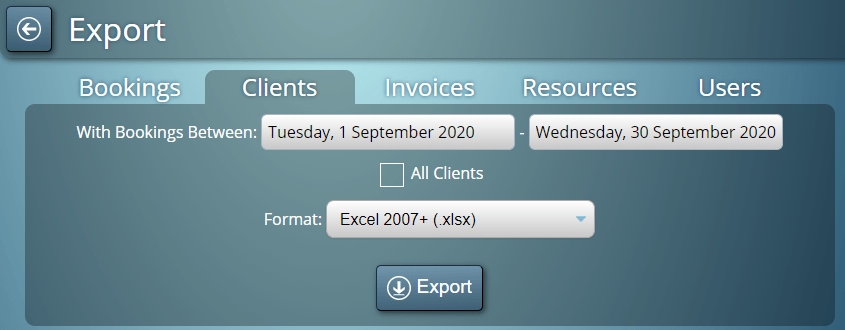
We’ve addressed this for v4.26! There’s now the option to export all clients, or just details of those with bookings within a specific date range!

Export Clients With Bookings Within A Specified Date Range