Google Chrome 15 Released… Firefox kicked into 2nd place?

Google Chrome 15
If you’re a Chrome user, you’ll be interested to know the next version of Google’s browser, Chrome 15, has just been released!

MIDAS is fully compatible with Chrome 15. That’s because as part of our ongoing commitment to our web based scheduling software, we regularly test our web app in pre-release builds of all 5 major browsers before final versions are released! This helps us identify as early as possible any potential incompatibilities with our software. We can then address these before a major browser update such as this is made available to the wider public!

If you’re technically minded, you can read what’s new in Chrome 15 in Google’s own blog.

Google Chrome Updates

Chrome 15 is a free update, and one of the things we love about Chrome is that it silently updates itself. No user interaction (other than a browser restart) is required. This ensures that you’re always using the most stable, secure and up-to-date version of Google Chrome!

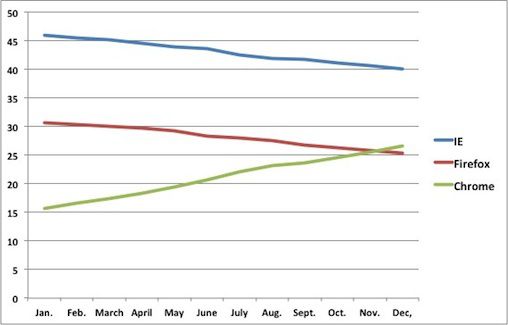
Mozilla FirefoxIn other interesting Google Chrome-related news, it’s been reported recently by a number of sources, including Computerworld.com, that by the end of 2011, Chrome may have overtaken Firefox to become the second most used web browser! At the end of September, Microsoft Internet Explorer was in the lead with a 31.7% total share of the web browser market. Mozilla Firefox had a 26.8% share, and Google Chrome had a 23.6% share, according to data provided by StatCounter. So far this year, this equates to a 9% decrease in use of Internet Explorer, a 4% increase in the use of Firefox, but an impressive 8% increase in the use of Chrome.

Chrome may pass Firefox as the world's second-most-popular browser by the end of the year
Chrome may pass Firefox as the world’s second-most-popular browser by the end of the year (Data: StatCounter)

If this trend continues – and there’s no evidence to suggest otherwise – Chrome may overtake Firefox to become the second most popular browser within the next couple of months!

So if you’ve never heard of Google Chrome (and if not, where have you been!?), or have never tried it out for yourself, why not give Chrome a go!?


What’s new in MIDAS v3.14

Work on our next update to MIDAS, v3.14 is nearing completion, so we thought we’d take this opportunity to tell you about a couple of the new features in this forthcoming update…

The biggest area that’s been updated in this release is the “My Messages” module.
Starting with version 3.14 you’ll be able to:

Receive notifications when consumables are low

The person(s) responsible for purchasing consumables can be informed when they need to re-order!

Low Consumable Warning
Low consumable notifications

Receive notifications when specific resources are added to bookings

For example, catering staff can be automatically notified when refreshments are required!

Greater control over watch “triggers”

The addition of AND/OR logic allows greater control over what triggers your watch notification. For instance you can set up a watch to notify you when either a new booking is added to a particular room OR a new booking of a particular type is added. Alternatively, you can set up the watch to notify you when a new booking is added to a particular room AND is a particular type, and so forth

Watch Settings
AND/OR logic providing greater control over notification triggers

Automatically forward notifications and messages to your email

You can have watch notifications and internal messages from other users automatically forwarded to your email address. This means that you don’t need to log in to MIDAS to check for new messages!

Suppress notifications window when you log in

You can disable the “My Messages” pop-up which displays after you login whenever you have messages, reminders, or watches.

My Messages Settings
Notification Settings

Also, in v3.14 we’ve extended the “Statistics” module to now include a section for “Invoice Statistics“. In this section you’ll be able to select a date range, and MIDAS will show you statistics of all invoices sent during that period. You’ll be able to see how much has been invoiced, how much has been paid, and how much is still outstanding! …and you can breakdown these statistics by client, organization, or booking type!

Invoice Statistics
Invoice Statistics

You can now also Print Statistics to your printer via the main print icon!


Firefox 7.0 Released!

Firefox 7
If you’re a Firefox user, you’ll be interested to know the next version of Mozilla’s popular browser, Firefox 7.0, has just been released! …in fact so fresh is this news, Firefox haven’t even updated their Release Notes for Firefox 7 yet!

MIDAS v3.13 is fully compatible with Firefox 7 because as part of our commitment to our browser based scheduling software, here at MIDAS HQ we regularly test our web app in pre-release builds of all 5 major browsers before final versions are released! This helps us to identify as early as possible any potential incompatibilities, so that we can address them before a major browser update is made available to the wider public!

Once Mozilla update the Firefox site, you’ll be able to see exactly what’s new in the final version of Firefox 7.0, but until then, the Release Notes page currently refers to Firefox 7 “Beta”, but should give you an idea of what’s new in v7.0

Firefox 7 is free and only take a couple of minutes to update!


Browser Wars: “Version Number Supremacy”

web browser versionsSo, no sooner do we blog about the Release of Firefox 6, and go on to outline how we also test our online scheduling tool in the very latest “alpha” builds of Firefox 8.0 too.. Mozilla go and bump the “alpha” build version from 8.0 to 9.0 overnight!!

So we decided to look a little closer at just what’s going on with Mozilla’s rapidly increasing “versioning” of Firefox of late…

In its simplest form, a browser version is made up of two numbers separated by a decimal point (period). The first number would be the “Major” version number, representing a significant milestone release. The second number would be the “Minor” version number, reflecting subsequent “minor” changes since the “Major” version was released. Sometimes a “revision” number or “build date” was also tagged onto the end of the version string.

Browser Infancy

Back in the days when there was really only two main players in the browser market, Microsoft Internet Explorer and Mozilla Firefox, browser versions incremented steadily and logically. For Internet Explorer, the release of significant versions went a little something like this:
IE1.0, IE2.0, IE3.0, IE4.0, IE5.0, IE5.5, IE6.0, IE6.1, IE7.0, IE8.0, IE9.0
..with IE10.0 expected to be ready to coincide with the release of Windows 8 next year

Firefox followed in a similar vain for their significant releases:
FF1.0, FF1.5, FF2.0, FF3.0, FF3.5…

Google Chrome makes waves

But then something happened to shake up the Browser world… along came Google Chrome!
Starting with version “1.0”, Chrome’s developers decided to do away with traditional versioning of each minor update. Instead, they decided that EVERY update they released for Chrome would be a “major milestone”! Hence, why after just a year or two in development, Google Chrome has already jumped up to version 12.0 (with “alpha” builds available right now for version 15.0!)

For most people comparing two similar software products, “Version 12” of one browser sounds more impressive and stable than “Version 3” of another web browser. So, not wanting to be outdone, Mozilla has now followed suite and instead of releasing logical progressions of Firefox 3.6, 3.7, 3.8…etc, they’ve jumped from 3.6 to 4 to 5 to 6 in a matter of months!!

Does browser version number matter?

To make matter’s worse, Mozilla could well be doing away with visible version numbers altogether in the not too distant future! Explaining the reasoning, Mozilla’s Asa Dotzler wrote in a discussion forum:

We concluded that most people don’t need to know what version number they’re using and what they actually want to know is whether or not they’re running the latest version. For the few people who care whether it’s version 7 or version 2011-08-16 or version 1.8.0.0.1.77, they can get this information from about:troubleshooting which is available in the Firefox Help menu.”

Dotzler added:

“We have a goal to make version numbers irrelevant to our consumer audience.”

So what can we learn from all this?

A software version number these days carries very little merit!

A higher version number of one product no longer means any more development has gone into it than a similar product with a lower version number!

Whilst these version numbers may well be irrelevant to a “consumer audience” as Mozilla state, they do still provide essential information to developers who create web-based apps such as ourselves!

If ever a user experiences difficulty with our software, one of the first things we ask them is which browser and version they are using! Making it more difficult for a non-technical user to locate this information isn’t going to be helpful!

Where will it end!?

Well, unless rival web browser developers stop competing for “version number supremacy”, who knows! …maybe it won’t be long until we see Firefox v53 and Google Chrome v182!!

Right now, Microsoft and Apple seem to be the only ones still maintaining some degree of sanity in the versioning of their respective browsers, Internet Explorer and Safari.

You can see which browser versions our web based scheduling software supports here

We have no plans on changing the way we “version” each new release of our browser based room scheduling software – you’re not suddenly going to see “MIDAS v12”!!

We keep our versioning really simple and straight forward. For example, our last releases of MIDAS were 3.10, 3.11, 3.12, 3.13, and our next will almost certainly be 3.14! (Unless we decide to code name it “Pi”! hehe!)