Category: News

MIDAS v4.08 Now Available!

It’s the start of a brand new year, and we’re excited to bring you the latest update to our web based room booking and resource scheduling software, MIDAS – Version 4.08.

MIDAS v4.08 features a wealth of new & improved features, many of which are once again as a direct result of feedback and suggestions from our customers across the globe!

Here’s what’s new and improved in MIDAS v4.08:

  • New: Automatically generate Cancellation Fee invoices for bookings cancelled at short notice
  • New: Scheduled Task option to automatically send any unsent invoices
  • New: Option to prevent invoices from ever being deleted
  • New: Option to send/force booking confirmations to be sent by default
  • New: “Potential Income” Venue statistics
  • Improved: Generating Repetitive Bookings when multiple dates already selected will add to (rather than replace) date selection
  • Improved: HiContrast Theme (gradient removed from booking blocks)
  • Improved: Resources now indicated in Booking Confirmation emails
  • Improved: Manage Venues, Manage Booking Types, and Re-Order Fields screens improved for mobile/tablet/touch devices
  • Improved: iPhone 6 Plus support
  • Improved: Generation of invoices for “all clients” over a date range will now generate in ascending date/time order (previously in order bookings were added to MIDAS)
  • Improved: Invoices can be re-emailed to clients when partly-paid or overdue
  • Improved: Repetitive Booking Generator now includes options for repeating every 5 or 6 weeks
  • Improved: Timezone selection
  • Improved: Support for Perl architectures where POSIX::tzset isn’t implemented (i.e. Strawberry Perl)
  • Improved: Adding/Modifying/Deleting Custom Fields now logged in Recent Activity
  • Improved: You can now define which booking fields should be included in Booking Confirmation Emails
  • Optimization: MySQL query & memory footprint reduction
  • Optimization: Image optimization
  • Update: System requirements (browsers)
  • Security enhancements
  • Fixed: Cumulative roll-up of various fixes for issues discovered since v4.07 – see https://bugs.mid.as for details

How To Get MIDAS v4.08

Existing self-hosting MIDAS customers with a valid Annual Support Subscription can update to v4.08 from within the software via MIDAS Admin Options → Manage MIDAS → Update.

Customers who instead have their MIDAS “remotely hosted” by us don’t need to do anything – we’ve already automatically updated you to v4.08 this past weekend!

2015 – A new year… a new start?

Not yet using MIDAS for your organization’s facility scheduling needs? As it’s the start of a new year, now would be an ideal time to make a fresh start, and finally take back control over your room bookings and resource scheduling with our intuitive, powerful and easy to use, web based software!

To find out more, check out the features of MIDAS, view screenshots, or give MIDAS a try online now.

If you’re still not convinced that MIDAS can help your organization streamline and simplify its booking and reservation process, read what some of our existing customers say, and then get MIDAS working for your organization today!

Keep Your Browser Up-to-date!

Supported Browsers We want you to have the best possible user experience when using MIDAS in your favorite Web Browser. We support our web based scheduling software in all major browsers (including Internet Explorer, Firefox, Chrome, Safari, and Opera). A list of minimum and recommended browser versions can be found at https://mid.as/browsers.


We’re supporting Small Business Saturday again this year!

Small Business Saturday 2014This Saturday will see the 2nd annual Small Business Saturday event right across the UK, supported by American Express.

Held on one of the busiest shopping days of the year – the first Saturday in December – Small Business Saturday is about encouraging everyone in the UK to support, promote, and inspire the country’s small businesses.

As you may know, we’re a small but highly customer-focused business, based right here in the UK. We’ve been developing our world-class Web Based Room Booking and Resource Scheduling software, MIDAS, since 2005.

We took part in the first ever Small Business Saturday last year and following its success, we’re excited to be getting involved once again this year!

So to celebrate Small Business Saturday 2014, we’ll be offering some very special discounts on our scheduling software EXCLUSIVELY to UK customers this coming Saturday! So don’t miss out! – Make sure you’re following us on Social Media and be sure to visit our website on Saturday!

Many of our competitors are based in other countries, so if you’re in the UK, and are on the look-out for a new room & resource scheduling system for your company or organization, don’t buy your software from a large, faceless, company based in another country – keep it right here in the UK!

Why not check out MIDAS for your scheduling needs, look out for our special offers this Saturday, and get your room bookings and appointments back on track and your venue(s) working for you in time for 2015!


Digital Signage Addon Improved!

Digital Signage The Digital Signage addon for our room booking and resource scheduling software is a feature-rich signage solution. It offers real-time display of your room bookings on TV screens around your site! Whether you’d like to display today’s bookings to visitors in your reception area, or have an individual screen outside each room just showing what’s currently taking place in that one room, our Digital Signage addon is for you! Find out how it works in this short Video Tutorial.

Digital Signage Booking System

Today we’ve released an update to the Digital Signage addon.

Better support for connection issues

The v1.09 update features better handling of server connection errors. Our Digital Signage addon has always allowed you to configure on a per-screen basis how often data on the screen should refresh. The default interval is every 5 minutes. This means every 5 minutes the addon needs to connect to your MIDAS server to retrieve up-to-date information to display on your screens.

No more Unable To Connect ScreensPreviously, if the addon was unable to connect to the server, your signage screens could display an ugly “Web page not available”-type screen. This would then require a subsequent manual refresh in order to display data again.
We’ve massively improved this for v1.09 of the addon! Now, if the addon is unable to connect to your server for any reason, it will simply retain the last known data on screen. At the same time, a small indication in the lower left corner indicating that the connection to the server has been lost will show. MIDAS will then keep attempting to automatically re-establish a connection to your server. Once a connection can been reestablished, your screen(s) will update accordingly.

We’re sure this update with meet with the approval of administrators, especially those running multiple screens around their site. Now there’s no need to manually refresh all screens after a server reboot or loss of internet connection!

Smooth Screen Transitions

The other notable improvement for v1.09 is in the way screen refreshes and transitions occur. Now the current screen will now smoothly “fade out” and then “fade in” the next screen.

You’ll find complete implementation, usage documentation and live examples of our Digital Signage at mid.as/digital-signage

How to Get The Digital Signage Addon For MIDAS:

Our Digital Signage addon v1.09 is available as a FREE update to customers with a previous version of the addon and who have a subscription valid for MIDAS v4.07.

Customers may update their addon via MIDAS Admin Options → Manage Addons → Addons Ready To Update

If you don’t already have the Digital Signage addon for your MIDAS system, you can can add it by upgrading.

Not yet using MIDAS? You can get it together with the optional Digital Signage addon here.

You might also be interested in:
Case Study: Read how The Livingston Centre in Ontario, Canada use the Digital Signage Addon

MIDAS v4.07 Now Available!

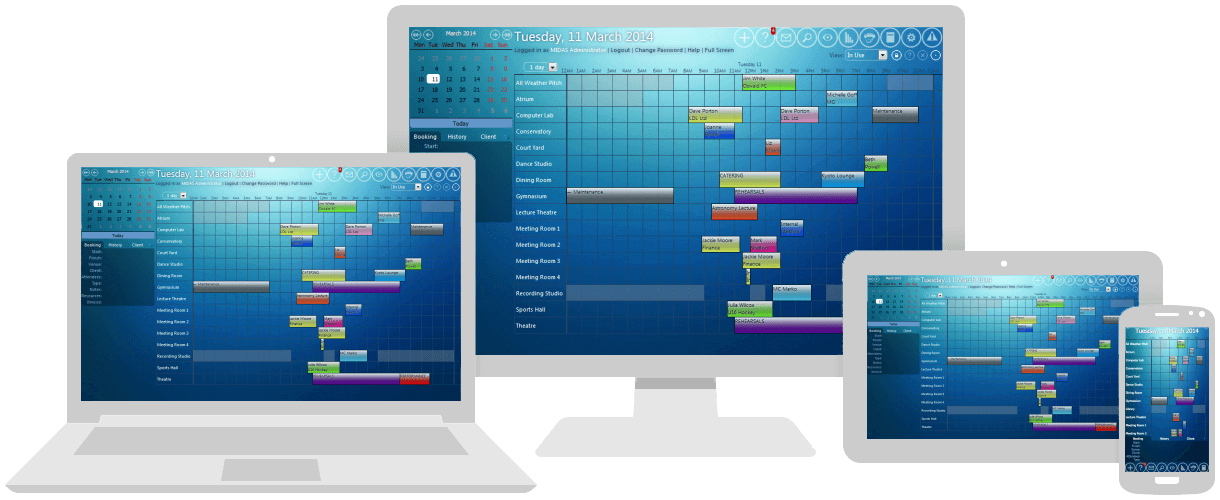
MIDAS v4.07 brings unified Web Based Room Booking and Resource Scheduling across your Desktop, Laptop, Tablet and Mobile Devices!

Room Booking and Resource Scheduling for your Desktop, Laptop, Tablet and Mobile Device

We’re excited to announce the availability of the latest version of our web based room booking and resource scheduling software, MIDAS – Version 4.07.

MIDAS v4.07 contains a whole host of new & improved features, many of which are as a direct result of feedback and suggestions from you our customers, and most of which we’ve already been blogging and Tweeting about during August.

So here’s the rundown on exactly what’s new and improved in the latest version of our powerful and intuitive scheduling system:

How To Get MIDAS v4.07

Existing MIDAS customers with valid Annual Support Subscriptions can update to v4.07 from within the software via MIDAS Admin Options → Manage MIDAS → Update.

Customers who have their MIDAS “remotely hosted” by us – you don’t need to do anything – you’ve already been automatically updated to v4.07!

Is your organization not yet using MIDAS for its scheduling needs? Maybe now is the right time to get on top of your room bookings and resource scheduling once and for all with our intuitive, powerful and easy to use, web based software!

So why not give MIDAS a try online now, Read what some of our existing customers say, and get MIDAS working for your organization today!

Keep Your Browser Up-to-date!

Supported BrowsersWe want you to have the best possible user experience when using MIDAS in your favorite Web Browser. We support our web based scheduling software in all major browsers (including Internet Explorer, Firefox, Chrome, Safari, and Opera). A list of minimum and recommended browser versions can be found at https://mid.as/browsers.