The next update to our web based room booking and resource scheduling software is just around the corner. Yesterday we started our new blog series giving you a “first look” at some of the new features and improvements you can look forward to in MIDAS v4.11..
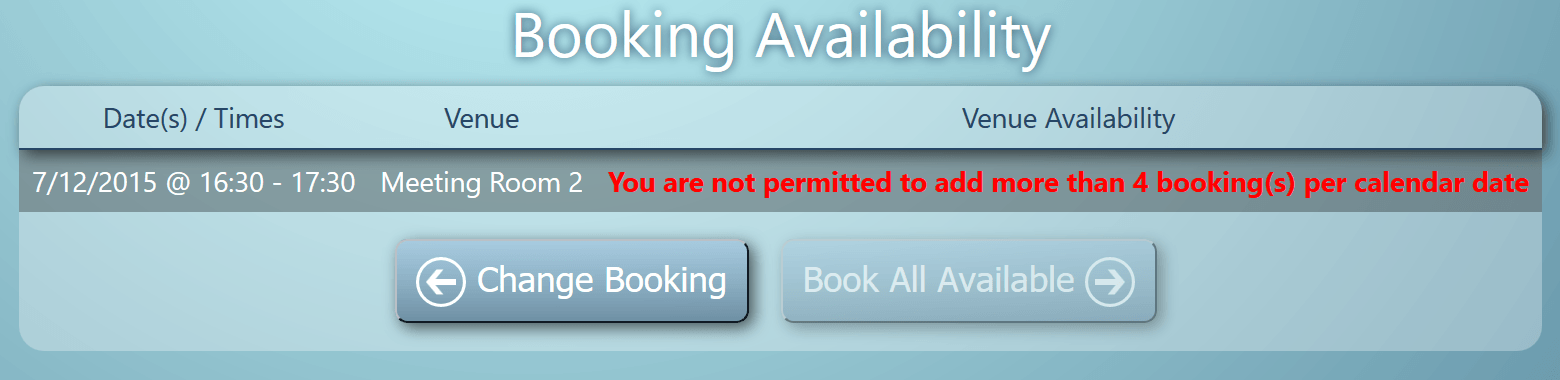
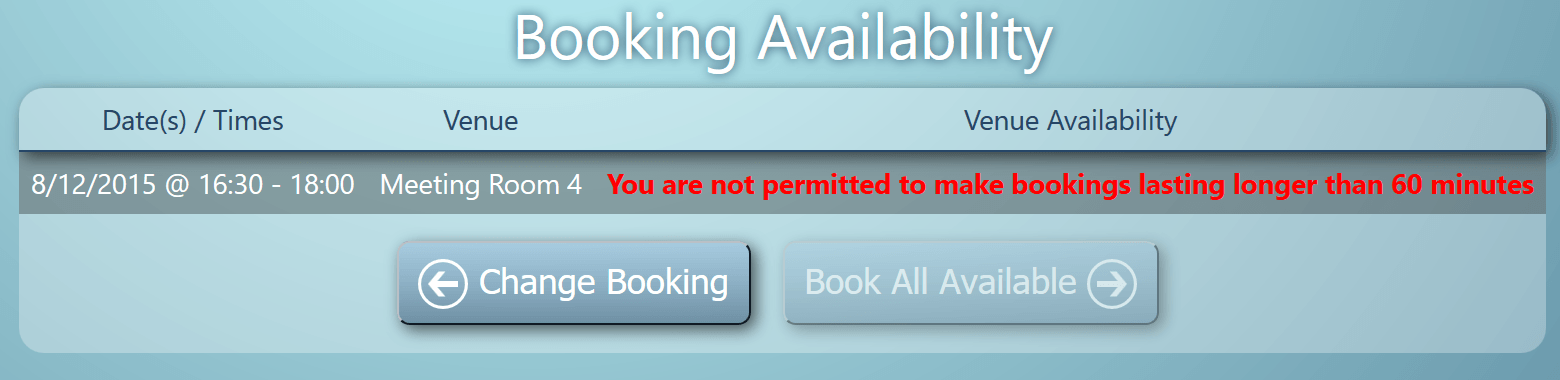
Today we’re excited to announce two new user permissions in v4.11 to compliment the extensive range of user permissions already available in MIDAS.
Maximum bookings allowed per date
This setting allows you to limit the maximum number of bookings a user may add to any particular calendar date. Left blank, there will be no limit imposed on the number of bookings a user can make.
Maximum booking length
This setting allows you to restrict the maximum length of bookings (in minutes) a user is allowed to make. Left blank, there will be no limit imposed on the maximum length of bookings.
If either of these limits are enforced for a particular user, and the user reaches these limits, they will be notified accordingly on their Booking Availability Screens:
New User Permission: Maximum bookings allowed per date
The next update to our web based room booking and resource scheduling software is just around the corner, and so over the coming days on our blog we’re going to give you a first look at some of the new features and improvements you can look forward to in MIDAS v4.11..
The first new feature of v4.11 we’d like to unveil is the ability to send a “Booking Cancellation” to a client when their booking(s) are deleted from the system.
When bookings are deleted, users will now be presented with the option to send a booking cancellation notification, along with a brief reason why the booking has been “deleted” (canceled):
Easily send the client a notification explaining why their booking is being cancelled
This functionality is available when individual bookings are deleted, or when multiple bookings are deleted via the “Delete Similar Bookings” function.
Like other email notifications that MIDAS is capable of generating, you also be able to customize the content of the “Booking Cancellation” email template too.
This Saturday sees the 3rd annual Small Business Saturday event taking place right across the UK.
Held on one of the busiest shopping days of the year – the first Saturday in December – Small Business Saturday is all about encouraging everyone in the UK to support, promote, and inspire the country’s 5 Million small businesses.
As you may know, we’re a small but highly customer-focused business, based right here in the UK. We’ve been developing our world-class Web Based Room Booking and Resource Scheduling software, MIDAS for the past decade.
We took part in the first ever Small Business Saturday back in 2013, and we’ve been proud to be involved and support the initiative every year since!
December is the perfect time to upgrade your room booking software solution ready for the new year. So to celebrate Small Business Saturday 2015, we’re offering some very special discounts on our scheduling software EXCLUSIVELY to UK customers tomorrow! So don’t miss out!…
On Saturday 5th December 2015, new UK customers can get 25% off online purchase of MIDAS using Promo Code “SMALLBIZSAT15“. Purchase securely online here.
On Saturday 5th December 2015, existing UK customers can get 25% off addons & upgrades – Upgrade securely online.
Many of our competitors are based in other countries. So if you’re in the UK, and on the lookout for a new room & resource scheduling system for your company or organization, don’t buy your software from a large company based in another country which cares more about shareholders than customers. Keep it independent, customer-focused and right here in the UK!
* Discounts are valid on Saturday 5th December 2015 and available for UK customers only
We know that keeping our customers informed and updated with timely information which may affect their service is paramount.
That’s why we have a separate, dedicated Service Status site providing an instant overview of the current status of the global MIDAS network at any given time, as well as details of any upcoming scheduled maintenance.
You’ll find our dedicated service status site at midas.network – and it’s worth bookmarking if you’re a “cloud hosted” customer.
Our Service Status site is continually updated – both automatically by our own internal monitoring systems, and manually by our staff.
Today we’re launching a couple of improvements to our Service Status site, where you’ll now find new status information on the performance of our Priority Support service and Live Sales Chat.
Dedicated MIDAS Service Status website
Our dedicated Service Status site now provides information on the current status of the following services:
Main Site – Indicates the current status of our main website, https://mid.as
Client Servers – Indicates the current status of the servers for our “cloud hosted” customers
Client Backup Servers – Indicates the current status of the backup servers for our “cloud hosted” customers with the optional Emergency Access Addon
Mail Servers – Indicates the current status of our email servers
Priority Support – Monitors the current responsiveness of our Priority Support service for customers with ongoing Annual Support Subscriptions
Live Sales Chat – Monitors the current status and responsiveness of the Live Sales Chat feature on our main website.
The Traffic Light System
We use a simple “traffic light” system on our Service Status site to make it easy to see at a glance the current status of our various services.
A green light indicates a service is performing normally and there are presently no issues. An amber light indicates that a service is currently working, but isn’t performing optimally. A red light indicates a service is currently experiencing a temporary fault/outage.
We post Service Status updates on Twitter too!
In addition to our dedicated Service Status site, we also post service status updates and upcoming scheduled maintenance notifications on our Twitter feed. You’ll find us on Twitter at https://twitter.com/mid_as

 This Saturday sees the 3rd annual
 A green light indicates a service is performing normally and there are presently no issues.
 An amber light indicates that a service is currently working, but isn’t performing optimally.
 A red light indicates a service is currently experiencing a temporary fault/outage.
 In addition to our dedicated Service Status site, we also post service status updates and upcoming scheduled maintenance notifications on our Twitter feed.