We think we’ve really “Excelled” with our forthcoming update to MIDAS… literally!
…because we’re adding the ability to export directly in the native Excel (2007+) .xlsx format.
Previously in MIDAS, if you wished to export bookings, clients, invoice summaries, or resources directly to Excel, you’d first need to export as a CSV (Comma Separated Values) file, and then import this file into Excel.
However, in MIDAS v4.18, you’ll now be able to export data directly into a native .xlsx Excel 2007+ format!
Export data to Excel (.xlsx)
Furthermore, following customer feedback, we’re also providing the ability to export Statistics & Reports data directly to Excel too. On Statistics report pages you’ll now find an “Export” icon:
Export statistics to Excel (.xlsx)
Self-Hosted Customers: Please note – in order to take advantage of the new Excel export options in MIDAS v4.18, you’ll need to ensure that the Perl module “Excel::Writer::XLSX” has been installed on your server. (This module is already installed on our cloud-hosted infrastructure). For assistance installing Perl modules on your server, please refer to our KB article: How to install Perl modules.
Click here to continue reading about some of the other new & improved features coming in MIDAS v4.18!
The first big update of 2018 for our MIDAS web based room booking and resource scheduling system is nearly ready, and includes a number of user-requested features and improvements.
Now, MIDAS has included a “BCC outgoing email to” setting for quite some time now. This setting allows you to enter an e-mail address to which e-mail (excluding generated notifications) sent by your users through MIDAS will be BCC’d (Blind Carbon Copied) to.
It’s a useful setting, as it allows administrators to keep track of outgoing e-mails, or for archiving purposes.
However, the setting has caused confusion for some customers who instead expected this setting to send a copy of EVERY single outgoing email (including system-generated notifications) to the defined email address, rather than its intended use of only BCC’ing emails that are not generated notifications (for example, if a user emails a client through the in-built email function).
Therefore, to add greater flexibility for those customers who have requested it, we’ve expanded the email BCC capabilities of MIDAS for v4.18.
Choosing which emails to BCC
You’ll now be able to select which “types” of outgoing emails from your MIDAS system you’d like to be BCC’d to a pre-defined address:
Choose which types of email to BCC
The types of outgoing email you can choose to be BCC’d include:
Generic
Bookings:
Booking Cancellation
Booking Confirmation
Booking Reminder
Booking Requests:
Booking Request Approved
Booking Request Approved (with changes)
Booking Request Rejected
Booking Request Submitted
Invoices:
Invoice (Cancellation)
Invoice (Regular)
Invoice Overdue
Invoice Reminder
Receipt
We do however suggest that you think very carefully as to which types of emails you select to be BCC’d. For larger MIDAS systems this could result in a significantly higher volume of outgoing email traffic.
For this reason, the extended BCC email options for our “cloud-hosted” customers are limited to only be available if your MIDAS system is configured to send outgoing email via an external SMTP server/relay. If your cloud-hosted MIDAS system is configured to send email via the internal “Sendmail” option, extended BCC email options will be unavailable to you. This restriction does not apply to self-hosted MIDAS systems.
Click here to continue reading about some of the other new & improved features coming in MIDAS v4.18!
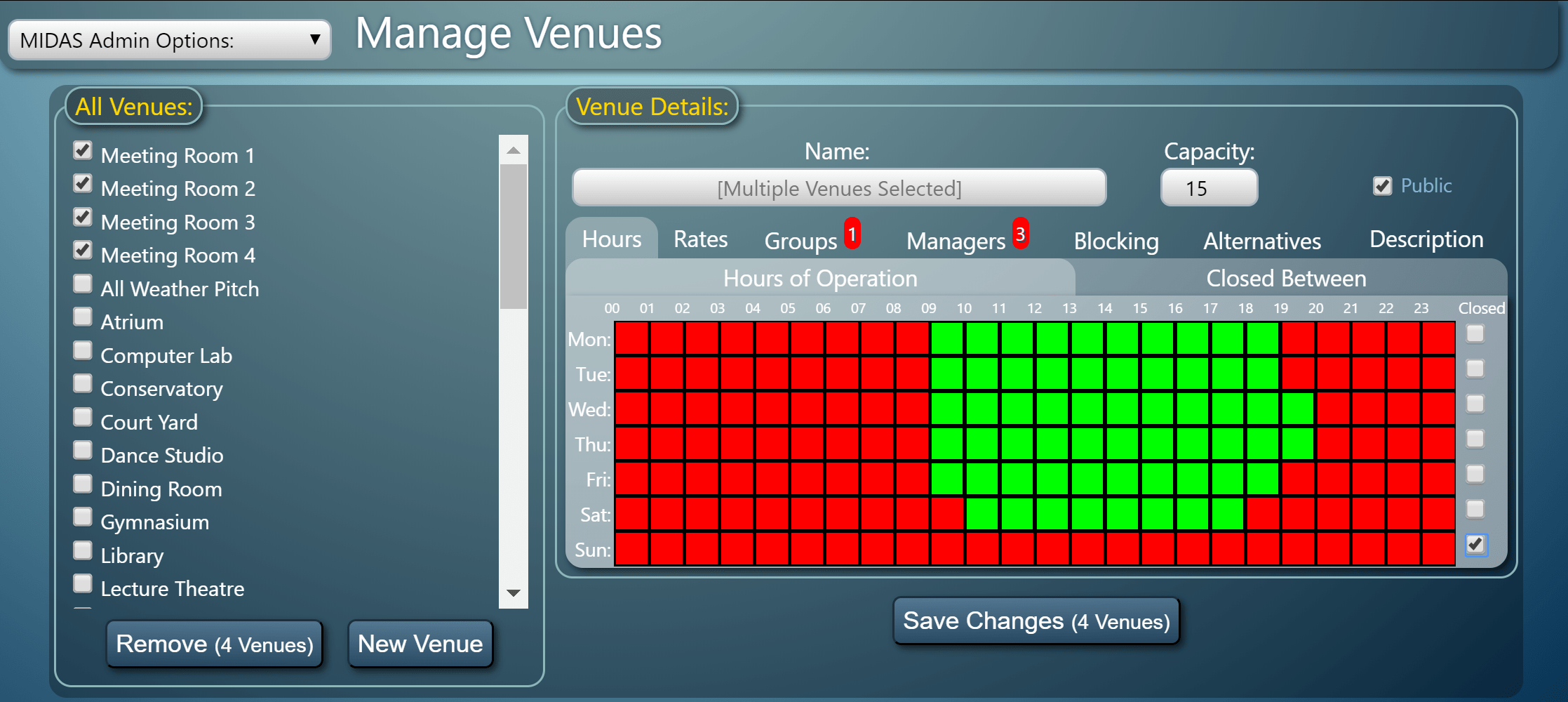
One of these concerns the setting up and modification of venues within the system. Whilst setting up your venues is typically a one-time task, if you’re setting up a large number of venues it can become a little mundane having to set hours of operation, rates, groups, managers, blocking rules, alternative venues, etc for each venue individually – especially if the settings are the same across multiple venues.
That’s why in v4.18, we’ve made it easier to make “bulk” changes to multiple venues at once, which we’re sure will be a real time saver!
Bulk Modify or Remove Venues
On the “Manage Venues” screen, multiple venues can now be selected simultaneously from the “All Venues” list to the left. Any changes then made in the “Venue Details” section to the right will be applied to all selected venues.
Furthermore, you’ll also be able to remove venues in bulk (rather than one at a time)
Click here to continue reading about some of the other new & improved features coming in MIDAS v4.18!
MIDAS booking systems incorporate a set of basic booking fields enabled by default. These allow you to capture the type of booking, the number of attendees, resources, and booking notes. That’s in addition to the space being booked (the “venue”), the date/time, and client details.
These booking fields can be re-ordered as well as made optional or required. They may also be selectively hidden from individual users.
For MIDAS v4.18, we’re adding a further custom booking field type to the available range, with the introduction of a custom “Checkbox” (tick box) booking field type:
Custom Checkbox (Tickbox) Booking Field
When adding a new “Checkbox” custom booking field to MIDAS, you’ll be able to title it, specify whether the box should be “checked” (ticked) by default, and also whether the checkbox is required to be checked/ticked in order to proceed in adding/modifying/requesting the booking.
This new custom booking field and associated options will certainly find uses in a variety of applications. For example, it will now be easy for MIDAS users to ensure that their hirers/customers have accepted any Terms & Conditions of Hire, etc before making their request/booking.
Click here to continue reading about some of the other new & improved features in MIDAS v4.18!