We put the latest web browsers head-to-head to try to find out which one is best!
In developing a powerful and feature-rich browser based room booking and resource scheduling system that’s supported in all five major browsers, we often get asked “So, which is the best web browser?”.
This time last year we put Chrome 23, Firefox 16, Internet Explorer 9 & 10, Opera 12 and Safari 5 head-to-head
Now, twelve months on, and less than a week since Internet Explorer 11 became available for Windows 7, Firefox celebrated its ninth birthday, and just a day after Google Chrome 31 is released, we decided it was high time to once again put the latest web browsers offerings “head-to-head” and independently, rigorously test and benchmark them to find out which one of the five major browsers is currently “the best”….
Browsers Tested
 |  |  |  |  |
| Google Chrome 31 | Mozilla Firefox 25 | Internet Explorer 11 | Opera 17 | Apple Safari 5 |
The Tests
We broadly tested four key areas of browser performance: Speed, Memory Usage, Compliance with standards, and Javascript Performance.
1. Speed
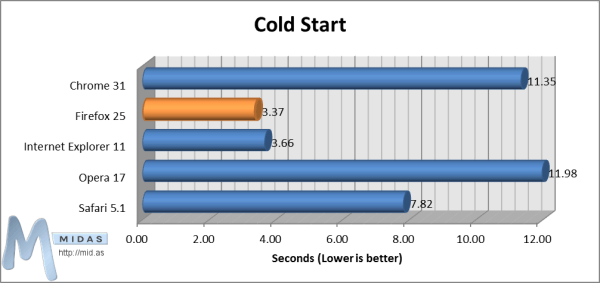
The “Cold Start” test measures the time taken to load up the browser upon its first run after a computer reboot. This is measured from the point at which the browser is executed until the point at which its user interface (UI) is ready to accept input.
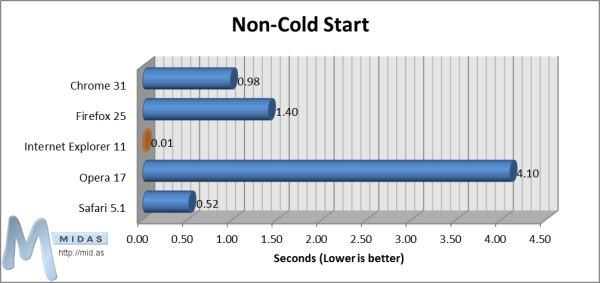
The “Non-Cold Start” test measures the time taken to load up the browser on second and subsequent runs after its first run after a reboot. This is measured from the point at which the browser is executed until the point at which the user interface (UI) is ready to accept input.
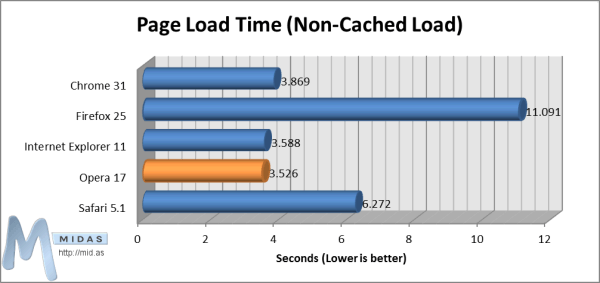
With the browser open, an empty cache, and showing a blank page (about:blank), the “Page Load Time (No-Cached Load)” test measures the time taken to completely load a complex web page. This is measured from the point at which the “Enter” key is pressed on the URL in the browser’s address bar until the point at which the test web page has fully loaded (as reported by an “onLoad” event on the test web page).
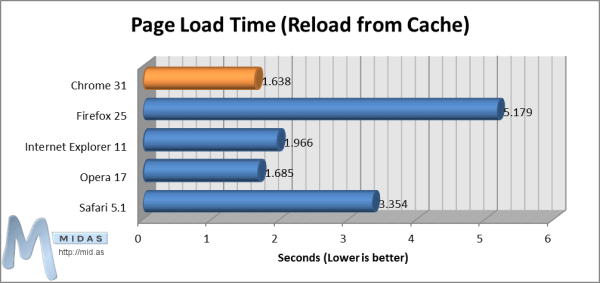
With the browser open, and the test web page already loaded in a single tab, the “Page Load Time (Reload from Cache)” test measures the time taken to reload a complex web page. This is measured from the point at which the F5 key (refresh) is pressed until the point at which the test web page has fully reloaded (as reported by an “onLoad” event on the test web page).
2. Memory Usage
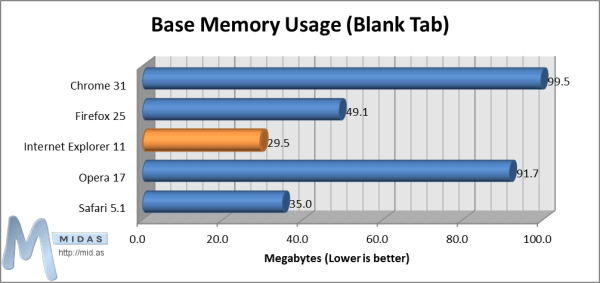
The “Base Memory Usage (Blank Tab)” test measures the amount of memory used by the browser with just a single blank (about:blank) tab open.
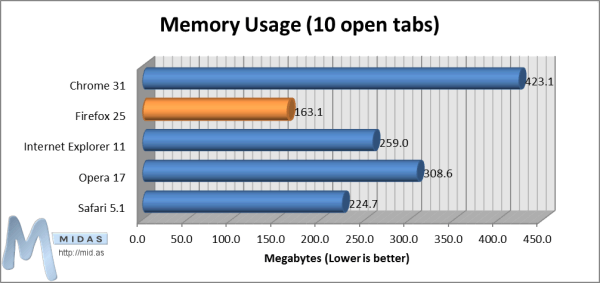
The “Memory Usage (10 open tabs)” test measures the amount of memory used by the browser with 10 tabs open, each displaying the home page of a popular website.
3. Compliance
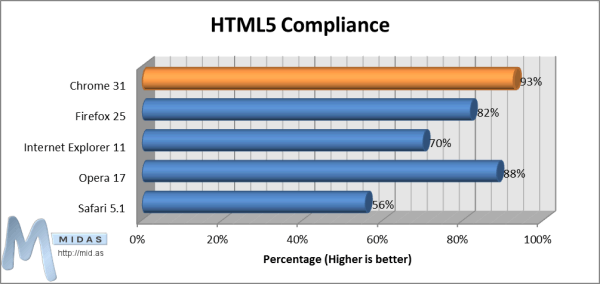
The “HTML5 Compliance” test measures how well each browser conforms to the current state of the HTML5 specification.
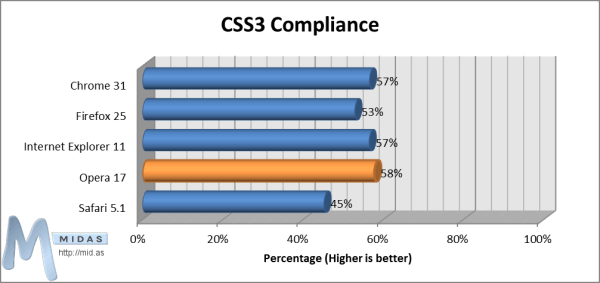
The “CSS3 Compliance” test measures how well each browser conforms to the current state of the CSS3 specification.
4. Javascript Performance
There are a number of different Javascript Performance Benchmark tests available today, all of which give quite different results. We’ve analyzed results from 6 of the most popular Benchmarking Tests and aggregated the results below:
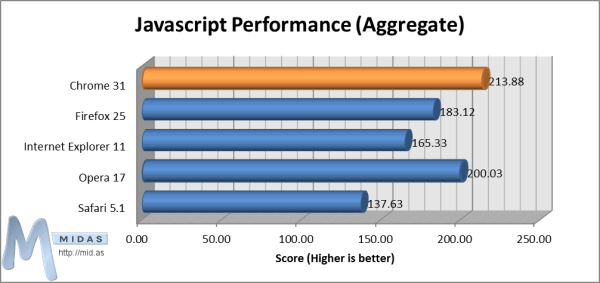
Individual details of each of the 6 individual Javascript benchmark test suits used to arrived at these aggregated scores may be found in our full test report, available to view/download at the end of this page.
Summary
| Category | Test | Winner | Runner-Up |
| Speed | Cold Start | | |
| Non-Cold Start | | | |
| Page Load Time (Non-Cached Load) | | | |
| Page Load Time (Reload from Cache) | | | |
| Memory Usage | Base Memory | | |
| 10 Open Tabs | | | |
| Compliance | HTML5 | | |
| CSS3 | | | |
| Performance | Javascript Performance (Aggregate) | | |
Results
| 1st Place | 2nd Place | 3rd Place | 4th Place | 5th Place |
| | | | |
| Google Chrome 31 | Opera 17 | Internet Explorer 11 | Mozilla Firefox 25 | Apple Safari 5 |
The above overall positions were derived based upon the sum of the positions that each browser finished in, in each of our tests. For example, in our HTML 5 compliance test, Chrome came first and so was assigned 1 point, Safari came 5th and so was assigned 5 points. Browsers were then ranked according to the lowest number of points to give the 1st-5th places above (1st being the best)
Analysis
Google Chrome
When we last tested the five major browsers back in November 2012, Chrome came first in 8 out of 13 our tests, making it a clear winner!
A year later, and Chrome is still going strong, coming top in 8 out of 15 tests, and second in a further two tests.
Where Chrome still doesn’t perform quite as well is when it comes to its memory usage, using well over 3 times as much memory with a single blank tab open than Internet Explorer 11.
Mozilla Firefox
We were a little surprised that Firefox only came top in 3 out of 15 tests, and only once came runner-up. To Firefox’s credit, its main strength still seems to be in its memory usage. With 10 websites open in separate tabs, the amount of memory used was less than half that of Chrome with the same ten sites open.
Internet Explorer
We were pleasantly surprised by the improvement of Internet Explorer 11 over previous versions as well as other browsers.
IE11 came top in a couple of our tests, and runner-up in a further three.
Where IE11 appears to have improved most over earlier versions of Microsoft’s browser in is the length of time taken to load and pages (either from a server, or from the cache) as well as start/restart the browser itself. In our tests, starting IE11 took just 0.01463 seconds! – some 280x quicker than Opera started.
That said, in general Internet Explorer 11 still has a way to go to come up to par with the other major browsers in terms of HTML 5 compliance.
Opera
A lot has changed with Opera since we last tested browsers twelve months ago. Since then, Opera have switched from using their own “Presto” layout rendering engine to instead using the same engine as Chrome.
Whilst this change has been received with mixed reviews by Opera users, with some unhappy that many of Opera’s original features were dropped, our test results actually show that the “new” Opera is a browser to be reckoned with, out performing Internet Explorer 11, Firefox 25 and Safari 5 in our tests.
Opera 17 came top in 3 out of our 15 tests, and runner-up in 6.
The browser also scored highly on HTML5/CSS3 compliance and in our aggregated Javascript performance tests, however, Opera’s memory usage was fairly high, second only to Chrome. Opera 17 was slow to start, however, once running it loaded and rendered web pages swiftly.
Safari
Our browsers tests were performed on a Windows machine (test specifics are included at the end of this report). Whilst the latest version of Safari is 7, Apple took the decision after the release of Safari 5.1 to no longer continue developing Safari for Windows users – a mistake in our view! Therefore, the most recent version of Safari available to Windows users is 5.1.7, which was used in our testing.
Given that Safari 5.1.7 is now the oldest of the 5 browsers tested, it follows that is doesn’t perform as well as its peers.
However, surprisingly, it did come runner-up in both our memory tests as well as our non-cold start test.
Conclusions – From a Developers Perspective
From our perspective, as developers of a leading web-based room booking and resource scheduling solution, perhaps the most important factors in determining which browser is “best” are compliance with the latest HTML5 and CSS3 standards. As we work hard to ensure our software works well in all the major browsers, this is where having universal standards between browsers becomes so important. In theory, a website (or in our case, a web app), should look and behave the same regardless of the browser being used, which should in theory happen if all browsers complied 100% with standards! Chrome 31 currently comes the closest to the HTML 5 standard with 93% compliance, but as can be seen, CSS3 compliance still has a long way to go for all browsers, with the winning browser in the CSS3 compliance test (Opera 17) only achieving 58% compliance.
Speed (page load time) and Javascript Performance are also important factors for us, as we want our web app to be as fast and responsive as possible. Opera 17 and Chrome 25 loaded pages faster in our tests, with Internet Explorer 11 following close behind. As for performance, both Chrome 25 and Opera 17 outperformed other browsers in our aggregated Javascript performance test scores.
A few surprising finds:
- Microsoft have made some significant steps forward with Internet Explorer 11 over earlier incarnations of their browser.
- Opera 17 performed better than expected
- Firefox 25 performed worse than expected, finishing an overall 4th place in our tests.
 | MIDAS, our popular Browser-Based Room & Resource Scheduling Software is currently supported in all browser versions we’ve tested here. Find out more at https://mid.as |
Conclusions – So which browser should I use then!?
• If you work with lots of browser tabs open at once, and/or the amount of available memory on your system is limited, Firefox 25 would seem a good choice of browser to use, as this used the less memory than other browsers under the same conditions.
• If you regularly open and close your browser, Internet Explorer 11 or Firefox 25 would seem a good choice as these browsers start up quickly. If, however, you tend to keep your browser running most of the time, Opera 17 would be a better choice, as even though its start-up time is considerably longer, initial page load times are the quickest of all the browsers we tested
• If you’re still using an earlier version of Internet Explorer – it’s certainly worth upgrading to IE11, or if that’s not possible (for example, if you’re using Windows XP, you won’t be able to update your Internet Explorer past version 8!), maybe it’s time to try a different browser!?
• At the end of the day, use the browser that you feel most comfortable with! …BUT make sure you keep it up-to-date, and don’t ignore the competition – if you do, you risk being left behind as other browsers overtake yours in terms of their speed, security, memory usage, standard compliance, and performance!
• In recent years, browsers such as Internet Explorer and Opera have been somewhat overlooked by many regular internet users – but if you’ve not used these browsers for years having previously dismissed them – a lot has changed, and it’s certainly worth giving them a second look again now!
View/Download The Complete Web Browser Test Report HERE
Test Specifics
Browsers Tested: Chrome 31.0.1650.48 m | Firefox 25.0 | Internet Explorer 11.0.9600.16428 | Opera 17 (Build 1652) | Safari 5.1.7 (7534.57.2)
Browser tests were performed on an Intel® Atom™ CPU D525 @ 1.80GHz system, with 4GB Ram, running Windows Home Server 2011 SP1 (Windows Server 2008 R2) 64-bit. Each browser was a clean install, using default install and browsers settings, and with no extensions/addons installed or enabled.
Speed tests were measured using Rob Keir’s millisecond timer and PassMark AppTimer v1.0. Each speed test was performed 10 times for each browser, and the results averaged to provide the data presented in this report.
Compliance Tests: HTML5 | CSS3
Javascript Performance Tests: Dromaeo | Speed-Battle | Sunspider | Peacekeeper | Octane | BrowserMark
Memory usage was measured 60 seconds after tabs had finished loading and was measured through the Windows Task Manager. Memory usage includes all associated processes running with the browser (for example, running Safari spawns both “Safari.exe” and “WebKit2WebProcess.exe” processes, the memory usage of both is taken into account)
The 10 sites open in tabs when measuring memory usage (10 open tabs) were:
https//mid.as | http://news.bbc.co.uk | http://facebook.com | https://twitter.com | http://google.co.uk | https://youtube.com | http://wikipedia.org | http://linkedin.com | http://bing.com | http://amazon.co.uk
Test Date: 13 November 2013
 In v4.04, we’ve introduced “venue-specific” resources! Previously, any resources you added to MIDAS would then be available globally across all of your venues. Now, you can specify your resources (equipment, consumables, and staffing) to only be available to specific venues. So, for instance, if you schedule a mixture of both sports facilities and classrooms, and you have “Football Nets” defined as a resource, you can now restrict this resource to only be available to say your “Sports Hall” and “All Weather Pitch”, but not available for classrooms!
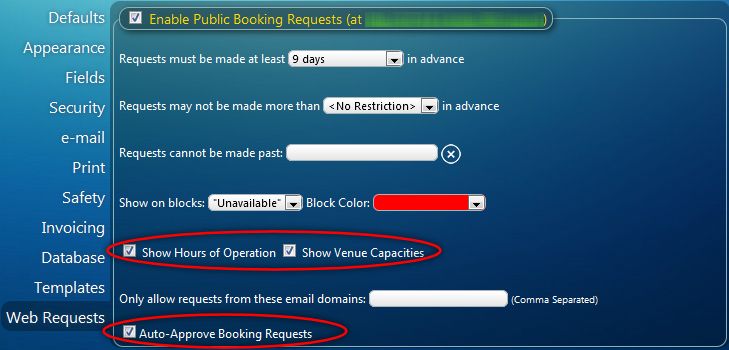 The “Public Booking Request” (web request) is a standard feature of our web based scheduling software. It allows non-users (i.e. visitors to your website/members of the public) to check your venue’s availability and make booking requests. This feature of our scheduling software is one of the most popular. Therefore, based on customer feedback, we’ve implemented three new settings in v4.04….
 With v4.04, you can now quickly sort received booking requests by either the date/time that the booking request was made, or the date/time that the requested booking starts. Sorting can be in either ascending or descending order, by simply clicking the corresponding heading. In earlier versions this was fixed to sort requests by booking start times in ascending order.
 MIDAS already allows you to add your own custom booking fields. These custom fields can either be single-line text, multi-line text, numeric, or drop-down list.
 This could be useful – for instance – to link to the homepage of the organization that the booking is for. Or you could use a custom URL field to to a .pdf or Word document with further information about the booking, or an associated booking contract/insurance certificate… or anything you want!