The next significant update to our leader web based room booking and resource scheduling software is just around the corner, and throughout this month, we’re outlining some of the new features and improvements you’ll find in the upcoming v4.07 release….
Improved Support for Smaller Screens
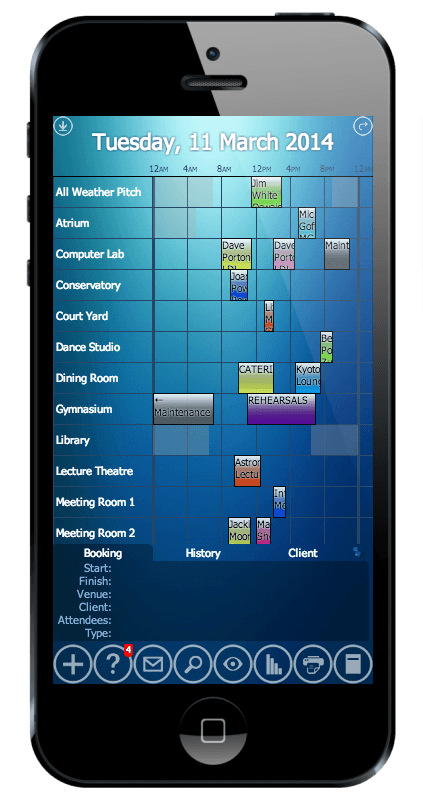
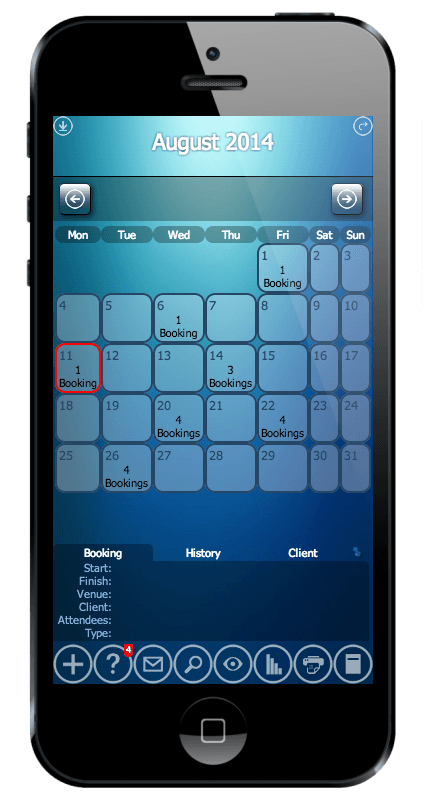
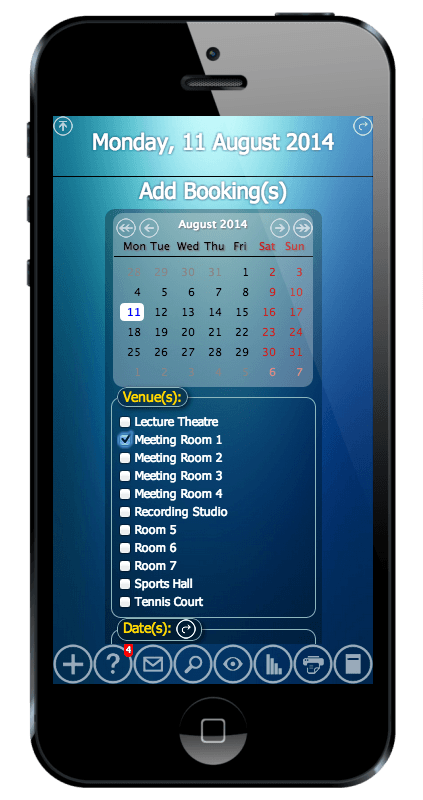
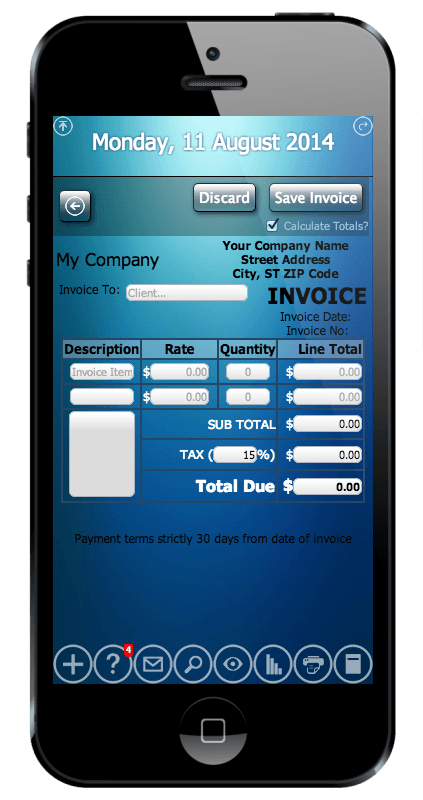
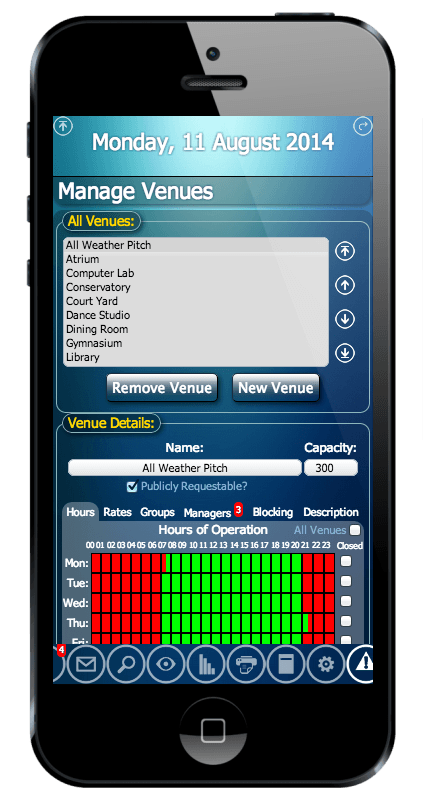
We’ve already previously optimized MIDAS for use on tablet devices (including the iPad), and for v4.07, we’ve further optimized the layout of MIDAS for use on even smaller mobile device screens – such as the iPhone.
Below are some screenshots of MIDAS v4.07 accessed using an iPhone 5 (Click for bigger images)
Best of all – there’s nothing additional to install on your phone/mobile device – there’s no separate “app” to download from the app store – you simply access MIDAS through your device’s web browser. If you’ve got an iOS device, such as an iPhone, you can also add a shortcut to MIDAS directly to your home screen for easy one-touch access to your booking system.
These improvements make MIDAS the ideal scheduling solution for seamless access to your bookings across your desktop, laptop, tablet and mobile devices alike, and it’s supported in all major web browsers too!
The next substantial update to our popular web based room booking and resource scheduling software is just around the corner, and so we’re taking the opportunity to outline some of the new features and improvements you can expect to see in the upcoming v4.07 release….
This post covers some of the improvements coming to the Public Booking Request capabilities within MIDAS.
Pre-Populate Selected Dates/Times
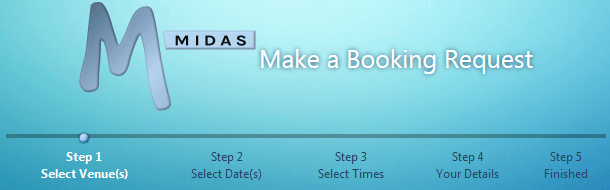
The standard public “Booking Request” process has the following five stages/screens
Select Venue(s)
Select Date(s)
Select Times
Your Details
Finished
When a member of the public makes a booking request for your facilities, they follow these stages in order. In v4.07, we’re giving you much more flexibility, by allowing you to “hard code” venues and/or dates into your public booking request links to allow requestors to “bypass” the first couple of stages using data supplied via your link.
For example, if the Public Booking Request for your MIDAS is https://your_midas_url/request, appending a “?venue=Hall” to the URL/link will jump straight to Stage 2 (Select Date(s)), with the “Hall” venue selected.
Alternatively, appending “?date=YYYYMMDD” to the end of your Public Booking Request URL will preselect the date you pass – Example: appending “?date=20141015” to your public booking request URL will pre-select the 15th October 2014.
You can also pass a combination of both a “venue” AND a “date” parameter at the same time to bypass stages 1 and 2 of the booking request process and jump straight to Stage 3 (Select Times) – Example: “https://your_midas_url/request?venue=Hall&date=20141015“
Furthermore, you can optionally pass multiple venues and/or dates by simply separating them with commas. In the following example, “Hall” and “Gymnasium” venues are preselected on 15th and 16th October 2014:
On the “Your Details” stage of the public booking request process, there’s now also a “Remember Me” tick box, allowing the requestor’s browser to optionally remember their details (name, organization, email address) for the next time they make a booking request from the same browser – so they won’t have to manually enter the same information each time.
Custom .css Styling
We’re also giving you even more control over the “look and feel” of your entire Public Booking Request process, by allowing you to override the default visual “theme” for your MIDAS, and use your own external .CSS style sheet instead! You can specify an external .css style sheet via MIDAS Admin Options → Manage MIDAS → Templates → Web Request
The next feature-rich update to our web based room booking and resource scheduling software is coming soon. Here on our blog we’re outlining some of the new features and improvements you can expect to see in the upcoming v4.07 release.
This article covers some of the improvements coming to the Invoicing capabilities of MIDAS.
Tax Exempt Clients
In MIDAS v4.07, you’ll be able to exclude individual clients from being charged tax on their invoices. Find Out More…
New “Payment Terms” Setting
We’re introducing a new “Payment Terms” setting for v4.07. This allows you to specify how many days you allow for your clients to pay their invoices. This new setting may be found via MIDAS Admin Options → Manage MIDAS → Invoicing.
New Invoicing Variables
As a result of the introduction of the new “Payment Terms” setting, a whole host of new invoicing variables have also been introduced. These include: %INVOICEDUEDATE%, %INVOICEDUEIN%, %INVOICEOVERDUEBY%, and %INVOICETERMS%. There are also new variables giving you far greater control over the “Invoice To” section of your invoices.
The previous %INVOICETO% variable (which includes the client’s name, organization, postal address and email address) can now be broken down into smaller parts. This is achieved through the introduction of the new variables %INVOICETO_CLIENT%, %INVOICETO_ORG%, %INVOICETO_ADDRESS%, and %INVOICETO_EMAIL%
New columns in the Invoicing Overview screen
Also as a result of the new “Payment Terms” setting, there’s now dedicated “Invoice Date” and “Due Date” columns added to the invoicing overview screen.
Invoice Reminders / Overdue Notifications
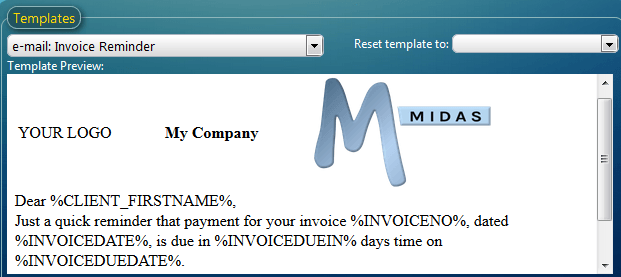
MIDAS v4.07 contains a new “Scheduled Tasks” engine. Scheduled Tasks allow your booking system to automatically send clients email reminders a number of days before their outstanding invoices are due, or if their invoice is overdue, send them a notification a certain number of days after.
The content and wording of these notifications can be fully customized too!
Improved PayPal Integration
If you allow your clients to pay their invoices online via PayPal, you can now have PayPal automatically update the status of their invoices within MIDAS once payment has been made. This means you’ll no longer have to manually update invoices yourself! For more information, please see: Configuring PayPal Integration
Google Wallet (formally Google Checkout) support removed
The previous support for clients to pay their invoices online via Google Wallet has regrettably been removed from 4.07. This is because Google no longer support such payment provisions. Google have now retired Checkout, and Google Wallet is now restricted to payments for mobile apps in the Google Play store only. We’ve covered this in more depth in this article.
The next substantial update to our popular web based room booking and resource scheduling software is just around the corner, and so throughout this month, we’re outlining some of the new features and improvements you can expect to see in the upcoming v4.07 release….
This post covers some of the improvements coming to the customizable “Templates” within MIDAS.
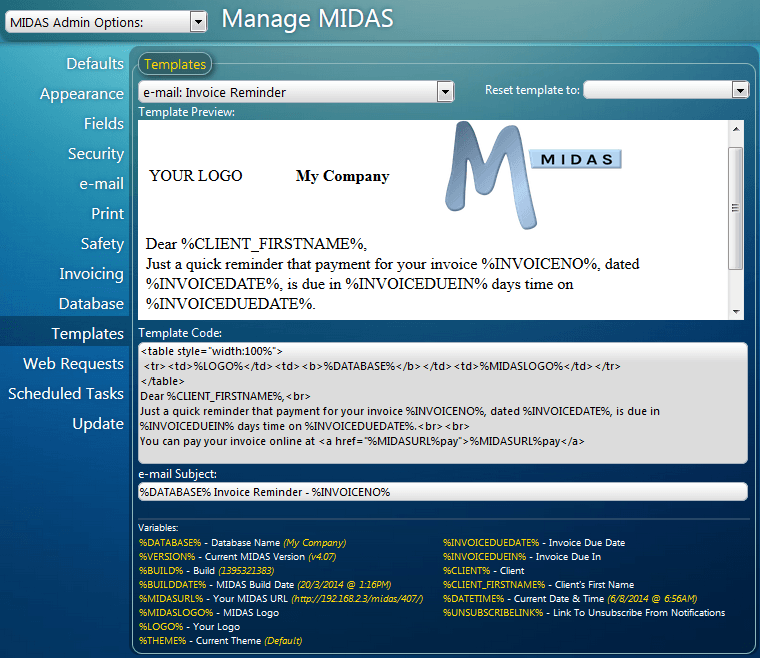
A range of customizable templates has been available to administrators for some time (ever since v3.12, way back in May 2011) via MIDAS Admin Options → Manage MIDAS → Templates. v4.07 sees a number of improvements to these templates…
New MIDAS Email Templates
More Flexible Email Templates
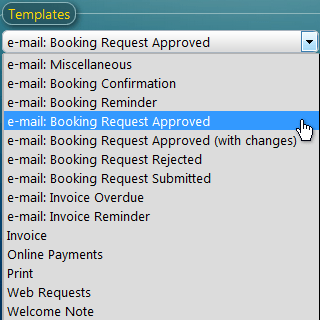
List of Templates
In previous releases, there has been a single customizable email template which was applied to all outgoing emails sent through your scheduling system. For v4.07, we’ve extended the number of email templates to NINE!
You’ll now be able to modify separate email templates for booking confirmations, booking reminders, invoice reminders, invoice overdue notifications, booking request submitted/approved/rejected notifications, as well as the original “general” email template for all other emails.
You’ll also be able to customize the subject field of most of these emails templates too!
More Variables
To accompany the many new templates available in v4.07, we’re also introducing a range of new “variables” which can be inserted into your template code to provide even more flexibility.
For example, a new %CLIENT_FIRSTNAME% variable has been introduced alongside the previous %CLIENT% variable to allow your emails to be more informal by using the client’s first name instead of their full name.
A whole host of new invoicing variables have also been introduced including, %INVOICEDUEDATE%, %INVOICEDUEIN%, %INVOICEOVERDUEBY%, and %INVOICETERMS%, as well as new variables giving you far greater control over the “Invoice To” section of your invoices.
The previous %INVOICETO% variable (which includes the client’s name, organization, postal address and email address) can be broken down into smaller parts through the use of the new variables %INVOICETO_CLIENT%, %INVOICETO_ORG%, %INVOICETO_ADDRESS%, and %INVOICETO_EMAIL%
Visual Template Editing
The other big improvement for templates in v4.07 is the ability to edit your templates “visually” in the “Template Preview” area as well as manually in the “Template Code” area.
You can now type, copy, cut, paste, and move items around in the “Template Preview” area, and MIDAS will automatically generate updated template code from your edits.
Reset Templates
Messed up a template and want to start again? Each template within MIDAS can now be reset to its standard factory default.
Further Customize Web Request and Pay Online Templates with CSS
External Custom CSS
We’re also giving you even more control over the “look and feel” of your “Public Booking Request” and “Pay Online” screens by allowing you to specify your own external .css Style Sheets that will override the default theme your MIDAS is running in when these pages are displayed.



 On the “Your Details” stage of the public booking request process, there’s now also a “Remember Me” tick box, allowing the requestor’s browser to optionally remember their details (name, organization, email address) for the next time they make a booking request from the same browser – so they won’t have to manually enter the same information each time.
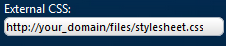 We’re also giving you even more control over the “look and feel” of your entire Public Booking Request process, by allowing you to override the default visual “theme” for your MIDAS, and use your own external .CSS style sheet instead! You can specify an external .css style sheet via MIDAS Admin Options → Manage MIDAS → Templates → Web Request
 We’re introducing a new “Payment Terms” setting for v4.07. This allows you to specify how many days you allow for your clients to pay their invoices. This new setting may be found via MIDAS Admin Options → Manage MIDAS → Invoicing.
 If you allow your clients to pay their invoices online via PayPal, you can now have PayPal automatically update the status of their invoices within MIDAS once payment has been made. This means you’ll no longer have to manually update invoices yourself! For more information, please see:
  The previous support for clients to pay their invoices online via Google Wallet has regrettably been removed from 4.07. This is because Google no longer support such payment provisions. Google have now retired Checkout, and Google Wallet is now restricted to payments for mobile apps in the Google Play store only. We’ve covered this in more depth in