We’re pleased to announce the launch of our brand new “Refer-a-Friend” program.
Many of our customers discover MIDAS as a result of a recommendation from another organization who already use our booking software for their scheduling needs.
We believe in the importance of these “word of mouth” referrals. They’re key to our success and longevity. That’s why we now offer a generous “Refer-a-Friend” program to our existing customers.
For every new customer you refer to MIDAS, we’ll give both them and you one month free! *
So if you’re an existing customer, get started and grab your free and unique referral link right here.
..plus, there’s no limit on the number of new customers you can refer. If you refer 12 new organizations, and you’ll get 12 months of MIDAS free!
The new “Refer-a-Friend” program replaces our previous affiliate scheme, which is now being retired after almost a decade.
* Full T&C’s for our Refer-a-Friend program may be found here.
During the global pandemic we’ve remained focused on both supporting our customer’s businesses through unprecedented challenges, and working to continually improve our MIDAS software.
Fixed: Cumulative roll-up of various fixes for issues discovered since v4.27
Security enhancements
Optimization: Code optimization
New & Improved Addons
Our range of optional addons extend the capabilities of your MIDAS system. To coincide with the release of MIDAS v4.28 we’re launching two brand new addons, as well making improvements to some existing addons too.
New Addons:
Custom Branding With this new addon, you can completely remove visible traces of “MIDAS” and the MIDAS logo from your booking system, and instead replace them with your own name and logo! Read more…
Domain Alias With this new addon, you can make your cloud-hosted MIDAS system appear as though it’s running on your own domain instead of your marko.mid.as domain! This makes it an ideal companion addon with our new Custom Branding addon. Read more…
Improved Addons:
API We’ve added a couple of new API calls, allowed bespoke styling to be included in emails sent via the API, and also added support for returning more appropriate http status codes with API responses. Read more…
Web Calendars Our improved Web Calendars addon now allows you to embed bookings for individual dates, as well as allowing your visitors to request/book directly from the calendar! Read more…
Self-Hosted customers with active Support Subscriptions will shortly be able to update to v4.28. It only takes a couple of clicks – simply log in to your MIDAS system and go to MIDAS Admin Options → Manage MIDAS → Update.
If no update is available, please check back again in a few days time, as we are staggering updates for self-hosted customers over the next few weeks.
Cloud-Hosted customers don’t need to do anything! – All our active Cloud-Hosted MIDAS customers will be automatically updated to this latest version of MIDAS this coming weekend (24th – 25th July 2021)
How to get addons…
New Customers:
Addons may be purchased along with MIDAS, or may be added to an existing MIDAS system at a later date.
To purchase MIDAS and any of the available addons, please go to mid.as/pricing.
Existing Customers:
Any addons you already have installed in your MIDAS system will automatically be updated to their latest versions when your MIDAS system is updated.
However, if you wish to add any new addons to your MIDAS system, you can view pricing and add these via mid.as/upgrade.
Every MIDAS booking system includes a “Recent Activity” log feature. This allows administrators to audit all activity taking place in their scheduling system.
The log records logins/outs, failed login attempts, bookings and clients added, modified, or removed, emails sent, database backups, and more.
The Recent Activity log can be quickly accessed by administrators from a dedicated toolbar icon.
Data from the log is shown on screen in chronological order (newest entries first), and is split into 4 columns:
Date / Time – The date and time that the event occurred
Originating IP – The IP address that the event originated from
User – The user account that initiated the event
Action – The event itself
The Recent Activity log may also be exported directly to Excel.
We’ve made a number of improvements to the performance of the Recent Activity log for MIDAS v4.28.
These include…
Log entries now load in blocks
Log entries are now loaded in blocks, with a “Show More” button available to append the next entries
For each and every action which occurs in a MIDAS system, an entry is made in the recent activity log.
Entries in the log are typically kept for a period of 30 days before automatically being removed. This retention period can be change to keep logs for longer or shorter periods.
For very active MIDAS systems (or those with a long log retention period), the Recent Activity Log can become very large.
To display a lengthy log in its entirety could slow down the viewer’s browser, and in some extreme cases make it appear that their browser has frozen/hung.
To address this, from v4.28 the Recent Activity log no longer displays all its entries at once.
If the log contains a high number of entries, only the newest entries will be shown, along with a “Show More” button at the bottom of the screen. Clicking the “Show More” button will load and append the next set of log entries to entries currently shown on screen.
The “Show More” button will continue to show as long as there are more entries in the log which aren’t currently being shown on screen.
The number of log entries shown on screen is derived from the “Maximum search results to display per page” setting. This setting usually controls the number of search results returned per page via the built in “Search” feature. However, the number of Recent Log Entries shown in each “block” is twice this setting. So if “Maximum search results to display per page” is set to the default of “50”, then 100 Recent Activity log entries will be shown at once.
Failed login attempts are now collated
Failed login attempts are now collated into single entries on screen
One of the benefits of the Recent Activity Log is that it records all failed login attempts to your MIDAS system.
This may happen, for instance, if a user enters their password incorrectly.
Similarly, if may also happen if someone tries to login to a non-existent account.
In today’s world, hackers use automated tools to try to “brute force” their way into systems. They do this by sending automated login requests using different email/password combinations. Often dozens, if not hundreds, of automated requests could be made every second.
As MIDAS logs failed and invalid login attempts, automated tools could soon flood the Recent Activity log with failed login entries.
To combat this, we’ve made a change in v4.28. Now instead of displaying every single failed login attempt, multiple failed login attempts from the same IP address will show as a single entry. This entry will indicate the total number of failed attempts, the time of the first attempt, and the time of the most recent failed attempt.
Faster rendering and displaying of the log
In addition to loading log entries in blocks, for v4.28, we’ve also streamlined the actual HTML code used to display log entries on screen.
This has more than halved the number of “nodes” (elements) that your browser has to process and render in order to display the recent activity log.
The result is that the Recent Activity Log now loads far quicker than it did before!
Any software application that “stores” data in some way shape or form, needs a reliable and efficient way to do so. That’s where a database comes in!
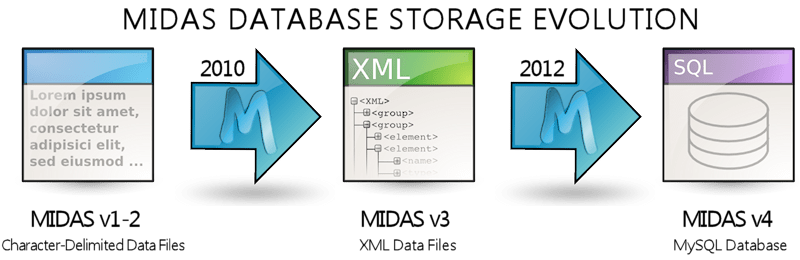
MIDAS – our web based room booking and resource scheduling software – is no exception. Since 2012, for its database, MIDAS has supported MySQL. More recently we started supporting MariaDB too.
In this post we thought we’d look a little bit closer as to the differences between MySQL and MariaDB.
What is MySQL?
MySQL is a database engine released under a GNU General Public License, and also available under a variety of proprietary licenses.
MySQL was originally owned and sponsored by the Swedish company MySQL AB, which was subsequently bought by Sun Microsystems, and which then went on to be ultimately acquired by Oracle Corporation.
In 2009, when it was announced that Oracle was to acquire Sun, the founder of MySQL wasn’t happy and so “forked” the MySQL project and created MariaDB… more on that later.
Prominent users of MySQL include Facebook, Pinterest, Airbnb, Sony, BBC, Symantec, GitHub, and booking.com.
What is MariaDB?
MariaDB is a community-developed fork of MySQL. One of its key attractions is that it is intended to always remain free under a GNU General Public License.
It was created by one of the founders of MySQL, who forked it due to concerns over MySQL’s acquisition by Oracle Corporation in 2009. The concerns centered around rumors that Oracle (who already developed a competing self-titled database product) wanted to kill off MySQL in order to let their own “Oracle” database thrive. In the end, that didn’t actually happen, but that fear was the initial main driving factor behind MariaDB initially.
MariaDB intended to maintain high compatibility with MySQL, ensuring it would be a “drop-in replacement” for MySQL. Whilst that’s still broadly true today, since its inception, the features of the two database engines have slowly diverged more.
MariaDB version numbers initially followed MySQL’s numbering scheme up to version 5.5. As such, MariaDB 5.5 for example offers all of the features that MySQL 5.5 offers.
Specific new features have since been developed in MariaDB, so its developers decided that a major version number change was necessary. MariaDB 10.0 was released in November 2012, whilst MySQL at that time remained at version 5.
New features are added more frequently to MariaDB than to MySQL. MariaDB development is also led by some of the original developers of MySQL, with many other contributors. MySQL on the other hand is now developed almost exclusively by Oracle’s own in-house team.
Prominent users of MariaDB include Google, Mozilla, and Wikipedia.
Popularity of MySQL vs MariaDB
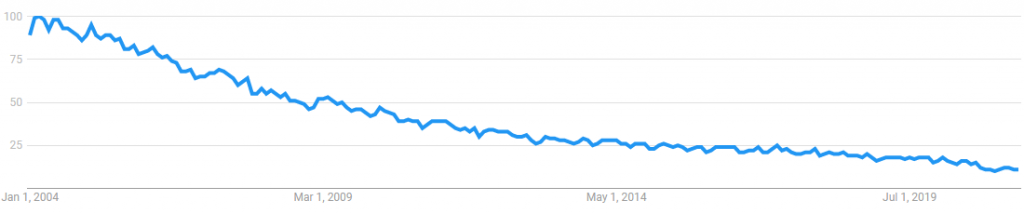
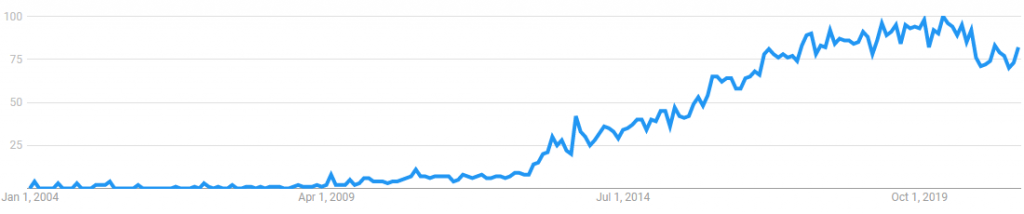
Whilst today MySQL is still the second most popular database engine in the world, its popularity has been slowly declining over the years. At the same time, interest in MariaDB (currently the 11th most popular database) has been steadily increasing.
MySQL global interest since 2004 – Source: Google Trends
MariaDB global interest since 2004 – Source: Google Trends
Between 2012 to 2019 we continued to develop MIDAS exclusively using MySQL as its back-end database.
In 2019 we started receiving queries from a couple of customers asking if we’d consider supporting other database engines, as they weren’t big fans of MySQL.
By this time, MariaDB was gaining in popularity, and as it was billed as a “drop in replacement” for MySQL, it seemed a logical choice to explore.
In 2020, we released MIDAS v4.24, with preliminary and experimental support for MariaDB.
In our own development environment here at MIDAS HQ, we ran both MySQL and MariaDB in parallel during 2020. During this time, MySQL remained as the “preferred” database engine we use for development and testing of our software.
At the beginning of 2021, we made the decision to switch our “preferred” development database engine over to MariaDB. (We still continue to run MySQL, but this is mainly just for testing purposes these days).
Why we moved to MariaDB?
MariaDB has a number of advantages over MySQL, including:
MariaDB offers improved performance in many scenarios.
If you’re considering a self-hosted edition of MIDAS (remember that we also offer a cloud-hosted edition too!), our software currently supports both MySQL and MariaDB databases.
At the end of the day, it will come down to personal preference, but we like to give self-hosted customers a choice. So if you’re looking for a room booking system that’s compatible with either MySQL or MariaDB, choose MIDAS!