Posts Tagged: print

Printing Improvements

We’re adding a couple of cool new features to the print functionality in MIDAS for the next release of our web based room booking and resource scheduling software, v4.16.

New Advanced Print Filter

MIDAS already features a wealth of advanced print options. These may be accessed by right/long clicking the “Print” toolbar icon. They include the ability to print bookings over a custom date range and limit printouts of bookings to only include those taking place in certain venues or which are of specific booking types.

For v4.16, we’re adding an additional “Advanced Filter”:

Advanced Print Filter

This will allow you to only include bookings within your printout that match (or not) the value of certain fields. You can also match against any custom booking fields you’ve set up. You’ll be able to select a booking field from a drop-down list, select a match type, and a match string.

Match types available include:

  • Equals – Will include bookings where the selected booking field’s value exactly matches the string you enter
  • Does Not Equal – Will include bookings where the selected booking field’s value doesn’t exactly matches the string you enter
  • Contains – Will include bookings where the selected booking field’s value contains an occurrence of the string you enter
  • Does Not Contain – Will include bookings where the selected booking field’s value contains no occurrences of the string you enter
  • Begins With – Will include bookings where the selected booking field’s value begins with the string you enter
  • Ends With – Will include bookings where the selected booking field’s value ends with the string you enter
  • Is Greater Than – Will include bookings where the selected booking field’s numeric value is higher than the value you enter
  • Is Less Than – Will include bookings where the selected booking field’s numeric value is higher than the value you enter

So, for example, you could generate a printout which only includes booking where there are more than 10 people attending. Or you could generate a printout which excludes any bookings that have “exclude from printing” in their booking notes, etc.

A “Case Sensitive” option is also available allowing you to optionally make string matches case-sensitive.

But that’s not all….

Limit Resource Category When Printing Bookings With Resources In “Grid” Layouts

The Advanced Print settings window in MIDAS allows you to choose between two different print layouts – a “table” layout and a “grid” layout.

If “grid” layout is selected, bookings are printed in a “grid”, with venues listed vertically, and each date shown across the horizontal axis. You can further specify a field you’d like to be shown within each grid cell. For instance, selecting “Booking Types” would create a printout indicating the types of bookings taking place in your venues over the selected date range.

The ability to select “Resources” as the field to show on these printouts has long been available. However, for v4.16 we’ve also introduced “Resources (Equipment)”, “Resources (Consumables)” and “Resources (Staffing)” options, allowing you to further drill-down the resources on your print-outs.
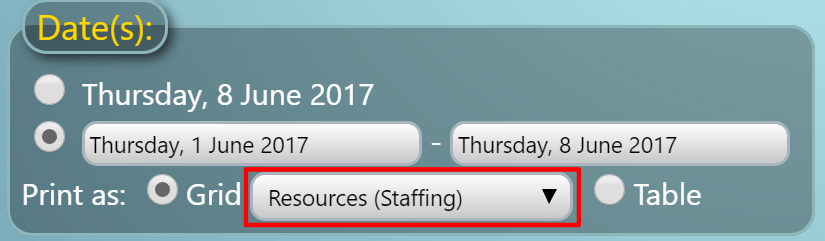
Print Resources including Equipment, Consumables, and Staffing

These new options provide a some great new possibilities! For example, selecting a “Resources (Staffing)” grid printout, will generate a printout of which venues, dates, and times your staff are assigned to.

Click here to continue reading about some of the other new & improved features coming in MIDAS v4.16!


MIDAS v3.14 is here!

We are pleased to announce the release of MIDAS v3.14! This update contains a number of exciting new features and enhancements to our popular web-based scheduling software, including:

  • Receive notifications when consumables are low!
  • Receive notifications when specific resources are added to bookings!
  • Graphical Invoice Statistics on your clients, organizations and booking types!
  • Statistics can now be printed!
  • “Apply Discounts Silently” option to apply discounts, but “hide” reference to them on invoices
  • Ability to be notified if another user modifies/deletes bookings you created
  • Setting to have “Watches” and internal messages from other users automatically forwarded to your email address
  • Setting to suppress the “My Messages” popup upon login
  • Change what information is displayed on dates in the Monthly Overview

You can read more about these exciting new features in our previous blog entry, and we’ve also produced a 10 minute video tutorial guiding you through exactly what’s new in MIDAS v3.14…

New Features in v3.14

If you’re an existing MIDAS user with a current Annual Support Subscription, you can upgrade to v3.14 right now! Simply login to your MIDAS, click the “MIDAS Admin Options” icon and select “Manage MIDAS -> Update”. If your Annual Support Subscription has recently expired, don’t worry – you can quickly renew your subscription. …and if we host MIDAS for you, then you’ve already been updated to v3.14!

If you’re new to MIDAS, why not read more about the features of MIDAS and check out the online demo.

To get MIDAS working for YOUR company/organization, grab yourself a copy of MIDAS v3.14 now!


What’s new in MIDAS v3.14

Work on our next update to MIDAS, v3.14 is nearing completion, so we thought we’d take this opportunity to tell you about a couple of the new features in this forthcoming update…

The biggest area that’s been updated in this release is the “My Messages” module.
Starting with version 3.14 you’ll be able to:

Receive notifications when consumables are low

The person(s) responsible for purchasing consumables can be informed when they need to re-order!

Low Consumable Warning
Low consumable notifications

Receive notifications when specific resources are added to bookings

For example, catering staff can be automatically notified when refreshments are required!

Greater control over watch “triggers”

The addition of AND/OR logic allows greater control over what triggers your watch notification. For instance you can set up a watch to notify you when either a new booking is added to a particular room OR a new booking of a particular type is added. Alternatively, you can set up the watch to notify you when a new booking is added to a particular room AND is a particular type, and so forth

Watch Settings
AND/OR logic providing greater control over notification triggers

Automatically forward notifications and messages to your email

You can have watch notifications and internal messages from other users automatically forwarded to your email address. This means that you don’t need to log in to MIDAS to check for new messages!

Suppress notifications window when you log in

You can disable the “My Messages” pop-up which displays after you login whenever you have messages, reminders, or watches.

My Messages Settings
Notification Settings

Also, in v3.14 we’ve extended the “Statistics” module to now include a section for “Invoice Statistics“. In this section you’ll be able to select a date range, and MIDAS will show you statistics of all invoices sent during that period. You’ll be able to see how much has been invoiced, how much has been paid, and how much is still outstanding! …and you can breakdown these statistics by client, organization, or booking type!

Invoice Statistics
Invoice Statistics

You can now also Print Statistics to your printer via the main print icon!