Category: Development

Upcoming New Features in the MIDAS API

To coincide with our next release of MIDAS, v4.16, we’ll also be releasing an update to the optional MIDAS API.

Our optional API access addon offers a programmatic and bi-directional interface to a MIDAS scheduling system.

The API can be used to extract data from a MIDAS system. This data can then be processed and used within your website and applications.

The API can also be used to make changes to settings and data within a MIDAS system. For instance, the API could be used to automate the adding of new bookings.

Or, the API can be used to interface MIDAS with other 3rd party software apps…. the possibilities are near endless!

API

To further increase the power and usefulness of the MIDAS API, we’re adding a couple of significant features in the forthcoming API update:

NEW: Command Line Support

Until now, all calls to the API had to be made via HTTP transactions. With the next update, you’ll also be able to make API calls directly from the command line! (self hosted editions only). API calls made in this way have the added benefit of being significantly more efficient and faster (assuming the call is made from the command line on the same server as the MIDAS system), as they do not require an HTTP transaction to be conducted.

To make API calls from the command line, simply call “api.pl” (located within your server’s MIDAS directory) and pass API parameters and values via command line switches.

For example, to retrieve the currently installed version of MIDAS from the Windows command line (cmd):

A MIDAS API call made from the Windows Command line (cmd)

…or from Windows PowerShell:

A MIDAS API call made from Windows PowerShell

NEW: Optional JSONP Support

By default, the MIDAS API outputs in JSON format. However following feedback from API users, we’re also introducing optional JSONP support with the next update to the API.

If you don’t know what JSONP is, then you probably don’t need it!

JSONP is a method commonly used to bypass the cross-domain policies in web browsers. Typically, modern browsers won’t allow you to make AJAX (Asynchronous Javascript) requests from one domain to another domain perceived to be on a different server.

For instance, if your MIDAS system is running on server A, and you wish to make client-side API calls through Javascript, you would typically only be able to make such AJAX requests from pages residing on server A itself. Attempting to initiate an AJAX request for server A from server B would be blocked by the user’s browser.

JSON and JSONP behave differently on the client and the server. JSONP requests are not dispatched using the XMLHTTPRequest and the associated browser methods. Instead, a <script> tag is created, the source of which is set to the target URL. This script tag is then added to the DOM (normally inside the element).

JSONP support in the MIDAS API (which is disabled by default) can be enabled via the API settings screen.

WARNING: Before enabling JSONP support, you should instead look to use CORS (Cross Origin Resource Sharing) wherever possible, as JSONP has inherent security risks as it injects Jasacript code directly into your web pages

With JSONP support enabled, you’d then be able to pass the name of a Javascript function in a “callback” parameter along with your API calls.

Consider a simple API call to retrieve the version number of MIDAS (passing the “action” parameter with a value of “get_setting“, and a “setting” parameter with a value of “version“). The typical JSON response would be:

{"version":"4.16"}

Now consider the same API call, with JSONP support enabled, and an additional “callback” parameter passed with a value of “myfunction“. The JSONP response would then be:

myfunction({"version":"4.16"})

The “callback” parameter must contain the name of an existing Javascript function on the calling page.

Upon receiving the JSONP response, the user’s browser will execute the “myfunction” Javascript function, passing the JSON data {"version":"4.16"} to it accordingly.


Improvements in Importing Data

We’ve made a number of improvements for the upcoming v4.16 release of our MIDAS software when it comes to importing data from 3rd party calendars/booking systems, namely:

1) Faster importing of CSV data

We’ve managed to significantly improve the import speed of CSV data, which in previous versions could become very slow/sluggish depending upon a combination of settings in MIDAS and the amount of data being imported

2) Improved CSV support

MIDAS v4.16 now better handles instances where CSV data fields themselves contained a record delimiting character.

For example, take the following CSV (Comma Separated Values) line:

Item 1,Item 2,Item 3,"Item 4a, Item 4b",Item 5

Previously MIDAS would incorrectly analyze the 4th item as being two separate data items, “Item 4a” and “Item 4b”, instead of a single data record.

This behavior is now corrected when importing data into MIDAS v4.16.

3) Support for importing bookings with resources

Until now, whilst you could import bookings into MIDAS, it was not possible to “map” data – including resources – to the resources database within MIDAS.

We’ve addressed this for v4.16 and you can import resources along within your booking data.

To be able to import resources along with your bookings, you’ll need to ensure that your resource data falls within a single “column” in your CSV data file. MIDAS will then parse this data and attempt to determine the applicable resource and quantity.

For example, if you wish to import a booking which has two laptops and one data projector assigned to it, your CSV data field for this should be in one of the following supported formats:

  • “2 Laptop, 1 Projector”
  • “2 Laptop; 1 Projector”
  • “x2 Laptop, x1 Projector”
  • “x2 Laptop; x1 Projector”
  • “2x Laptop, 1x Projector”
  • “2x Laptop; 1x Projector”
  • “2No. Laptop, 1No. Projector”
  • “2No. Laptop; 1No. Projector”

Click here to continue reading about some of the other new & improved features coming in MIDAS v4.16!


New Advanced Invoice Generation Filter

If you follow our blog, you’ll already be aware of some of the exciting new features on the horizon with MIDAS v4.16. Our previous post looked at new filter options when it comes to generating printouts of your bookings.

We’re also adding a similar filter when it comes to generating invoices from your bookings:

Advanced Invoice Generation Filter

This provides additional flexibility to allow you to only generate invoices which include bookings that match specific filter criteria.

For example, as per the screenshot above, you can generate invoices only for bookings which have more than ten attendees.

The advanced filter allows you to choose a booking field (including any custom booking fields you’ve set up), select a match type, and enter a match string.

Match types available include:

  • Equals – Will include bookings where the selected booking field’s value exactly matches the string you enter.
  • Does Not Equal – Will include bookings where the selected booking field’s value doesn’t exactly match the string you enter.
  • Contains – Will include bookings where the selected booking field’s value contains an occurrence of the string you enter.
  • Does Not Contain – Will include bookings where the selected booking field’s value contains no occurrences of the string you enter.
  • Begins With – Will include bookings where the selected booking field’s value begins with the string you enter.
  • Ends With – Will include bookings where the selected booking field’s value ends with the string you enter.
  • Is Greater Than – Will include bookings where the selected booking field’s numeric value is higher than the value you enter.
  • Is Less Than – Will include bookings where the selected booking field’s numeric value is higher than the value you enter.

These powerful new filter options for both printout and invoice generation offer a whole new level of flexibility to your MIDAS system, and we’re sure they’ll be put to great use by our customers!

Click here to continue reading about some of the other new & improved features coming in MIDAS v4.16!


Printing Improvements

We’re adding a couple of cool new features to the print functionality in MIDAS for the next release of our web based room booking and resource scheduling software, v4.16.

New Advanced Print Filter

MIDAS already features a wealth of advanced print options. These may be accessed by right/long clicking the “Print” toolbar icon. They include the ability to print bookings over a custom date range and limit printouts of bookings to only include those taking place in certain venues or which are of specific booking types.

For v4.16, we’re adding an additional “Advanced Filter”:

Advanced Print Filter

This will allow you to only include bookings within your printout that match (or not) the value of certain fields. You can also match against any custom booking fields you’ve set up. You’ll be able to select a booking field from a drop-down list, select a match type, and a match string.

Match types available include:

  • Equals – Will include bookings where the selected booking field’s value exactly matches the string you enter
  • Does Not Equal – Will include bookings where the selected booking field’s value doesn’t exactly matches the string you enter
  • Contains – Will include bookings where the selected booking field’s value contains an occurrence of the string you enter
  • Does Not Contain – Will include bookings where the selected booking field’s value contains no occurrences of the string you enter
  • Begins With – Will include bookings where the selected booking field’s value begins with the string you enter
  • Ends With – Will include bookings where the selected booking field’s value ends with the string you enter
  • Is Greater Than – Will include bookings where the selected booking field’s numeric value is higher than the value you enter
  • Is Less Than – Will include bookings where the selected booking field’s numeric value is higher than the value you enter

So, for example, you could generate a printout which only includes booking where there are more than 10 people attending. Or you could generate a printout which excludes any bookings that have “exclude from printing” in their booking notes, etc.

A “Case Sensitive” option is also available allowing you to optionally make string matches case-sensitive.

But that’s not all….

Limit Resource Category When Printing Bookings With Resources In “Grid” Layouts

The Advanced Print settings window in MIDAS allows you to choose between two different print layouts – a “table” layout and a “grid” layout.

If “grid” layout is selected, bookings are printed in a “grid”, with venues listed vertically, and each date shown across the horizontal axis. You can further specify a field you’d like to be shown within each grid cell. For instance, selecting “Booking Types” would create a printout indicating the types of bookings taking place in your venues over the selected date range.

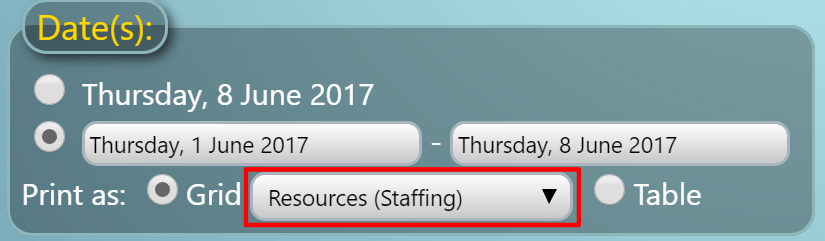
The ability to select “Resources” as the field to show on these printouts has long been available. However, for v4.16 we’ve also introduced “Resources (Equipment)”, “Resources (Consumables)” and “Resources (Staffing)” options, allowing you to further drill-down the resources on your print-outs.

Print Resources including Equipment, Consumables, and Staffing

These new options provide a some great new possibilities! For example, selecting a “Resources (Staffing)” grid printout, will generate a printout of which venues, dates, and times your staff are assigned to.

Click here to continue reading about some of the other new & improved features coming in MIDAS v4.16!