Last week, we posted about ensuring your server is ready for MIDAS v4. In doing so, we unveiled that this major update would utilize a new database system… but why this change?
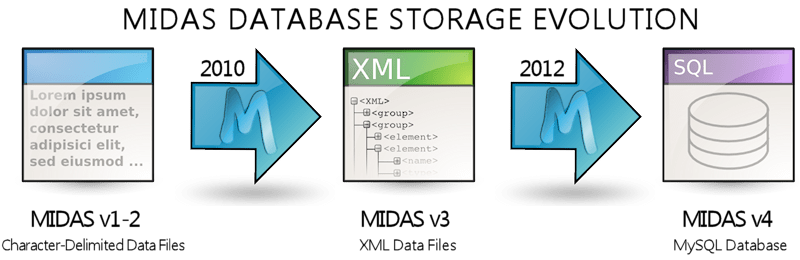
First came CSV…
When development first started way back in 2005, MIDAS stored data in a series of “flat file” databases. These were essentially character-delimited data files (similar to the popular CSV (comma separated value) file format). As MIDAS developed and grew over the next couple years, this format for storing data become more and more restrictive to what we wanted to do with MIDAS. Consequently, an improved method for storing data was needed.
…followed by XML
A new database format was first introduced with MIDAS v3, in 2010, when we moved the data storage over to an XML based format. This offered a number of improvements, allowed for customizations, and was more “robust” than the previous “flat file” format
However, this XML based format does have some drawbacks. As the storage was still essentially file and disk based, the performance of MIDAS was dependent on the number and size of XML files MIDAS had to read from, process, and write to disk. Now, for the majority of our customers, this has never been an issue. However, for a very small number of customers – those with a very high number of venues/bookings/users, etc, – the file/disk based nature of the XML storage format, could impact on the speed and performance of MIDAS.
…and so that’s the primary reason why starting with MIDAS v4, we’ve moved over to a faster, and “industry-standard”, database format – MySQL.
Introducing MySQL
“If MySQL is so good, why hasn’t this been implemented sooner?”
Well, when MIDAS was originally created over 7 years ago, MySQL was in its infancy! At that time, few servers ran MySQL by default, and there were very few web applications around that used it. In those days, if you wanted to add MySQL support to your website hosting account, it would likely be an expensive “add on”.
For this reason, we initially took the decision not to rely on MySQL, as we wanted to make MIDAS as widely accessible as possible. This is why, for the last 7 years, you’ve only needed a web server running Perl to host MIDAS.
However, the Internet has come a long way in the last 7 years! These days, MySQL is common place. The vast majority of web servers/web hosting packages now have MySQL available and ready to use “out of the box”, and a very large number of websites and popular website software use MySQL databases.
When MIDAS v4 becomes available this Summer, if you wish to install/run this new version of our scheduling software on your own web server, MySQL 5.1 (or later) must be available. So check your server now, so you don’t miss out!
 In summer 2012 we have a major update coming to our web based room scheduling software. Starting with version 4, MIDAS will use a
  The Google Chrome team have today


