MIDAS allows organisations to control how members of the public can view room availability, submit booking requests, or make direct bookings for specific venue.
They can do this without signing in or requiring a user account. These are known as the “Public” features of MIDAS.
The Public features of MIDAS comprise of two similar but distinctly different functions…
Public Web Bookings
The Public Web Bookings feature allows an individual to check room availability, book, and securely pay for their booking online.
Public Booking Requests
The Public Booking Requests feature allows an individual to check room availability and submit a booking “request” online. Once a booking request has been submitted, a “Manager” for that space can quickly approve or reject that request. Requests which are approved become confirmed bookings.
Greater control over public venue access
Now, you may not want all the spaces/rooms within your MIDAS booking system to be available for public booking/requesting.
That’s why on the Manage Venues screen, when an administrator selects a venue, there was a tick-box to make the venue “public”.
Until now, marking a venue as “Public” would apply to both public-facing Web Bookings and public-facing Booking Requests – if both features were enabled.
For MIDAS v4.41, we’ve made an improvement. You can now make each venue available for…
- Public “Booking”
- Public “Requesting”
- Both Public Booking and Public Requesting
- No Public Booking or Public Requesting
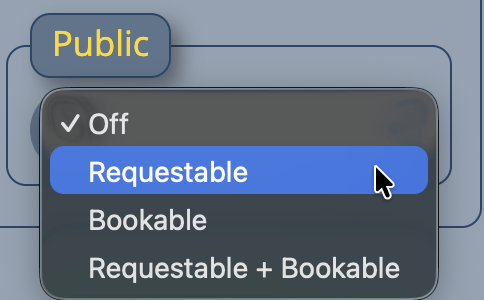
This small but significant improvement will now allow you to have some spaces directly bookable by the public. At the same time, you can have other spaces which must instead be “requested” and approved by an administrator.
This added flexibility makes it easier to balance accessibility with control – especially for venues that require approval before confirming bookings.