Joan Alternative: MIDAS Room Booking Software
Looking for a Joan alternative that doesn't tie your booking system to proprietary e-paper hardware? MIDAS works with any device you already own, and offers something Joan can't: the option to self-host on your own server.
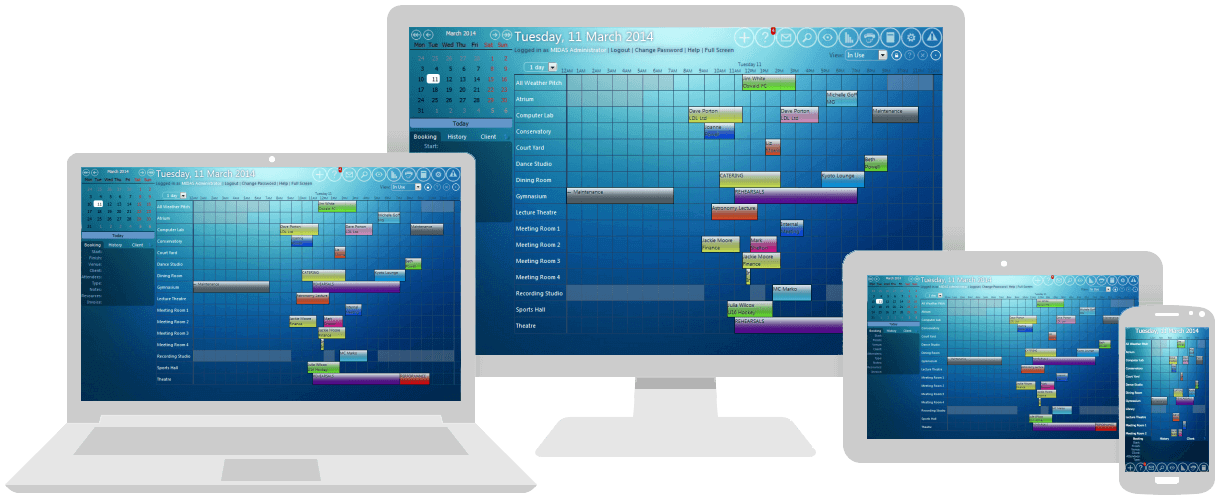
MIDAS is a mature room and resource booking platform that's been independently developed for two decades. Joan (made by Visionect) has built a genuinely innovative product around its battery-powered e-paper displays - they look great mounted outside meeting rooms. But the platform's heavy hardware orientation, plus the per-user-plus-per-device pricing model, often makes it the wrong choice for organisations that don't want to be locked into proprietary tablets.
The Hardware-First Trade-Offs
Joan's e-paper displays are widely praised in reviews - "elegant", "battery-powered", "no wiring required". But beneath the hardware shine, the platform has structural limitations that consistently push organisations to evaluate alternatives:
- Heavy hardware orientation drives up total cost. The list-priced per-device cost (around €9.99/device/month) plus per-user cost (around €0.99/user/month) sits on top of the up-front hardware itself - which can run €300-€800+ per display. Joan's pricing calculator surfaces these costs, but they add up faster than most buyers expect.
- Battery and connectivity issues. Capterra and Software Advice reviewers report battery life problems and Wi-Fi connectivity issues, particularly on mesh networks where multiple access points share the same SSID. As one reviewer put it: "The software interface is done very well... but it's let down by terrible hardware implementation."
- Software is constrained without Joan hardware. Joan can run on iOS or Android tablets, but reviewers note that without the proprietary e-paper devices "it only covers the very basic functionalities of booking a room and displaying the current status and schedule".
- No floor plan management. Capterra reviewers specifically request "a main floor plan layout" - useful for orienting users in larger offices but not part of Joan's current feature set.
- Mobile app speed issues. "The App is very slow and I have to wait until the Map is loaded. When I go from one day to the next one, it takes a lot of time to load the map." (Verified Capterra reviewer, August 2025).
- Tier escalation as you add devices. Joan's tiered pricing means adding rooms beyond your tier limit forces an upgrade. The Enterprise+ plan starts at €999 base for 20 devices - useful at scale but a steep step up from smaller tiers.
- SaaS-only with no self-hosted option. Joan is cloud-only. Organisations that need on-premises deployment for data residency have no path.
MIDAS vs Joan: Side-by-Side
| Feature | Joan |  |
| Hardware Strategy | Proprietary e-paper displays recommended; limited features without them | No proprietary hardware - works with any web browser on any device |
| Pricing Model | Per-user (~€0.99/mo) + per-device (~€9.99/mo) + hardware | Per-venue and per-user, with one-time self-hosted option |
| Hardware Cost | ~€300-€800+ per Joan display, plus ongoing subscription | Zero - reuse existing tablets, monitors, or TVs for digital signage |
| Battery Concerns | E-paper devices need recharging every 1-2 weeks | No proprietary hardware to maintain or recharge |
| Self-Hosted Option | Not available | Yes - one-time purchase, runs on your own server |
| Resource Types | Rooms, desks, parking, assets (within tier limits) | Rooms, equipment, staff, consumables - all native |
| Floor Plans | Limited - no main floor plan layout | Available via configurable views |
| Digital Signage | Tied to proprietary displays | Optional Digital Signage addon on any HDMI display |
| Free Trial | Available | 30 days, fully featured, no credit card required |
The bottom line: Joan is fundamentally a hardware company. MIDAS is fundamentally a software platform. If you don't want hardware lock-in, that distinction matters.
The Real Cost Comparison: A Worked Example
Consider a 20-room office with 50 staff who book meetings:
- Joan (typical configuration): 20 e-paper displays × ~€500 = €10,000 hardware up-front, then 20 devices × €9.99 + 50 users × €0.99 = ~€249/month subscription, or €2,990/year ongoing. Total over 3 years: roughly €19,000 (~$20,500).
- MIDAS cloud-hosted (annual): 20 venues, 50 users = roughly $595/year. Three-year total: ~$1,785.
- MIDAS self-hosted: 20 venues, 50 users = roughly $1,520 one-time + $189/year optional support. Three-year total: ~$2,098.
That's roughly a 90% saving over three years - and you avoid the proprietary hardware investment entirely. If you want digital signage outside meeting rooms, the MIDAS Digital Signage addon works with any HDMI-capable display (including the cheap LCD TVs you can buy from any electronics retailer for $100-200).
The Hardware Lock-In Problem
Joan's e-paper displays are genuinely well-designed. Battery-powered, no cabling, low power consumption - the engineering is impressive. But that hardware integration creates several long-term issues:
- Vendor concentration risk. If Visionect (Joan's parent company) changes strategy, gets acquired, or discontinues a product line, your displays may become orphaned hardware. This isn't hypothetical - the booking software market has seen multiple vendor consolidations in recent years.
- Hardware refresh cycles. Battery degradation, display wear, and Wi-Fi standard evolution mean these devices have a finite useful life. When Joan releases new generations, you'll face a replacement decision.
- Cost compounds. Every new room means buying more Joan hardware, paying for shipping, mounting it, and adding it to your subscription. With MIDAS, adding a new room is a configuration change.
- You're paying twice for displays you may already own. Most offices already have iPads, Android tablets, or LCD TVs that could display booking information. Joan asks you to add specialised hardware to that mix.
Beyond the Door Sign: Resource Types Joan Doesn't Cover Well
Joan's strength is the dedicated meeting-room display. MIDAS handles much more on a single platform:
- Equipment scheduling alongside rooms. Book the AV cart, the projector, the mobile screen, the catering trolley - and have conflict detection across all of them.
- Staff scheduling. Assign caretakers, technicians, or instructors to bookings - useful for community centres, training providers, and conference venues.
- External lettings and invoicing. Generate invoices, track outstanding payments, and manage non-staff customers booking your facilities. Stripe and PayPal payment processing are included as standard.
- Public-facing booking forms. Take requests from your website without exposing your full admin interface - ideal for halls, churches, and conference venues.
- Schools, churches, community centres, conference venues. Joan was designed for the meeting-room-outside-the-door use case. MIDAS handles the full breadth of organisations and resource types.
Digital Signage Without the Hardware Tax
If the appeal of Joan is the visible digital sign outside each meeting room, MIDAS provides equivalent functionality without the proprietary hardware. The optional Digital Signage addon displays your booking schedule on:
- Existing tablets you already own (iOS, Android, or web)
- LCD TVs connected via HDMI - the cheap ones from any electronics retailer work fine
- Existing digital signage hardware your organisation has deployed for other purposes
- Old laptops or PCs repurposed as display kiosks
The visual result is similar to Joan's displays at a tenth of the hardware cost.
Resource Reporting You Won't Find on Joan
Joan focuses on the front-of-room booking experience. Where it falls short is in helping you understand how your rooms are actually used over time. MIDAS includes a Resources report as standard, alongside five other categories - Bookings, Venues, Clients, Invoices, and Users - all displayed as graphs and tables, with full Excel export.
The Resources report specifically gives you visibility on resource popularity, potential income from those resources across a date range, and which resources are most-watched - useful when you're deciding whether to invest in another mobile screen, AV cart, or other shared kit. Joan's analytics don't go this deep.
The Self-Hosting Difference
Joan is SaaS-only. MIDAS gives you the choice: cloud-hosted convenience, or self-hosted on your own web server. For organisations with data residency requirements, regulated industries, or simply a preference for owning their software outright, self-hosted MIDAS is a category Joan doesn't compete in.
Migration: How to Move from Joan to MIDAS
The most common migration path:
- Start a free 30-day MIDAS trial with your real venues. No credit card, no sales call.
- Decide what to do with existing Joan hardware. Most organisations either keep them as decoration during the transition, or repurpose them for digital signage on the new system. Joan displays won't run MIDAS natively, but other devices you have already will.
- Recreate your booking rules - moderation chains, how-far-ahead users can book, who can book what, and how long bookings can last. Most have direct MIDAS equivalents.
- Set up digital signage on existing tablets, monitors, or TVs you already own.
- Run in parallel briefly, then cut over fully before your Joan renewal lands.
If you have specific questions about migrating booking data or repurposing existing hardware, our team can help. Get in touch.
Frequently Asked Questions About Joan Alternatives
Why are organisations looking for Joan alternatives?
Common reasons include hardware lock-in to proprietary e-paper displays, ongoing per-device subscription costs on top of the hardware investment, battery and Wi-Fi reliability issues reported by reviewers, mobile app speed problems, lack of self-hosted option, and total cost of ownership that compounds as you add rooms. MIDAS removes all of these concerns by working on hardware you already own and offering both cloud and self-hosted deployment options.
Can I keep my Joan hardware if I switch to MIDAS?
The Joan e-paper devices are designed to run Joan's software specifically and won't run MIDAS natively. Most organisations switching either retire the Joan hardware or keep it running until the batteries fail, while deploying MIDAS digital signage on existing tablets, monitors, or LCD TVs they already own. The MIDAS Digital Signage addon works on any HDMI display.
Does MIDAS provide digital signage like Joan's e-paper displays?
Yes, via the optional Digital Signage addon. The visual result is similar to Joan's displays - a clean schedule view outside each meeting room - but works on existing tablets, LCD TVs (via HDMI), or old laptops. Total hardware cost is typically a tenth of Joan's per-room investment, with no battery or Wi-Fi mesh issues to manage.
Is MIDAS cheaper than Joan?
Significantly, especially when you account for hardware costs. A typical 20-room deployment runs approximately €19,000 over 3 years on Joan (€10,000 hardware + €9,000 subscriptions). The same deployment on MIDAS cloud-hosted costs roughly $1,785 over 3 years - about 90% less. Self-hosted MIDAS is in a similar range over the same period.
Can MIDAS run on my own servers?
Yes. Self-hosted MIDAS is a one-time purchase that you install on your own web server, with your booking data staying entirely within your infrastructure. Joan is cloud-only with no self-hosted option - if data residency matters to your organisation, this is a deciding factor.
Does MIDAS handle equipment booking like Joan does?
MIDAS handles equipment, staff, consumables, and rooms together natively - book the AV cart and the projector at the same time as the room they're going into, with conflict detection across all of them. Joan's asset booking is more limited and operates separately from its room-display strength.
Does MIDAS offer a free trial?
Yes - MIDAS offers a 30-day free trial with no credit card required. You can configure your real venues and start taking bookings within minutes. No hardware required to evaluate.
Try the Leading Joan Alternative Today
If Joan's hardware lock-in, total cost of ownership, or lack of self-hosting has pushed you to evaluate alternatives, MIDAS is worth a serious look. Two decades of independent development, transparent published pricing, and no proprietary hardware required.
Start your free 30-day trial today and see how much you can save without the proprietary hardware tax.
Comparing Room Booking Systems?
See how MIDAS compares with other room and resource scheduling software:
Skedda alternative · Robin alternative · Condeco alternative · SuperSaaS alternative · YAROOMS alternative · MRBS alternative · eSPACE alternative · Hallmaster alternative
Information on Joan is based on third-party data available at the time of publication and is intended for comparative purposes only; we recommend checking with the vendor for the most up-to-date details.