Stop Double Bookings
How MIDAS Prevents Double Bookings Before They Happen
A double booking is one of those problems that sounds minor until it actually happens - two groups show up for the same room at the same time, and someone has to leave. Whether you manage a handful of meeting rooms or dozens of spaces across a large facility, this is exactly the kind of situation MIDAS is built to prevent.Real-Time Availability Checking
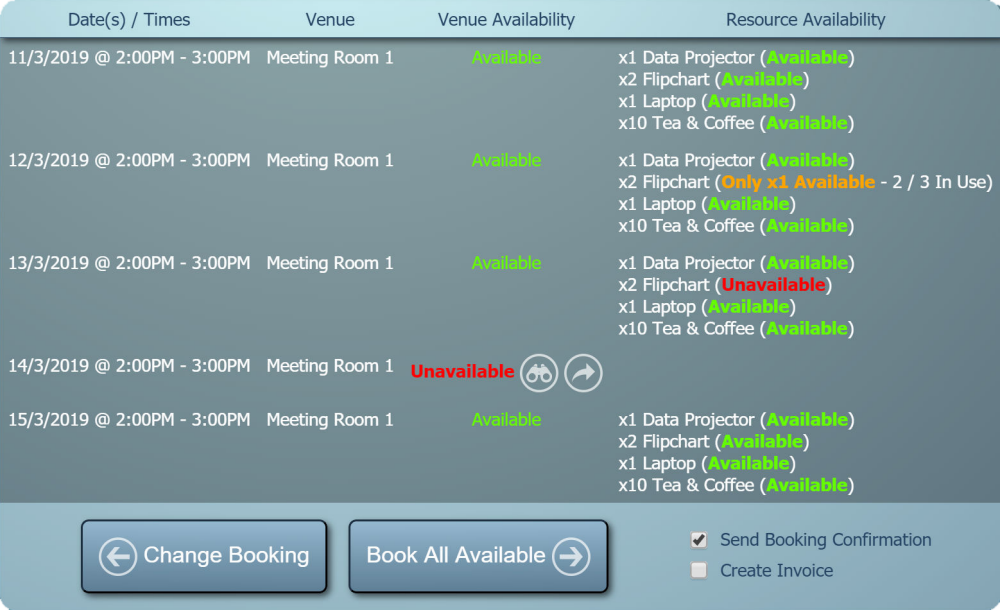
Every time a booking is created or modified in MIDAS, the system checks whether the requested space is already in use for any part of the requested time. This happens automatically - there is nothing extra for the person making the booking to do. If a conflict exists, MIDAS flags it clearly on the Booking Availability screen before the booking can be saved.The conflict display is straightforward: the affected time slot shows as "Unavailable" in red, and clicking the binoculars icon alongside it reveals the details of the existing booking causing the clash. That information is useful - it lets the person making the booking see exactly what is in the way and make an informed decision.
Suggesting Alternatives Automatically
When a requested slot is taken, MIDAS does not just say no and leave you to figure out the rest. If you have configured booking alternatives for your venues, the system can automatically offer alternative rooms or time slots. This is particularly useful in busy facilities where a quick pivot to a similar space is often all that is needed.Occupancy Limits Add Another Layer
For organisations that track attendee numbers, MIDAS goes further. You can set a maximum occupancy for each room and a global limit for your whole site. If a booking would push the expected number of people in a space - or across the site - beyond those limits, MIDAS will stop it from being saved. This matters in scenarios involving fire safety or licensing restrictions.Venue Blocking for Complex Layouts
Some facilities have spaces that cannot be used independently when a related space is booked - for example, a large hall that subdivides into two smaller rooms. MIDAS handles this through venue blocking rules, which automatically prevent bookings in linked spaces when they would create a conflict.Complete Booking History
Every booking in MIDAS carries a full audit trail: who created it, when, and any modifications made since. If a conflict does somehow arise, you have the information needed to trace what happened and resolve it quickly.→ Start a free trial and see how MIDAS handles availability checking in a live environment.
Further reading: