Don't Exceed Maximum Occupancy!
Maximum Occupancy Limits in MIDAS
Exceeding the licensed capacity of a room or a building is not just an operational problem - it can be a safety and legal one. MIDAS includes occupancy limit controls that make it straightforward to enforce capacity restrictions without relying on staff to remember the limits manually.Setting Per-Room Limits
Each bookable space in MIDAS can have its own maximum occupancy set. When a booking is created and an attendee count is entered, MIDAS checks the count against the limit. If the booking would put more people in the room than the capacity allows, it cannot be saved - regardless of who is making the booking, unless they have permission to override.Global Site Limits
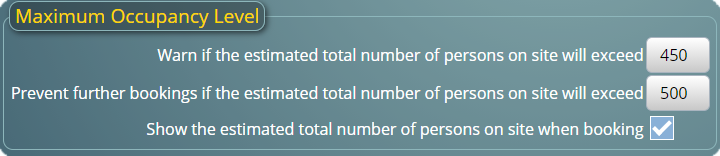
In addition to individual room limits, MIDAS supports a global occupancy limit for the whole facility. When a new booking is added, MIDAS considers the expected occupancy across all rooms during the requested time slot. If the total would reach or exceed the site limit, the booking is blocked.Alerts When Approaching Capacity
MIDAS can issue alerts when the projected site occupancy is approaching the global limit. This gives administrators advance warning before capacity becomes a problem, rather than only learning about it when a booking attempt is rejected.Emergency Evacuation Printouts
The occupancy tracking feeds into MIDAS's emergency printout feature. At any point, you can generate a printout showing the expected number of people in each room based on current bookings. This gives your fire marshal or evacuation coordinator an immediate reference in an emergency.Administrator Overrides
Specific user accounts can be granted permission to override per-room capacity limits when necessary. This caters to exceptional situations while keeping the global site limit enforced.→ Try MIDAS free for 30 days and see how occupancy management works in practice.