Graphical Reports & Statistics
Reporting and Statistics in MIDAS
The data in your booking system is genuinely useful for making decisions about how your facility is managed - but only if you can get at it easily. MIDAS includes a reporting section that turns booking data into charts and summary tables without needing to export anything to a spreadsheet first.What the Reports Cover
Reports in MIDAS are organised into seven categories: Bookings, Clients, Venues, Resources, Invoices, Users, and System information. Each category contains multiple individual report types, and most can be filtered by date range, specific venue, booking type, or other relevant criteria.Graphical Output
Most reports display as charts - bar charts, pie charts, and line graphs depending on what makes the data most readable. The visual format makes it easier to spot patterns and outliers than reading through raw numbers. Reports can be printed directly, making it straightforward to share a summary with stakeholders who do not have system access.Exporting for Further Analysis
When you need to do more with the data - running custom calculations, combining it with data from other systems, or building your own charts - MIDAS can export reports to Excel. Raw booking, client, invoice, and resource data can also be exported in CSV format.Practical Uses
Some common reasons organisations use the MIDAS reporting tools: justifying investment in additional rooms based on utilization data; demonstrating income from facility hire to finance teams; identifying rooms that are rarely used; tracking whether specific clients are growing or declining in their booking volume; monitoring outstanding invoice balances.→ Try MIDAS free for 30 days and run reports against your own booking data.
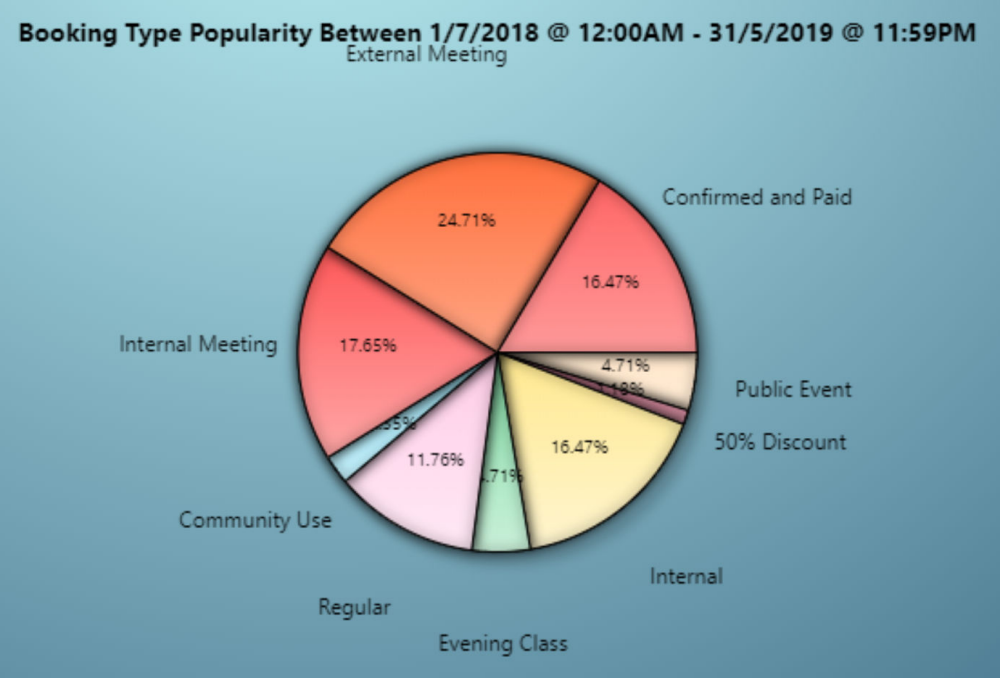
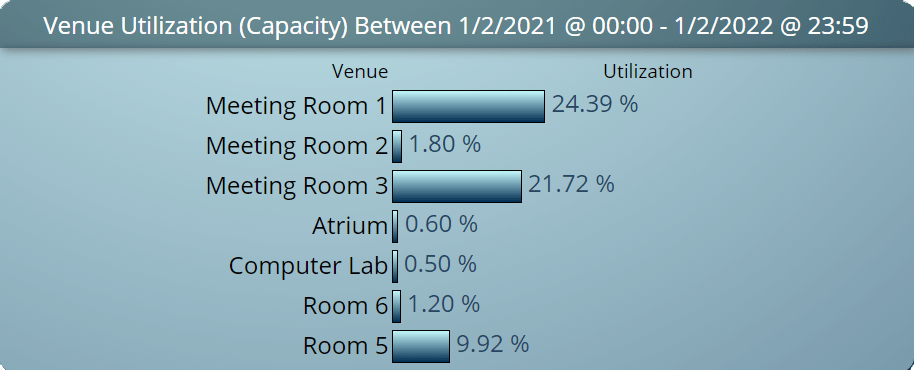
WATCH: How to Generate and Print Reports:
Further reading: