Color-coded Bookings
Color-Coded Bookings: Making Sense of a Busy Schedule
When you have dozens of bookings visible in the scheduling grid, telling them apart at a glance matters. MIDAS lets you assign a color to each booking type, turning a wall of text into something you can actually read quickly.Booking Types and What They Do
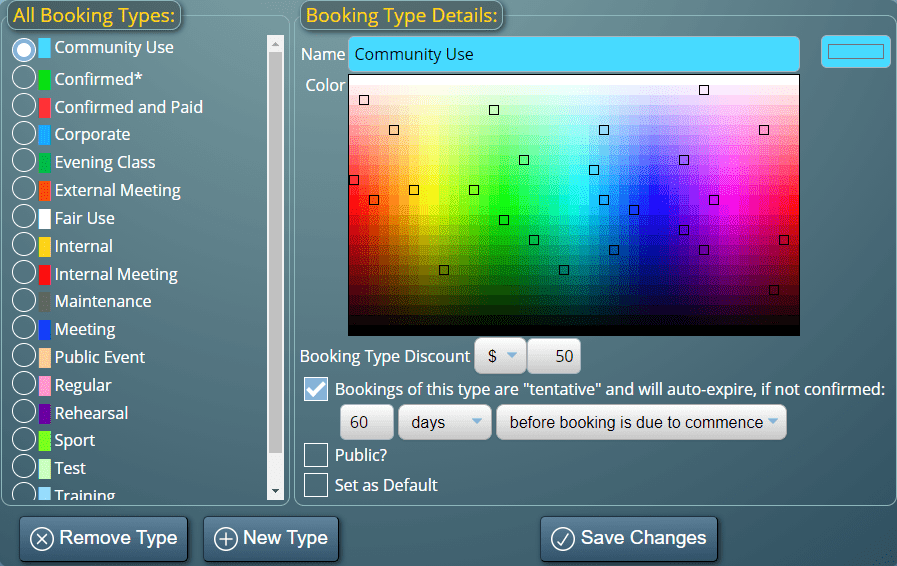
Every booking in MIDAS is assigned a booking type - a category you define that describes the nature of the booking. Common examples include internal meetings, external hire, training sessions, maintenance blocks, or events. You decide the names and the colors.Once assigned, booking types do more than change the color in the grid. They also control:
- Pricing - Each booking type can carry a discount, so internal bookings might be free while external hire is billed at the full room rate
- Reporting - Reports in MIDAS can break down bookings by type, showing which categories account for the most usage or revenue
- Visibility - When printing or filtering the grid, you can include or exclude specific booking types
Choosing Colors That Work
MIDAS lets you pick any color for each booking type using a color picker. The color appears on the booking block in the grid, making different types immediately distinguishable without reading the booking details. In a busy grid showing multiple rooms across a full day, this makes a noticeable practical difference.Filtering by Booking Type
The grid can be filtered to show only certain booking types. If you want to see only external hire bookings for the week, a couple of clicks gives you that view. The same filter applies when printing, which is useful for producing a report showing just one category of booking over a given period.→ Try MIDAS free for 30 days and set up your booking types to match how your organisation works.