Intelligent Booking Alternatives
Intelligent Booking Alternatives in MIDAS
A booking request that can't be fulfilled doesn't have to end in a dead end. When a room is unavailable at the time requested, MIDAS can automatically suggest alternatives - other times, other rooms, or both - based on what you have available and what you've defined as suitable substitutes.When alternatives appear
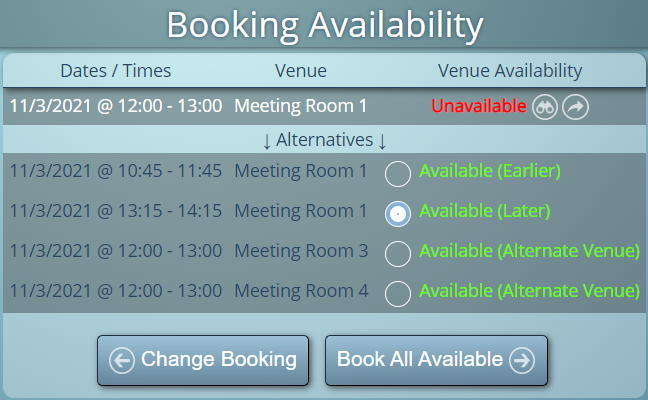
If a user tries to book a space that is already taken (or closed at that time), the availability screen shows the conflict and, where alternatives are configured, presents other options. The suggestions might include:- Earlier or later time slots in the same room on the same day
- The same time slot on adjacent days
- Alternative rooms that are available at the requested time
Configuring alternative venues
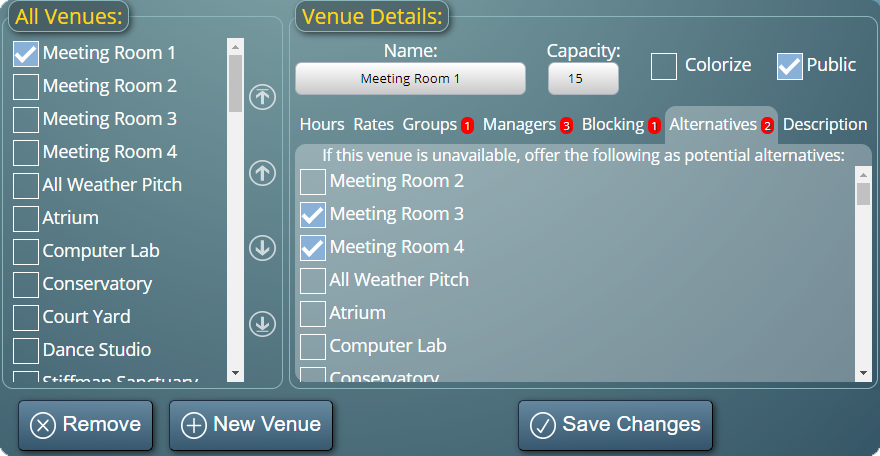
Administrators define which rooms should be suggested as alternatives for each other. A room isn't automatically considered a substitute for every other room in the system - you specify the relationships. This means the alternatives offered are relevant: a small meeting room won't be suggested as an alternative for a 200-seat auditorium.Making a booking from an alternative
When alternatives are shown, the user can select one with a single click. The booking form opens pre-populated with the alternative venue or time, and they can confirm or adjust before saving. It removes several steps from the process of finding a workable slot.→ Start a free trial and configure alternative venues to see how the suggestions work.
WATCH: How To Offer Booking Alternatives:
Further reading: