Keep Track of User Activity
Audit Logging in MIDAS: A Full Record of System Activity
When something goes wrong in a booking system - a record is deleted, a setting is changed, an invoice is modified - being able to find out what happened and who did it matters. MIDAS maintains a comprehensive audit log that records all user activity and system events, with enough detail to trace what occurred and when.What Gets Logged
The audit log captures every significant action in MIDAS: user logins and logouts (including IP address), failed login attempts, bookings created, modified, and deleted, client record changes, invoice activity, user account changes, system settings changes, and database backup and restore operations. Every entry includes a timestamp and the responsible user account.Filtering and Searching the Log
The audit log can be filtered by user account, action type, or date range. If you are investigating a specific incident, you can narrow the log to just the relevant user and time period without scrolling through thousands of unrelated entries.Geolocation of IP Addresses
With the optional Geolocation add-on, IP addresses in the audit log are automatically resolved to a geographic location - useful for spotting logins from unexpected countries, which might indicate a compromised account.Access Control
Access to the audit log is controlled by a user permission. Only accounts with that permission can view or export the log. MIDAS also supports "invisible" user accounts whose actions are not recorded, for automated system processes that would otherwise create noise in the log.Exporting the Log
The audit log can be printed or exported for offline analysis, compliance records, or inclusion in a security report.→ Start a free trial and review how the audit logging works in a live system.
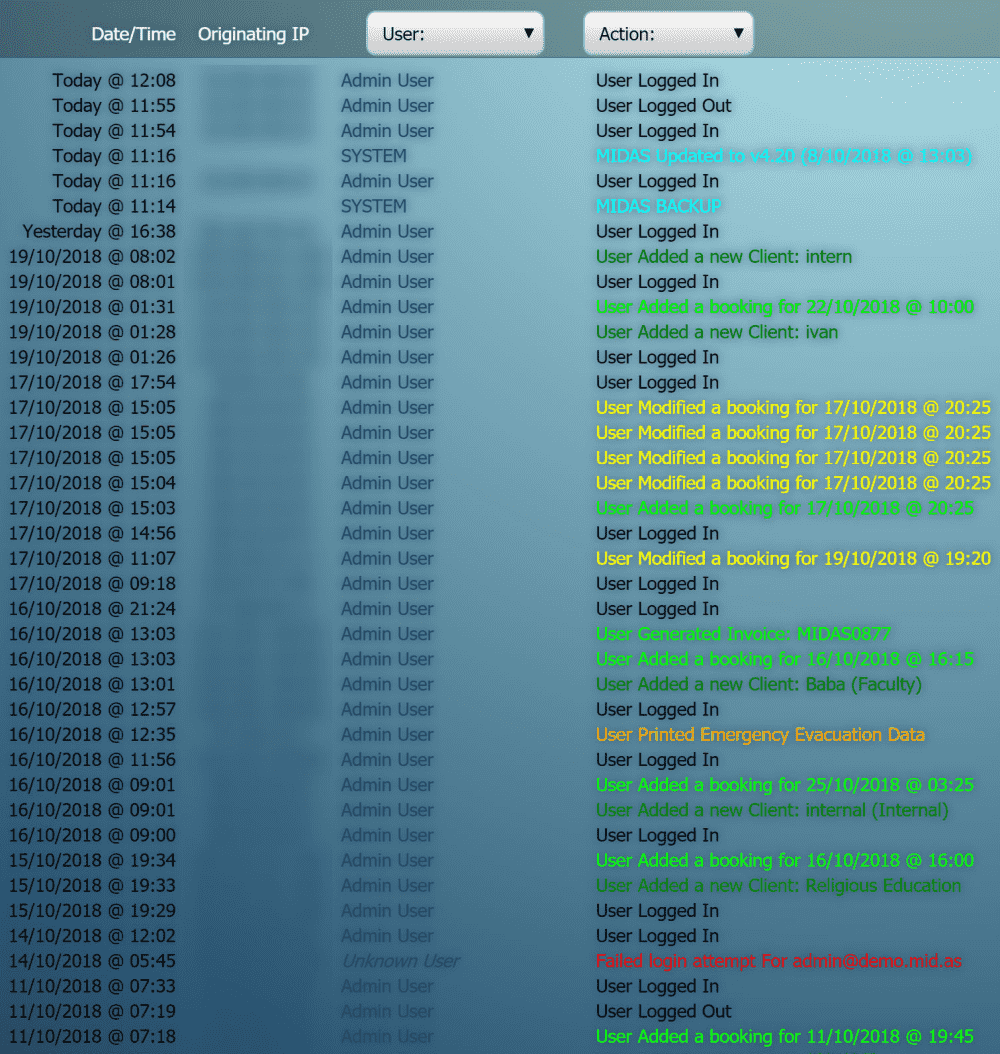
WATCH: How to Audit User Activity:
Further reading: