SuperSaaS Alternative: MIDAS Room Booking Software
Looking for a SuperSaaS alternative that doesn't charge based on your booking volume? MIDAS pricing is based on the venues and users you need - not how busy your calendar gets - so high-traffic booking systems don't trigger surprise tier escalations.
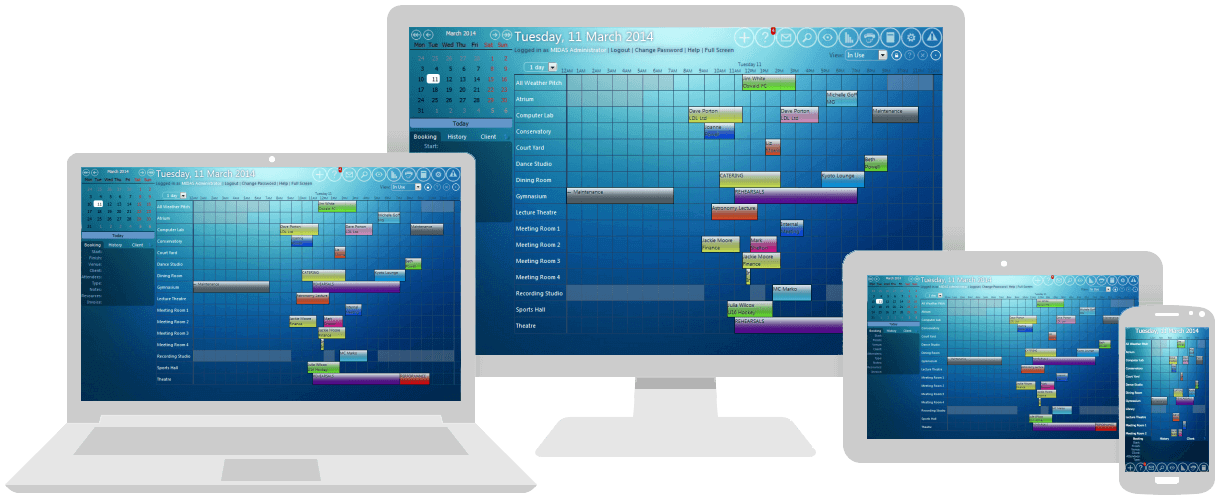
MIDAS is a purpose-built room and resource booking platform that's been independently developed for two decades. SuperSaaS is a capable, low-cost appointment scheduling tool that many organisations adopt initially because the entry price is hard to beat - but as bookings grow and requirements get more sophisticated, the appointment-based pricing model and the platform's appointment-first design start to bite.
Appointments vs Rooms: Why the Difference Matters
SuperSaaS works well as an appointment scheduler for service businesses (gyms, classes, consultants). When organisations try to use it specifically for room and resource booking, common frustrations emerge:
- Pricing scales with appointment volume, not capacity. SuperSaaS tiers are based on the number of upcoming appointments your account holds (50 free, then 100/300/600/etc. on paid tiers). For a busy room booking system with hundreds of recurring weekly bookings, your monthly bill can climb unpredictably and force tier upgrades that have nothing to do with adding rooms or users.
- "Big jumps" between packages. GetApp reviewers specifically call out that there's "a big jump from package E to package F in price" - you can find yourself one booking over a tier limit and forced into a much more expensive plan.
- Outdated user interface. Independent reviews consistently flag SuperSaaS as having "an outdated user interface" - functional, but visibly older than modern alternatives. The Research.com 2026 review notes a "steep learning curve due to complex interface and many configuration settings".
- Limited reporting capabilities. Capterra reviewers describe the reporting tool as "very limited" - "Sometimes it's so hard to view the lists of names in the reservations textbox". For organisations needing utilisation analytics, this is a real constraint.
- Mobile experience is "suboptimal". Research.com flags "Mobile experience is suboptimal, with usability issues on smaller or less common devices" - meaningful for organisations whose staff or members book primarily from phones.
- SaaS-only with no on-premises option. If your organisation prefers self-hosted deployment for any reason, SuperSaaS isn't a candidate.
- No annual billing. Multiple reviewers complain about the absence of annual subscriptions - it's monthly-only, which complicates budgeting.
MIDAS vs SuperSaaS: Side-by-Side
| Feature | SuperSaaS |  |
| Pricing Basis | Tiered by upcoming appointment count | Per-venue and per-user, capped on capacity not volume |
| Primary Design Focus | Appointments (people booking time slots) | Rooms, equipment, and resources (purpose-built) |
| Self-Hosted Option | Not available | Yes - one-time purchase, runs on your own server |
| Annual Billing | Not available - monthly only | Monthly, annual, or one-time purchase options |
| User Interface | Functional but dated | Modern, responsive design |
| Reporting | Limited - reviewers describe as "bare bones" | Six standard report categories included |
| Equipment & Staff Scheduling | Possible via combined schedules, but workaround-heavy | Native support for rooms, equipment, staff, and consumables |
| Free Trial | Free plan with 50-appointment limit (with ads) | 30-day free trial, fully featured, no ads |
The bottom line: SuperSaaS is an appointment scheduler that does room booking. MIDAS is a room booking system, designed for room booking from day one.
The Volume Pricing Problem
SuperSaaS's pricing model ties cost to the number of upcoming appointments in your system. For most appointment scheduling use cases (a salon, a consultant, a gym) this works fine because appointment volume correlates with revenue. For room booking, it doesn't.
Consider a community centre that takes 500 weekly bookings (recurring classes, hall hires, regular events). At any given time, it might have 1,500-2,000 upcoming appointments in the system. That's well into SuperSaaS's higher tiers - and the cost compounds purely because you're successful at filling your rooms.
MIDAS pricing is based on the number of spaces you're managing and the number of user accounts that need to log in. You can take 50 bookings a month or 5,000 - your monthly bill doesn't change.
The Real Cost Comparison: A Worked Example
Consider a community centre managing 15 rooms with 5 admin staff, taking around 400-500 bookings per month (with hundreds always pending in the future):
- SuperSaaS Package F or G (estimated): Roughly $40-60/month to handle the appointment volume. Annualised, around $480-720/year. Adding capacity tiers as you grow pushes this higher.
- MIDAS cloud-hosted (annual): 20 venues, 5 users = roughly $420/year.
- MIDAS self-hosted: 20 venues, 5 users = ~$880 one-time + $130/year optional support.
Past a certain volume, MIDAS becomes cheaper than SuperSaaS even at face value. MIDAS gives you a proper room booking interface, modern UI, comprehensive reporting, and the option to self-host - which SuperSaaS can't match.
Booking Constraints Built for Room Use Cases
SuperSaaS's strength is the appointment slot - person picks a time, books it, done. Room booking often needs more nuanced constraints. MIDAS gives administrators a comprehensive set of rule controls on every plan:
- Per-venue capacity enforcement. Each room has a maximum occupancy that MIDAS enforces - useful for fire safety compliance and meeting room sizing.
- Site-wide occupancy thresholds. Soft warnings and hard caps on the total number of people across all venues at once.
- Per-user booking quotas. Limit users to a maximum number of bookings per day, week, month, or year - ideal for member-based community centres or shared facilities.
- Restricted day windows. Show casual users only the 9am-5pm slice of the day rather than the full 24-hour view.
- Predefined time slots. Replace the standard start/finish time selector with a fixed list of durations (e.g., 30/60/90 mins) or a fixed list of slot times - useful for sports facilities and any venue where you want to constrain booking patterns.
- Maximum booking length per user. Stop casual users accidentally booking a room for a week.
SuperSaaS technically supports some of these via configuration combinations, but the platform was built around appointment slots first - so room-specific constraints often require workarounds.
Where MIDAS Wins on Use Cases SuperSaaS Wasn't Built For
SuperSaaS is at its best for appointment-based businesses - dance studios, fitness classes, salons, consultants. When organisations push it into room booking territory, the cracks show. MIDAS is built natively for the room-booking job:
- Equipment scheduling alongside rooms. Book the projector, AV kit, vehicles, or instruments with conflict detection across both the room and its resources. SuperSaaS technically supports this through "combined schedules" but it's awkward to configure.
- Staff scheduling. Assign caretakers, technicians, or instructors to specific bookings, with availability tracking across staff and venues.
- Native invoicing. Generate invoices, track payments, and manage external customers booking your facilities. The Invoices report shows income received vs outstanding across any date range. Stripe and PayPal payment processing is included as standard.
- Public-facing booking forms with admin moderation. Take requests from your website, route them through approval workflows, and only confirm bookings that meet your rules.
- Multi-venue, multi-site management. Manage many venues from a single admin interface without the multi-schedule workarounds SuperSaaS requires.
Real Reporting, Without the "Bare Bones" Limits
The most consistent SuperSaaS criticism in independent reviews is the limited reporting. MIDAS includes six standard report categories on every plan, displayed as graphs and tables with full Excel export:
- Bookings: bookings created, modified, and taking place across any date range, filterable by booking type
- Venues: capacities, usage, utilisation, availability, and potential income
- Resources: resource popularity, potential income, most-watched resources
- Clients: top clients, organisation popularity, individual client booking history
- Invoices: invoiced amounts, percentage breakdowns, income received vs outstanding
- Users: user activity, total users, currently signed-in users
None of this is locked behind tier upgrades - it's all available from the entry plan upward.
The Self-Hosting Option SuperSaaS Doesn't Offer
SuperSaaS is SaaS-only. MIDAS gives you the choice: cloud-hosted or self-hosted on your own web server. For organisations subject to data residency scrutiny, government departments, or any organisation that prefers on-premises deployment, MIDAS provides an option SuperSaaS simply doesn't offer.
Migration: How to Move from SuperSaaS to MIDAS
The typical migration path:
- Start a free 30-day MIDAS trial with your real venues. No credit card, no sales call.
- Export your SuperSaaS data. SuperSaaS allows export of bookings, users, and resources. This data can be imported into MIDAS via .csv, .txt, or .ics files, including historical bookings if you want continuity.
- Map SuperSaaS schedules to MIDAS venues. If you've used SuperSaaS's "combined schedules" feature for equipment or staff scheduling, MIDAS handles this natively rather than via workarounds.
- Recreate booking rules - moderation chains, lead-time controls, occupancy enforcement, and per-user permissions.
- Run in parallel briefly, then cut over once your team is comfortable.
Our friendly team can help you migrate to MIDAS from SuperSaaS. Get in touch with specifics about your setup, and we'd be happy to help.
Frequently Asked Questions About SuperSaaS Alternatives
Why does SuperSaaS pricing keep going up?
SuperSaaS tiers are based on the number of upcoming appointments your account holds. As your booking volume grows, you cross tier thresholds and pay more - even if you're not adding rooms or users. For organisations with high recurring booking volume (community centres, schools, churches), this can mean steady cost escalation. MIDAS pricing is based on venues and users, not appointment volume, so a busy calendar doesn't trigger upgrades.
Can MIDAS handle high-volume room booking like SuperSaaS?
Yes - and unlike SuperSaaS, MIDAS doesn't charge more as your booking volume grows. Take 100 bookings a month or 10,000; your subscription stays the same as long as your number of venues and users doesn't change. This makes MIDAS particularly suitable for community centres, schools, and any organisation with high recurring booking volume.
Does SuperSaaS offer a self-hosted option?
No - SuperSaaS is cloud-only. If your organisation requires on-premises deployment for data residency, GDPR compliance, or internal IT policy reasons, SuperSaaS isn't a candidate. MIDAS offers self-hosted deployment as a one-time purchase that you install on your own web server.
Is MIDAS more expensive than SuperSaaS?
At very low booking volumes, SuperSaaS's free plan and lowest paid tier ($9/month) are cheaper than MIDAS's $29/month entry point. Once you're past the SuperSaaS free-tier limit and need real reporting, integrations, and a modern UI, MIDAS typically becomes the better value - especially as booking volume grows. For most established organisations, MIDAS is comparable or cheaper at face value, with much lower total cost of ownership.
Can MIDAS handle appointment scheduling like SuperSaaS?
MIDAS is purpose-built for room and resource booking rather than person-centric appointment scheduling. If your primary use case is "client books time with consultant" or "gym member books fitness class slot", SuperSaaS or a dedicated appointment tool may fit better. If your primary use case is "user books a room (and possibly equipment, staff, or other resources)", MIDAS is the right tool.
Does MIDAS offer annual billing?
Yes. MIDAS cloud-hosted is available on monthly or annual billing, with annual billing saving around 8% versus monthly. Self-hosted MIDAS is a one-time purchase with optional annual support. SuperSaaS only offers monthly billing - reviewers have specifically complained about the absence of annual options.
Does MIDAS have better reporting than SuperSaaS?
SuperSaaS reporting is widely described in independent reviews as "limited" or "bare bones". MIDAS includes six standard report categories - Bookings, Venues, Resources, Clients, Invoices, and Users - all displayed as graphs and tables with Excel export, included as standard rather than gated behind tier upgrades.
Try the Leading SuperSaaS Alternative Today
If you've grown out of SuperSaaS - either because the appointment-based pricing has become uncomfortable, the interface feels dated, the reporting is too limited, or you need self-hosted deployment - MIDAS is a natural step up. Two decades of room-booking-specific development, openly published pricing, and a 30-day free trial.
Start your free 30-day trial today and stop paying more for being busy.
Comparing Room Booking Systems?
See how MIDAS compares with other room and resource scheduling software:
Skedda alternative · Robin alternative · Joan alternative · Condeco alternative · YAROOMS alternative · MRBS alternative · eSPACE alternative · Hallmaster alternative
Information on SuperSaaS is based on third-party data available at the time of publication and is intended for comparative purposes only; we recommend checking with the vendor for the most up-to-date details.