Set Operating Hours
Setting Operating Hours in MIDAS
A booking system that allows bookings at any hour, regardless of when a facility is actually open, creates problems that are annoying to fix after the fact. MIDAS lets you define exactly when each space is available for booking, preventing requests outside those hours from being accepted in the first place.Per-venue, per-day configuration
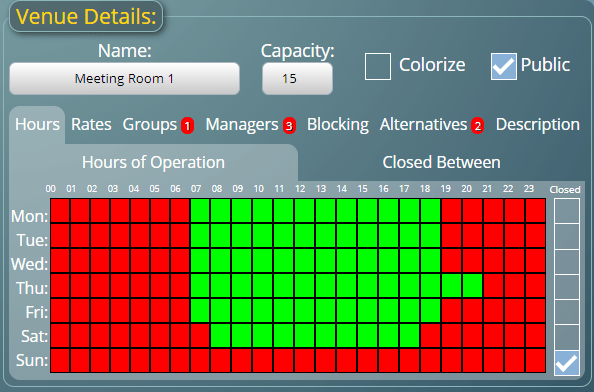
Each venue in MIDAS has its own operating hours, set per day of the week. A room available Monday to Friday from 8am to 10pm, but only 9am to 6pm on weekends, can be configured exactly that way. Different rooms within the same facility can have different hours if needed.Closing specific dates
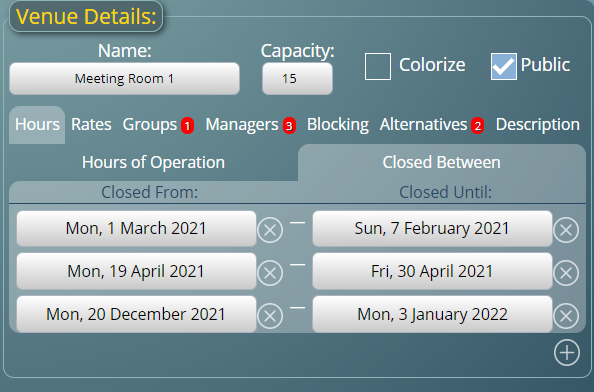
As well as regular weekly hours, you can block out specific calendar dates - bank holidays, annual shutdowns, maintenance periods. You can close an individual room on a particular date, or close all venues simultaneously. Closures can span date ranges for extended shutdowns.Administrator overrides
Certain user accounts can be granted a permission to book outside of normal operating hours. This is useful for senior staff or administrators who sometimes need to arrange access to a space at times the facility is technically closed, without removing the restriction for everyone else.What users see
When operating hours are set, the booking grid reflects them visually - the available hours are shown in the grid, and hours outside operating times are displayed differently. Attempts to book outside operating hours are blocked with a clear explanation, so users understand why the slot isn't available.→ Start a free trial and configure operating hours for your venues during setup.
WATCH: How to Setup Venue Operating Hours:
Further reading: